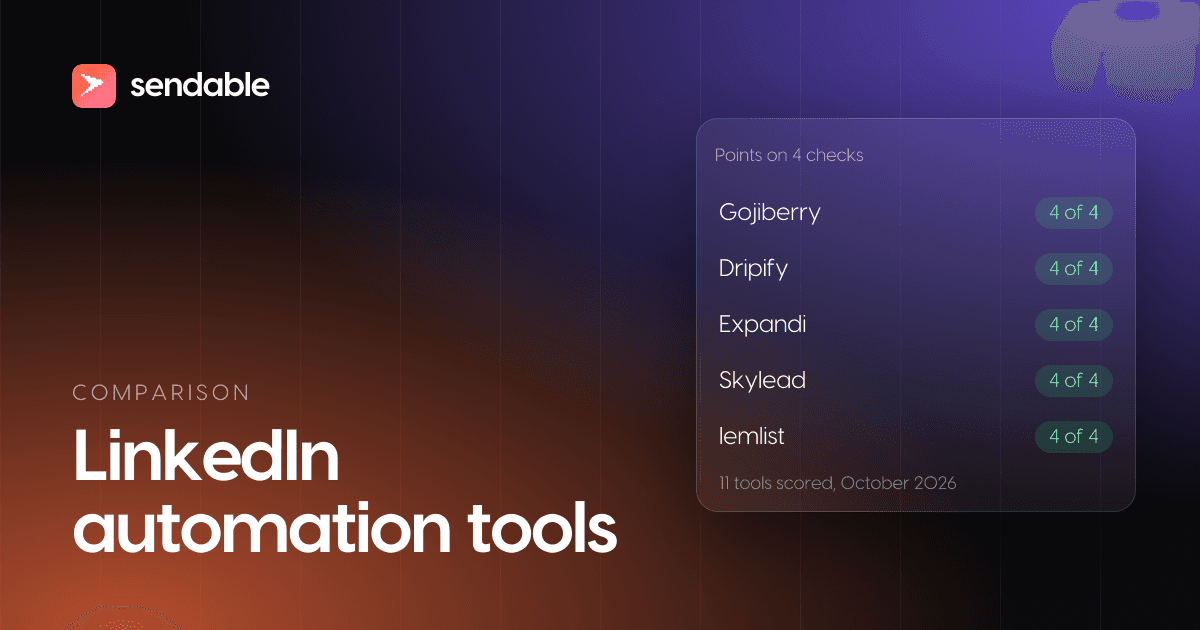
LinkedIn automation tools send profile visits, connection requests and follow-up messages from your LinkedIn account on a schedule, and stop the sequence when someone replies. I compared 11 of them on four things each vendor's own site documents: the tool runs in the cloud, it keeps adding new people on its own, replies land in one inbox included in the price, and email can sit in the same sequence. Six pass all four. Linked Helper is the cheapest, and HeyReach is the one built for agencies.
Full disclosure: I build Sendable, one of the 11. It ranks seventh, where the four checks put it. Every price below comes from the vendor's own site, opened on October 29, 2026.
My verdict: the sending is a solved problem, so pick the tool by where your leads come from and by channel. For LinkedIn and email together, Gojiberry if you want an agent to write for you, Dripify or Expandi if you write the sequence. For LinkedIn only, start from the people who just gave you a reason to write.
The best LinkedIn automation tools at a glance
Prices checked on October 29, 2026, for one LinkedIn account on monthly billing, in US dollars where the vendor shows them, on the cheapest plan that has every point the tool scores. Sendable bills in euros: at the European Central Bank rate of October 28, 2026 (1 EUR = 1.1133 USD), €59 is about $66.
| # | Tool | Best for | Price, one account | Score | One limit |
|---|---|---|---|---|---|
| 1 | Gojiberry | An agent that finds, writes and sends on LinkedIn and email | $99, 2 accounts included | 4 of 4 | You do not build the sequence |
| 2 | Dripify | A simple LinkedIn and email drip | $99 (Advanced) | 4 of 4 | New leads only from your own criteria |
| 3 | Expandi | Branching sequences with email follow-ups | $99 | 4 of 4 | One plan; image personalization extra |
| 4 | Skylead | Heavy cold email next to LinkedIn | $100 | 4 of 4 | AI enrichment and AI SDR are add-ons |
| 5 | lemlist | Email-first teams adding LinkedIn | $109 | 4 of 4 | One Chrome profile per LinkedIn account |
| 6 | La Growth Machine | LinkedIn, email and calls from one inbox | $135 (Pro) | 4 of 4 | The shared inbox starts on Pro |
| 7 | Sendable | Buying signals feeding a LinkedIn sequence you write | €59 (about $66) | 3: no email | LinkedIn only |
| 8 | Waalaxy | A cheap first sequencer | $69 (Business), from $19 | 3: inbox is an add-on | Monthly invitation caps |
| 9 | Linked Helper | The lowest budget | $15 | 2: no cloud, no email | Your machine must stay on |
| 10 | HeyReach | Agencies running 10 or more accounts | $79 | 2: no new leads, no email | Email only through other tools |
| 11 | Dux-Soup | Dux-Soup users moving to the cloud | $99 (Cloud) | 2: no new leads, no email | No email steps |
The score says how much of the job one subscription covers. It says nothing about message quality or account safety, which no one can measure from outside.
How I ranked these tools
A tool made the list if it sends LinkedIn invitations and messages in a sequence from your own account and publishes a price per account or seat. It then earned one point per check that its own site documents:
- Runs in the cloud. The campaign keeps going with your laptop closed.
- Keeps adding people on its own. Signals, lookalikes, a database it monitors or a saved search it re-runs: new people arrive without a new import from you.
- One inbox, included. Replies from every connected account land in one place without a paid add-on.
- Email in the same sequence. A step can send an email without a second tool.
Ties go to the lower monthly price of the cheapest plan that has every point counted, then to the plan that includes more LinkedIn accounts. Dripify and Expandi still tie after that, so the alphabet decides between them.
Leaving a specific tool rather than choosing your first one? The LinkedIn automation alternatives hub links the nine alternatives pages, from Waalaxy to Clay, with who should leave each tool and why.
1. Gojiberry
Gojiberry sells an AI sales agent, not a sequencer. You enter your website; the agent detects buying and social signals (competitor engagement, people who follow your company, people active in your space), adds lookalikes, scores each prospect against your ideal customer, then writes and sends on LinkedIn and by email, "no sequences to build". You can approve messages before they go, and replies land in a unified inbox with an answer drafted. Its help center says your LinkedIn session runs "through a proxy in the same region you log in from".
Price (checked October 29, 2026): Pro is $99 a month with 2 AI agents, 2 LinkedIn accounts and up to 1,800 prospects contacted a month. The help center lists $59 a month per extra AI Outreach Agent (one more LinkedIn sender) and $99 a month per teammate with their own workspace.
Best for: one or two people who want an agent to find, write and send on both channels.
Limits: the agent writes the messages and decides the steps. Signal-based tools are compared one by one on my Gojiberry AI alternatives page.
2. Dripify
Dripify is the cloud sequencer for a straight drip: connect, wait, message, follow up, with email steps in the same sequence. Its FAQ says campaigns run on its servers, "so nothing depends on your browser being open or your machine being on", from a dedicated IP, within "up to 75 connection requests and 100+ messages a day". Each seat connects one LinkedIn account and replies land in a dedicated inbox. Advanced adds "evergreen" campaigns that keep feeding in new people who match your criteria.
Price (checked October 29, 2026): Pro is $79 per user per month and Advanced $99, or $59 and $79 billed annually. The 7-day trial runs on Advanced and needs no card.
Best for: a simple LinkedIn and email drip, if you can describe your buyer as a LinkedIn search.
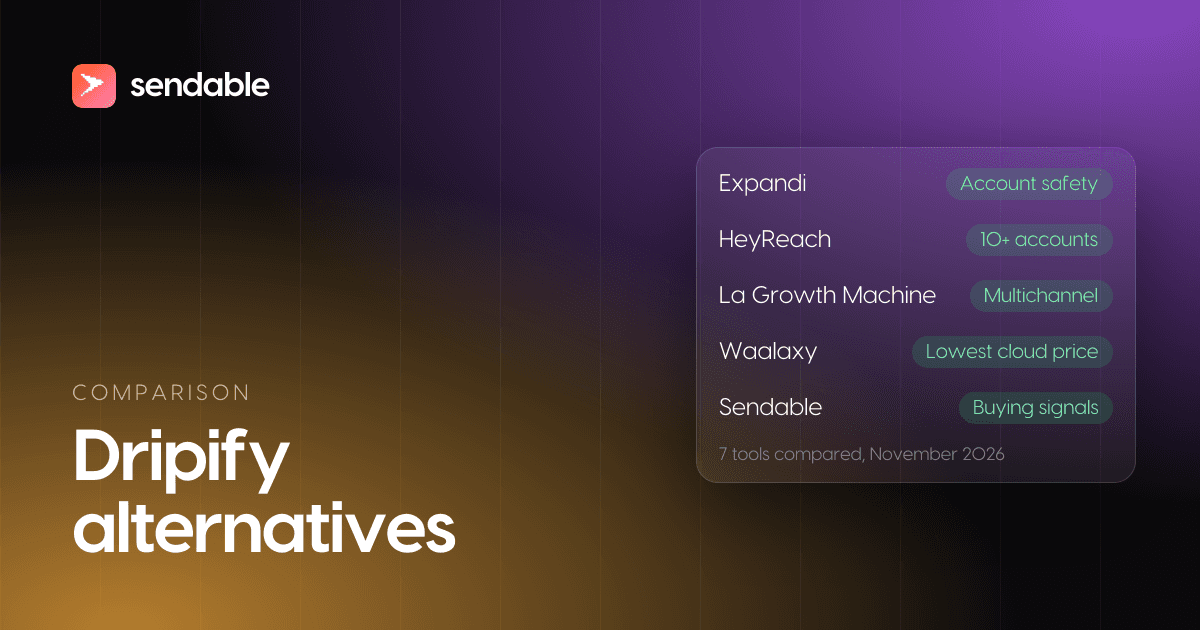
Limits: new people come only from your own search criteria, and team management starts on Advanced. Seven tools that replace it are compared on my Dripify alternatives page.
3. Expandi
Expandi is a cloud sequencer with one public plan and a dedicated country-based IP per account, plus an automatic warm-up. Its builder has 10 campaign types and if/then conditions, and one sequence mixes invitations, messages, InMails and email follow-ups. It triggers outreach on "buying signals like profile views, post engagement, and group activity", and replies land in a global inbox.
Price (checked October 29, 2026): $99 per account per month, 20% less on annual billing, with a 7-day free trial. Above 10 seats and for white label, it is a quote.
Best for: branching sequences on a few accounts, with email as the follow-up channel.
Limits: no lighter plan, and image or GIF personalization costs extra. Seven replacements are scored on Expandi's own criteria in my Expandi alternatives guide.
4. Skylead
Skylead puts LinkedIn steps (it says "social automation") and unlimited email accounts with warm-up in one cloud seat, up to 100,000 emails a month. It finds people through a B2B database, account-based prospecting and post signals, and replies land in its Smart Inbox.
Price (checked October 29, 2026): $100 per seat per month, with 2 months free on annual billing. Agency is $999 a month for 25 seats as a first-year promotion. AI enrichment and the AI SDR are add-ons. 7-day free trial.
Best for: teams that send a lot of cold email and want LinkedIn in the same sequence.
Limits: one price for everyone, and the AI features cost extra.
5. lemlist
lemlist is an email platform that added LinkedIn: visits, invitations, messages, voice messages and InMail, next to email, calls and SMS, with a database of 650 million leads and a unified inbox. Its signal agents "continuously monitor buying intent" (hiring, funding, job changes, LinkedIn engagement) and are "available on all lemlist plans", paid in credits. Its own comparison of LinkedIn tools lists lemlist as a cloud tool; you connect LinkedIn through its Chrome extension, one lemlist seat and one Chrome profile per LinkedIn account.
Price (checked October 29, 2026): Multichannel, the plan with LinkedIn steps, is $109 per user per month, or $87 billed yearly. 14-day free trial.
Best for: teams whose outbound is mostly email and who want LinkedIn touches in the same campaign.
Limits: LinkedIn steps need Multichannel, not the $69 Email plan, and each LinkedIn account takes its own seat and Chrome profile to connect.
6. La Growth Machine
La Growth Machine bills per identity, one person's LinkedIn and email (and X on the top plan). It says it is "100% cloud-based", "with no extensions, and no shared IPs". Every plan has LinkedIn and email automation, LinkedIn voice messages and a database of 27 million companies. Pro adds calls, the shared LinkedIn and email inbox, and lookalikes that bring "50+ leads for each positive reply".
Price (checked October 29, 2026): per identity per month, Basic $70, Pro $135 and Ultimate $195 (€60, €120 and €180), with 2 months free on annual billing. Basic stops at 3 identities. 14-day free trial.
Best for: small teams running LinkedIn, email and calls, answering from one inbox.
Limits: the four points start on Pro, at $135 per identity. Eight replacements, compared channel by channel, are on my La Growth Machine alternatives page.
7. Sendable
This is the product I am building. Read this entry with that in mind, and judge it with a trial rather than on my word.
Sendable starts from buying signals rather than a list. It watches 16 of them, among them job postings, people who started a new job in the last 90 days, reactions and comments on posts or pages you pick, a keyword tracker, event attendees and profile viewers. AI checks each person against the ideal customer you describe and writes down why. The ones who fit enter your LinkedIn sequence (visits, invitation, likes, text or voice messages, waits, a condition on acceptance, withdrawal of unanswered invitations), sent in the cloud within the days, hours and daily limits you set. Replies from every account land in one inbox, with interested ones marked.
Price (checked October 29, 2026): €59 per LinkedIn account a month (about $66), or €590 a year. Each account includes 500 credits a month, one per person who matches, and a team runs up to 5 signals at once. The 7-day trial needs a card and charges nothing before it ends; it includes 20 credits, one LinkedIn account and 3 signals.
Best for: founders and small teams who want buying signals to decide who gets contacted, and who write their own messages.
Limits: no email, and no AI that writes your messages or answers for you. No tool, this one included, can promise replies. Sendable's team can also run that outreach for you on the Done for you plan, and four companies give their results.
8. Waalaxy
Waalaxy is the common first tool: prebuilt sequences, follow-ups, and an auto-import that adds profile visitors, post commenters or new results of a saved Sales Navigator search every 12 hours. Its help center says the cloud is "included and mandatory" on Advanced and Business.
Price (checked October 29, 2026): per user per month for a US visitor, Pro $19 with 300 invitations a month, Advanced $39 with 800, and Business $69, which adds email sequences; $16, $32 and $55 billed yearly. The inbox is an add-on at €20 a month (about $22). 14-day free trial.
Best for: a cheap, simple first LinkedIn sequencer.
Limits: monthly invitation caps, a paid inbox, and email only on Business. The tools people switch to from Waalaxy are priced at their real cost, inbox and email included.
9. Linked Helper
Linked Helper is desktop software: "it runs on your own computer, or on a VPS you control", and stops when that machine does. It offers 30+ action types, a built-in inbox, AI that drafts messages and detects leads fitting your ideal customer, and an Auto-Collect that keeps "pulling new profiles from a saved search on a schedule". One license runs one LinkedIn account.
Price (checked October 29, 2026): Standard $15 and Pro $45 per license per month on a one-month term, up to 45% less on longer terms. The 14-day trial gives full Pro access with no card.
Best for: the lowest budget, if a computer or a rented server can stay on.
Limits: no cloud, no email steps, and more setup than the cloud tools.
10. HeyReach
HeyReach is built for agencies: unlimited campaigns, a unified inbox across accounts, and a price per sender, never per teammate or client. Each sender on the entry plan gets "a dedicated static residential proxy". You import leads from LinkedIn searches, Sales Navigator, post reactions, event attendees or a CSV, and email goes through native integrations with Instantly, Smartlead and EmailBison.
Price (checked October 29, 2026): $79 per sender per month, with a 14-day trial on 3 accounts and no card. Agency is $999 a month for 25 senders with white label, and Unlimited $2,999.
Best for: agencies with 10 accounts or more and their own list or signal tool.
Limits: it adds no new people on its own and sends no email itself, which is what an agency with its own stack often wants. For agencies leaving it, my HeyReach alternatives page prices eight tools from 5 to 50 accounts.
11. Dux-Soup
Dux-Soup, now sold as STACKED, comes as a desktop app (Local) or a Cloud version that "runs continuously, no need to keep a machine on". Both run drip campaigns of up to 12 actions (visit, connect, message, InMail, endorse, follow, like a post), pause on a reply and gather replies in a unified inbox.
Price (checked October 29, 2026): Local is $55 per seat per month and Cloud $99, or $41.25 and $74.17 billed annually.
Best for: existing Dux-Soup users who want the same tool without a machine left on.
Limits: no email steps and no new leads on its own, at Expandi's price for the cloud version.
What LinkedIn automation tools cost for 1, 5 and 25 accounts
On monthly billing, the order changes with the number of accounts. Prices checked on October 29, 2026, for the plan each tool is scored on. Skylead, Waalaxy and Dux-Soup bill per seat or user without saying how many LinkedIn accounts one covers, so they are left out.
| Tool and plan | 1 account | 5 accounts | 25 accounts |
|---|---|---|---|
| Gojiberry Pro, then $59 per extra sender | $99 (2 included) | $276 | $1,456 |
| Dripify Advanced | $99 | $495 | $2,475 |
| Expandi | $99 | $495 | Quote above 10 seats |
| lemlist Multichannel | $109 | $545 | $2,725 |
| La Growth Machine Pro | $135 | $675 | $3,375, or an Agency quote |
| Sendable | €59 (about $66) | €295 (about $328) | €1,475 (about $1,642) |
| Linked Helper Standard | $15 | $75 | $300 (20% volume discount) |
| HeyReach | $79 | $395 | $999 (Agency) |
From two accounts up, Gojiberry is the cheapest in this table among tools that bring new people on their own. At 25 accounts, HeyReach's Agency plan costs less but adds no one, and Linked Helper stays the cheapest at every size as long as you run the machines.
Cloud, desktop or browser extension: where the tool runs
Where a tool runs decides whether your campaign keeps going at night and which IP address LinkedIn sees. Cloud tools act through your LinkedIn session from the vendor's servers, often with one IP per account: country-based at Expandi, dedicated at Dripify, a static residential proxy at HeyReach. Desktop tools (Linked Helper, Dux-Soup Local) run from your own machine and stop with it. Browser extensions are fading: Waalaxy moved everyone to its cloud because "Google will no longer allow actions to be performed from an extension in 2024".
It does not decide whether LinkedIn allows it. LinkedIn's page on prohibited software names "crawlers", bots, "browser plug-ins, or browser extensions" alike: a cloud tool is more convenient, not more permitted. What LinkedIn's own tools can send without one, and how to set up a sequence, is in my guide on how to automate LinkedIn messages.
Is LinkedIn automation allowed?
Not under LinkedIn's rules. Its help page on prohibited software and extensions says it does not permit software that can "scrape, modify the appearance of, or automate activity on LinkedIn's website", and that members who use it "risk having their accounts restricted or shut down." Every tool here automates invitations and messages, so every one carries that risk, Sendable included.
LinkedIn publishes no weekly invitation number. Its page on invitation restrictions gives reasons instead: "You've sent many invitations within a short amount of time", and "Many of your invitations have been ignored, left pending, or marked as spam by the recipients." The tools set their own caps: Waalaxy 300 or 800 invitations a month, Dripify up to 75 a day, Sendable 30 a day per account by default. What lowers the risk is the same everywhere: low volumes, a new account warmed up slowly, people with a reason to accept, and invitations withdrawn when nobody accepts them. The settings that keep an account out of trouble, step by step, are in is LinkedIn automation safe.
A LinkedIn automation, step by step in Sendable
Here is one automation, end to end. The screenshots come from a demo workspace: Tenurio and every person in it are fictional. Tenurio sells employee onboarding software to people leaders at US companies of 51 to 500 employees, and its founder posts about onboarding every week. The signal: the people who look at the founder's profile afterwards.
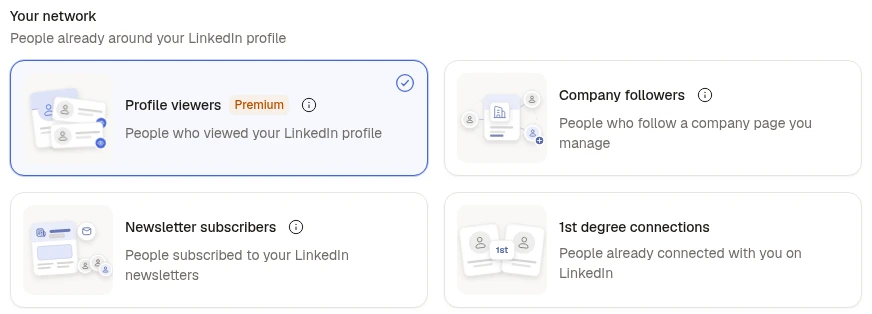
Step 1: Pick the signal
Profile viewers collects the people who viewed your LinkedIn profile in about the last 30 days, which takes LinkedIn Premium on the account. A profile view is worth acting on the same week; how long every signal stays fresh is in how to identify buying signals. What the free and Premium viewer lists show, and what to write to a viewer by hand, is on the LinkedIn profile viewers page.
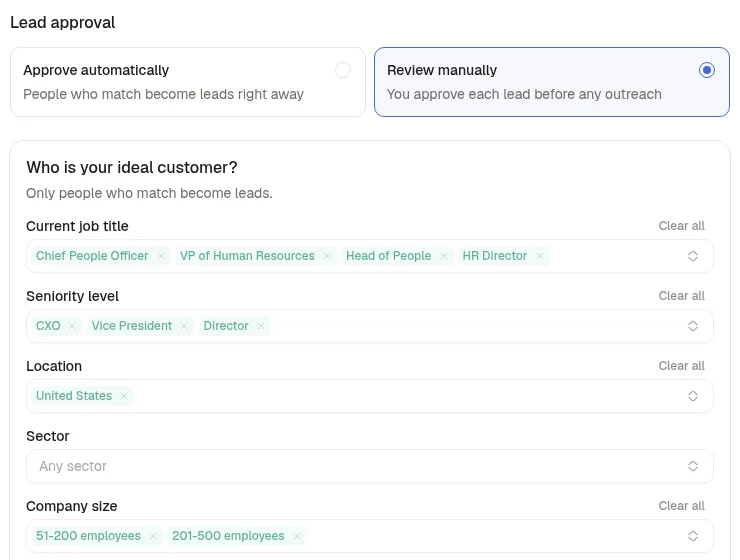
Step 2: Describe who should get a message
Every viewer goes through the ideal customer filter: job titles, seniority, location and company size here. Lead approval is set to Review manually for the first week, so nobody is contacted before Tenurio has read the verdicts.
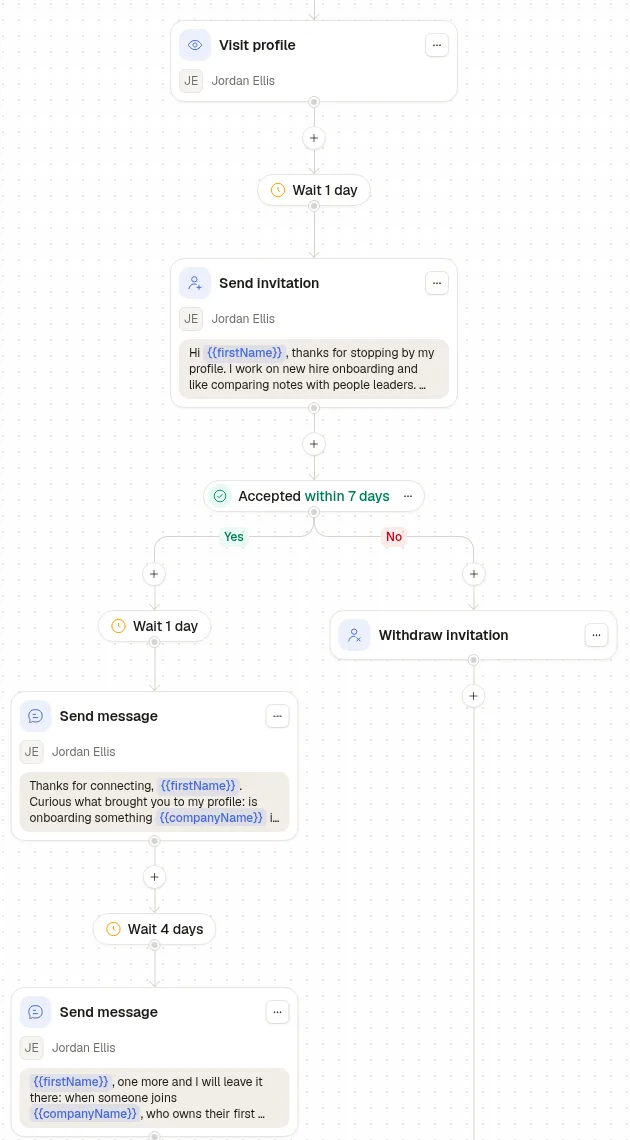
Step 3: Write the sequence
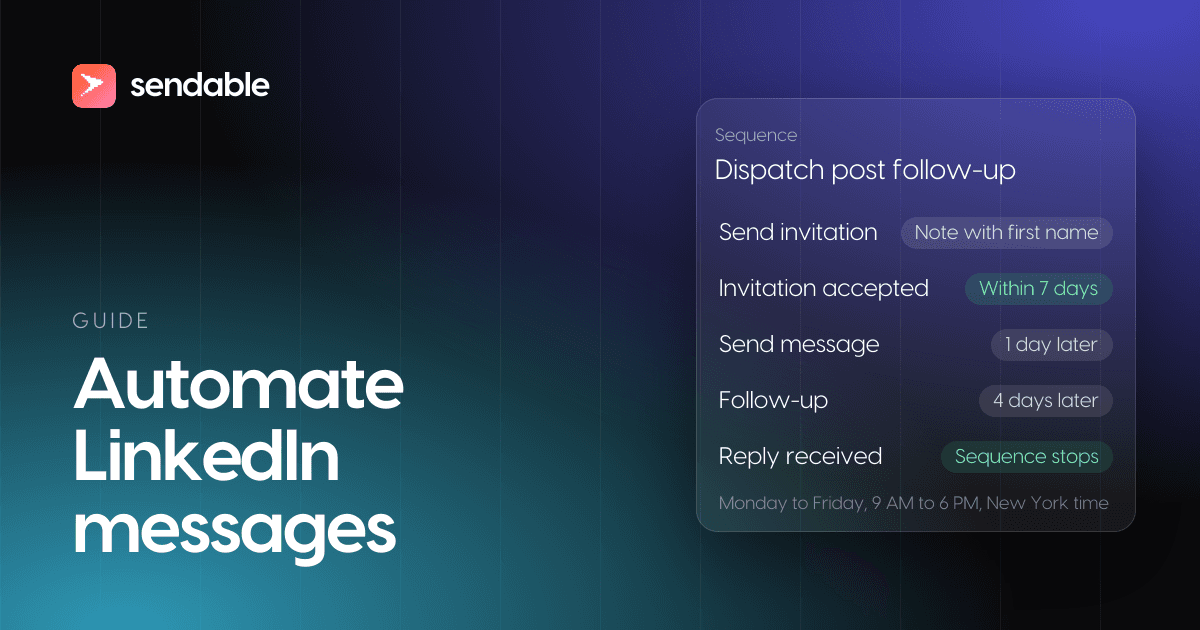
A profile view is something the person did on purpose, so the invitation can mention it. The sequence visits their profile, waits a day, invites, and gives the invitation 7 days. Accepted: one question a day later, one short follow-up 4 days after. Not accepted: the invitation is withdrawn instead of sitting pending. The campaign sends Monday to Friday, 9am to 6pm New York time, within the account's daily limits.
Step 4: Read the verdicts before anything is sent
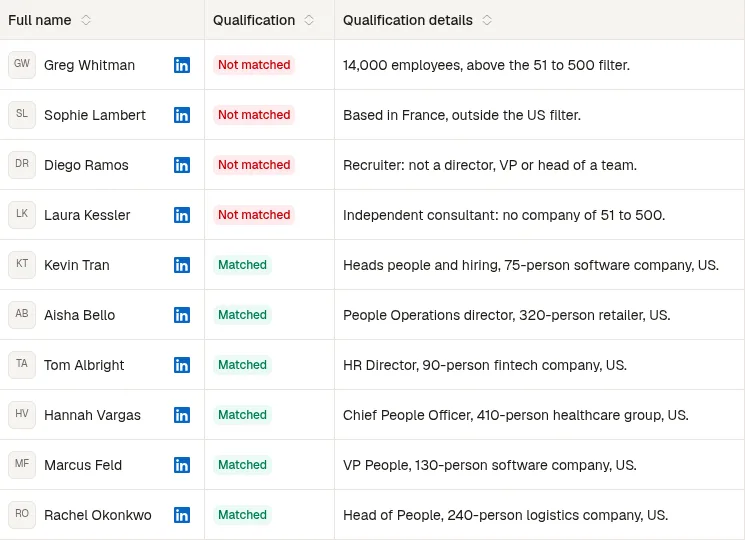
Six of the ten viewers matched, each verdict with its reason. The four rejects are a 14,000-person freight group, a Head of People in France, a recruiter at a staffing agency and an independent consultant. Once Tenurio agrees with the verdicts, it approves the leads and the sequence starts.