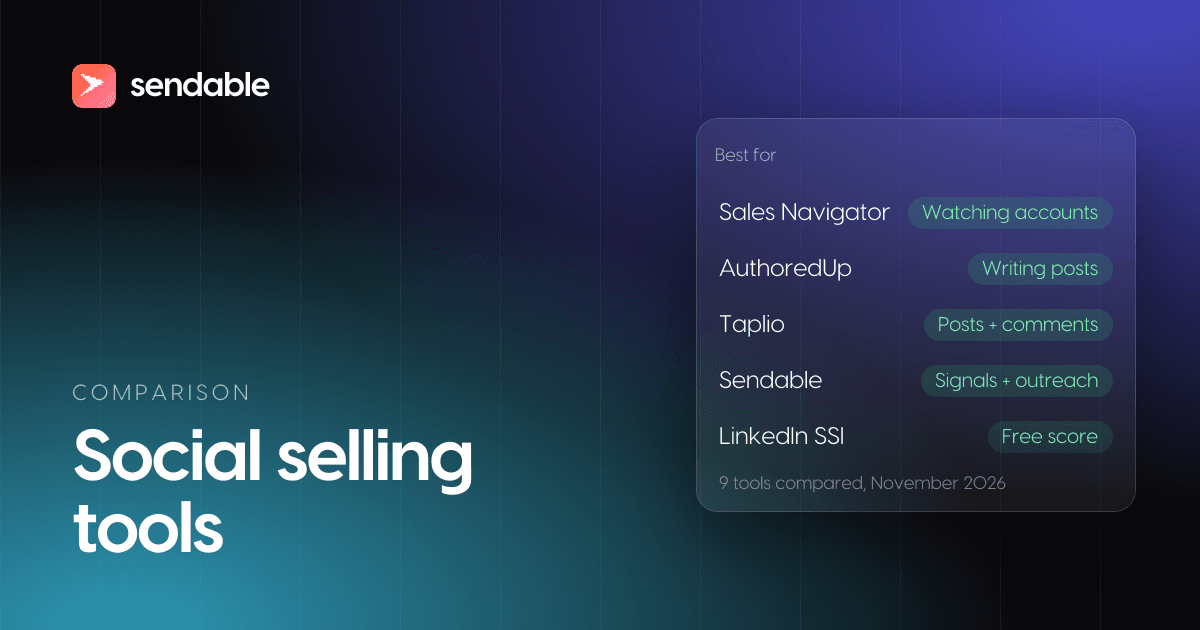
Social selling tools help you sell on LinkedIn by doing one of five jobs: watching the accounts you want, posting so buyers know your name before you write, spotting who shows interest this week, starting the conversation, and measuring whether any of it works. For most people the right set is small: LinkedIn Sales Navigator to watch accounts, AuthoredUp or Taplio to post, a signal tool such as Sendable or Teamfluence to know who to write to now, and the free Social Selling Index as a check. That last one has changed: LinkedIn's own SSI page is now titled "From SSI to AI" and says the score "no longer accurately reflects the modern sales environment".
Full disclosure: I build Sendable, one of the nine tools below. It comes sixth, where the order announced before the list puts it. Every price comes from the vendor's own site, opened on November 3, 2026.
My verdict: buy the tool for the job you skip, not a suite. In my experience, most people who say they do social selling post now and then and never write to the people who reacted. That gap costs less to close than any other on this list.
The best social selling tools for LinkedIn: comparison at a glance
Prices checked on November 3, 2026, on monthly billing, in the currency each vendor shows. Sendable and Teamfluence bill in euros: at the European Central Bank rate of November 3, 2026 (1 EUR = 1.1179 USD), €59 is about $66 and €449 about $502.
| # | Tool | Job | Best for | Free plan or trial | Paid from, a month |
|---|---|---|---|---|---|
| 1 | LinkedIn Sales Navigator | Watch | Following saved leads and accounts | Free trial with a card | $119.99 a license (Core) |
| 2 | Brand24 | Watch | Mentions of your brand, competitors and topics | 14-day trial | $349 (Team, the first plan with LinkedIn) |
| 3 | AuthoredUp | Post | Writing and formatting your own posts | Free trial, no card | $19.95 a profile (Individual) |
| 4 | Taplio | Post | Writing, scheduling and commenting in one place | 7-day trial | $39 (Starter) |
| 5 | EveryoneSocial | Post | Employees sharing company content | Demo | Quote only, priced by users |
| 6 | Sendable | Spot and reach out | Writing to people who just engaged on LinkedIn | 7-day trial with a card | €59 per LinkedIn account (about $66) |
| 7 | Teamfluence | Spot | Every engager on every teammate's posts | No trial, a call first | €449 (about $502), unlimited seats |
| 8 | Vidyard | Reach out | Video messages inside LinkedIn | Yes, 5 videos a month | $89 a seat (Starter) |
| 9 | LinkedIn Social Selling Index | Measure | A free score of your LinkedIn activity | Free | Free |
The numbers follow the order of a social selling week, not a quality score: the rule is in how I picked and ordered these tools.
What are social selling tools?
Social selling tools are software that help a seller, a founder or a whole team build relationships with buyers on social networks, mostly LinkedIn in B2B, until a conversation about buying makes sense. LinkedIn defines social selling as "a strategic method for sellers to connect and build relationships with prospects" through social networks. The tools split into five jobs, and four of them match the four parts of the Social Selling Index.
| Job | What you do | Part of the SSI it feeds | Tools on this list |
|---|---|---|---|
| Watch | Follow accounts, people and conversations so you know what changed | Engage with insights | Sales Navigator, Brand24 |
| Post | Publish so buyers know your name before you write to them | Establish your professional brand | AuthoredUp, Taplio, EveryoneSocial |
| Spot | Find who did something this week that shows interest | Find the right people | Sendable, Teamfluence, Sales Navigator |
| Reach out | Start the conversation and follow up | Build relationships | Sendable, Vidyard, Sales Navigator |
| Measure | Check whether any of it brings conversations | All four | LinkedIn Social Selling Index, your CRM |
Two neighbours get mixed into most lists of social selling software. Social media management suites such as Hootsuite or Sprout Social publish and reply for brand accounts; they serve the marketing team more than the person selling. Social commerce, such as Instagram Shopping or TikTok Shop, sells products to consumers inside the app. Neither is ranked here: this list is for B2B selling on LinkedIn.
Does social selling work, and on which buyers?
It works on buyers who already know you, and most buyers are not buying yet. LinkedIn's own figures are strong: on its social selling page, "Leaders in the social selling space create 45% more sales opportunities than those with a low social selling index", "Businesses that prioritize social selling are 51% more likely to reach their sales quota", and "78% of businesses that use social selling outperform those that don't". LinkedIn sells Sales Navigator and gives no date or method for those three numbers on that page, so read them as a direction, not a forecast. Its 2022 State of Sales figure is more specific: sellers at 150% of quota or more "were more than twice as likely to have expanded their LinkedIn network in the past year (53%)" than their average peers (25%).
The timing problem is better documented. The LinkedIn B2B Institute's 95-5 rule says "95% of your potential buyers aren't ready to buy today". Professor John Dawes of the Ehrenberg-Bass Institute, who wrote the report behind that rule in May 2021, estimates that "only 20% of business buyers are 'in the market' over the course of an entire year; something like 5% in a quarter", and notes that buyers prefer brands they are familiar with. His warning reads like a brief for social selling:
"…do some targeting for people who are ready to buy, but if that's all you do, you will never build the widespread mental availability needed to become (or remain!) a big brand."
John Dawes, Ehrenberg-Bass Institute, 2021
That is why a social selling setup needs two kinds of tools. Posting tools work on the 95% who will buy later and should know your name by then. Signal tools work on the 5%: the people who comment, change jobs or view your profile this month, and who deserve a message now.
How I picked and ordered these tools
A tool made the list if it does one of the five jobs on LinkedIn and its own site documents what it does. EveryoneSocial publishes no price, but employee advocacy is a job most lists cover and its pages rank on this very query, so it stays with "quote only". For each tool I checked three things on the vendor's pages on November 3, 2026:
- How it works on LinkedIn: a product of LinkedIn itself, a browser extension, a web app that connects your account, or no connection at all.
- Whether it acts on your account: publishes posts, or sends invitations and messages for you. LinkedIn's rules on third-party software make this the question that decides your risk.
- What it costs on monthly billing, and per what: a license, a profile, a LinkedIn account or the whole team.
| Tool | How it works on LinkedIn | Acts on your account | Billed per |
|---|---|---|---|
| Sales Navigator | LinkedIn's own product | It is LinkedIn | License |
| Brand24 | Collects public mentions of your keywords | No | Plan; unlimited users from Team |
| AuthoredUp | Chrome extension inside LinkedIn | Publishes the posts you schedule | Profile |
| Taplio | Web app, plus a free Chrome extension | Publishes posts; Pro automates DMs and connection requests | Plan; team discount up to 30% |
| EveryoneSocial | An advocacy platform your employees use | Employees post what they choose to share | Users, on a quote |
| Sendable | Connects your LinkedIn account | Sends visits, likes, invitations and messages on your schedule | LinkedIn account |
| Teamfluence | Connects your team's profiles | Sends connection requests across team accounts | Team; unlimited seats |
| Vidyard | Chrome or Edge extension in LinkedIn messages | No, you send each video yourself | Seat |
| LinkedIn SSI | LinkedIn's own score | It is LinkedIn | Free |
Four of the nine never act on your account: Sales Navigator, Brand24, Vidyard and the SSI. The list follows a social selling week: watch, post, spot, reach out, measure. Within a job, the cheapest entry plan comes first, and a quote comes last. Sendable spots and reaches out, and costs less than Teamfluence, so it opens the spotting group: sixth.
1. LinkedIn Sales Navigator
LinkedIn Sales Navigator is the base most social sellers start from, because it is LinkedIn's own tool for following buyers. You "find the right leads faster with 50+ advanced search filters", save leads and accounts, and get alerts on "real-time signals like job changes and new content". Its Account Alerts cover "new funding announcements or layoffs", target Company Page posts, "prospect LinkedIn activity, and leadership changes". Advanced adds Buyer Intent, "seeing when buyers show interest in your company". Every plan includes 50 InMails a month, and Message Assist generates "personalized outreach with AI".
Price (checked November 3, 2026): Core starts at $119.99 per license a month, or $1,079.88 a year; Advanced at $159.99 a month, or $1,799.88 a year; Advanced Plus is "customized based on your sales team's size". The page says the "prices listed above are estimates and may exclude Value-Added Tax (VAT)". The free trial is open to members without a paid LinkedIn subscription who have not used a free trial in the past 365 days, with a reminder email seven days before it ends.
Best for: anyone who sells to a list of named accounts and wants to see when something changes there. LinkedIn notes that "the average sales cycle requires sellers to engage up to 11 people within a target company account", which is hard to follow by memory.
Limits: it shows you what changed but sends nothing on a schedule and publishes nothing, and Buyer Intent starts on Advanced. Whether the license pays off for you is the subject of is Sales Navigator worth it.
2. Brand24
Brand24 is a social listening tool. You give it keywords (your brand, a competitor, a problem you solve) and it collects the public mentions across social networks, news, blogs, Reddit, YouTube, podcasts and reviews, with AI sentiment on every plan. LinkedIn is one of its sources, but not on the cheapest plan. Mentions refresh every 12 hours on Individual, every hour on Team, and in real time from Pro.
Price (checked November 3, 2026): Individual is $249 a month ($199 billed annually) for 3 keywords and 2,000 mentions, without LinkedIn. Team is $349 ($299) for 7 keywords, 10,000 mentions a month, unlimited users and LinkedIn. Pro is $499 ($399), Business $699 ($599), and Enterprise starts at $1,499 billed annually. 14-day free trial.
Best for: a team that wants to hear when someone mentions its brand, a competitor or the pain it solves, on LinkedIn and everywhere else.
Limits: it finds mentions, not people who fit your target, and nothing is sent from the tool. LinkedIn coverage starts at $349 a month.
3. AuthoredUp
AuthoredUp is a writing tool for LinkedIn posts that lives in a Chrome extension. Its editor adds text styling, bullet points and a preview, keeps unlimited drafts and snippets, offers "300+ hooks and post endings", and brings your past posts and their analytics into one place. Scheduling runs through the extension.
Price (checked November 3, 2026): Individual is $19.95 a month for one profile ($16.63 a month billed yearly, or $199.50 a year). Business is $14.95 per profile a month from 3 profiles, with team analytics and draft collaboration. Teams of 10 profiles or more get a custom plan on a quote. The free trial needs "No credit card required."
Best for: people who write their own posts and want them to read well in the feed, with a history of what worked.
Limits: it helps you post and stops there: nothing in it contacts anyone, and scheduling needs the extension. It is compared with eight other schedulers, the free native one first, in LinkedIn scheduling tools.
4. Taplio
Taplio, by lempire, calls itself "the only all-in-one AI-powered tool to grow your brand on LinkedIn". Every plan schedules posts, shows analytics and searches "5M+ viral posts". Growth adds AI writing and engagement feeds, where you comment on posts from 40+ niche feeds or your own lists, and saves up to 20 likers and commenters per post to a contact list. Pro saves all of them and adds "Automate lead outreach": automated DMs and connection requests. A free Chrome extension "works without a Taplio plan".
Price (checked November 3, 2026): Starter is $39 a month, Growth $69 and Pro $199 on monthly billing; yearly billing saves 25%. The 7-day free trial gives "every Pro feature, with limited AI usage", and a team or agency saves up to 30%.
Best for: creators and founders who want writing, scheduling and commenting in one tool.
Limits: AI writing starts at $69 and lead outreach at $199. Its automated DMs and connection requests carry LinkedIn's restriction risk, like every tool that sends for you.
5. EveryoneSocial
EveryoneSocial is an employee advocacy platform, "the AI-powered advocacy platform for activating execs and staff". The company picks the stories, and employees share them with their own networks, so the company's content reaches people its page never would. It adds executive activation, company page insights, and governance for regulated industries.
Price (checked November 3, 2026): quote only. "One plan, priced by the number of users. From 500-person pilots to global rollouts of 50,000+." Quotes usually come back the same business day, and the sample quotes on the page run on an annual term.
Best for: companies with hundreds of employees that want sales, recruiting and executives to share the same stories.
Limits: no public price, and it is built for large programs. For a team of five, AuthoredUp Business or Taplio's team discount is the realistic version.
6. Sendable
This is the product I am building. Read this entry with that in mind, and judge it with a trial rather than on my word.
Sendable does the spotting and the first contact. It watches 14 LinkedIn signals, plus a CSV of your own profiles. The social selling ones: people who reacted to or commented on posts you pick (yours or anyone's), people engaging with the posts of up to 10 profiles or company pages, people who post about your keywords or engage with those posts, your profile viewers (with LinkedIn Premium), followers, newsletter subscribers, poll voters and event attendees. The others: people who started a new job in the last 90 days (see LinkedIn job change alerts) and companies hiring for a role you choose. AI checks each person against the ideal customer you describe and writes down why they match or not, and you approve the matches by hand or automatically.
The matches enter a LinkedIn sequence you write: visit the profile, like their last post, send an invitation, wait, check whether it was accepted, then send text or voice messages, or withdraw the invitation. It sends from your account inside the days, hours and daily limits you set, by default 20 invitations a day on a free LinkedIn account and 30 on Premium or Sales Navigator. A reply ends that person's sequence and lands in one inbox for every account, and leads sync to HubSpot or Attio.
Price (checked November 3, 2026): €59 per LinkedIn account a month (about $66), or €590 a year, with no tiers. Each account includes 500 credits a month, one per person who matches your ideal customer; rejections are free. A team runs up to 5 signals at once. The 7-day trial needs a card and charges nothing before it ends; it includes 20 credits, one LinkedIn account and 3 signals. Every plan detail is on the pricing page.
Best for: founders and small B2B teams who post, or follow the posts of their market, and want the people who engage to get a message while the reason is still fresh.
Limits: no posting, scheduling or content analytics, so it sits next to AuthoredUp or Taplio, not instead of them. LinkedIn only, with no email steps; a work email or a phone comes only through a "Find email or phone" step that runs on your own FullEnrich account. No AI writes your messages, and like every tool that sends for you, it carries LinkedIn's restriction risk.
7. Teamfluence
Teamfluence tracks "engagement on your posts, your team's posts, competitors, influencers, keywords and ads", across every profile your team connects. It says it finds "the work email for 9 out of 10 leads", runs "if this, then that" workflows into Slack, HubSpot or Clay, and "distributes connection requests across your team accounts automatically". HubSpot and Salesforce connect natively.
Price (checked November 3, 2026): "One plan for everything: €449 per month" (about $502), with unlimited seats, 1,000 qualified leads a month and 20,000 credits. A lead counts as qualified the first time you move it out of Teamfluence: to your CRM, a CSV, a webhook, Slack or the API. A Small Unlimited plan is listed next to it, without a price on the default view. Billing is monthly, and there is no trial: "We don't do self-service sign-ups", so every customer starts with a call.
Best for: a team where several people post and want every engager on everyone's posts in one place.
Limits: no trial and a team-sized price for a solo seller. The connection requests it sends carry the same LinkedIn risk as Sendable's.
8. Vidyard
Vidyard records short videos for sales. With its Chrome or Edge extension, you open a LinkedIn message, click the Vidyard icon and record your camera, your screen or both, per its help center. InMail works only "from the Messaging composer on LinkedIn.com", and "Vidyard is not available directly within LinkedIn Recruiter or Sales Navigator".
Price (checked November 3, 2026): the free plan needs no card and records 5 videos a month, up to 30 minutes each. Starter is $89 per seat a month ($59 billed annually) with unlimited recording and video analytics, after a 14-day trial. Teams and Enterprise are quoted.
Best for: a first message or a follow-up where seeing your face does more than another paragraph: after an event, a call or a long comment thread.
Limits: someone you are not connected with sees a plain link until they reply in the thread; the preview with a play button shows for 1st-degree connections.
9. LinkedIn Social Selling Index
The Social Selling Index is LinkedIn's own score of your activity, "a metric from 0 to 100", in four parts of up to 25 points each: establish your professional brand, find the right people, engage with insights, build relationships. You open it while logged in, and the dashboard pictured on the SSI page says "It is updated daily."
Price (checked November 3, 2026): free.
Best for: a monthly check that your profile, your network and your activity are not holding you back.
Limits: LinkedIn itself now says "A high SSI score doesn't always represent the efficacy of a sales person or correlate with measurable sales outcomes." What to make of that is in the next section.
Is the LinkedIn Social Selling Index still worth tracking?
As a monthly check, yes; as a goal, no. LinkedIn retitled its SSI page "From SSI to AI", added the line "Less scoring, more selling", and writes that "the SSI score no longer accurately reflects the modern sales environment".
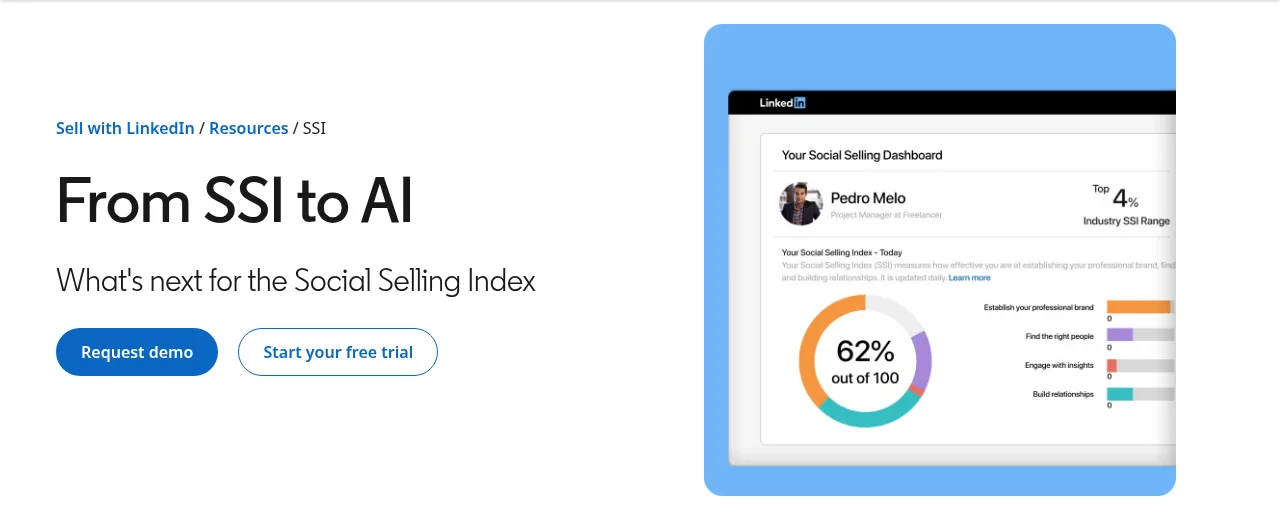
LinkedIn gives two reasons on the same page: "A high SSI score doesn't always represent the efficacy of a sales person or correlate with measurable sales outcomes. Plus, the time and effort needed for high SSI scores can distract people from closing deals and building deep customer relationships." The page then points sellers to Sales Navigator's AI features, so read it with LinkedIn's interest in mind. The point stands anyway: a score that rises when you post more does not tell you whether the right people answered.
If you still want the score to move, each part has one lever:
- Establish your professional brand: a complete profile with a photo, a headline that says who you help, and regular posts. LinkedIn says profiles with a picture "are 14x more likely to be viewed than those that don't".
- Find the right people: search and save the people you sell to, rather than connecting with everyone who asks.
- Engage with insights: comment with something useful on your buyers' posts, not a compliment.
- Build relationships: connect with people who have a reason to accept, and keep the conversation going.
What to measure instead: invitations accepted, replies, and conversations that become meetings, per post or per signal. Those numbers live in your CRM or in the tool that sent the messages; Sendable shows reply and interested rates per campaign.
Which social selling tools are free?
LinkedIn covers the basics for nothing, and three tools on this list have a free plan or a free part. The free options, checked on November 3, 2026:
- LinkedIn itself: the Social Selling Index, and its own post scheduler, which most people need before any paid tool (the free scheduler and eight paid ones are compared in LinkedIn scheduling tools).
- Vidyard Free: 5 videos a month, up to 30 minutes each, no card.
- Taplio's Chrome extension: "instant stats, your best posts, trending content, and quick saves", and it "works without a Taplio plan".
- Sendable's LinkedIn comment exporter: exports the comments of any LinkedIn post to CSV or Excel, free and without a login, so you can try writing to commenters by hand before paying for anything.
The rest start with a trial. AuthoredUp's needs no card, Brand24's lasts 14 days, Taplio's and Sendable's 7 days (Sendable asks for a card), and Sales Navigator's asks for a card and is open only to eligible members. Teamfluence and EveryoneSocial start with a call.
What does a social selling stack cost?
Less than one Sales Navigator license for a solo founder who posts, and about $1,000 a month for a team of five that wants every job covered. Prices on monthly billing, checked November 3, 2026, euros converted at the ECB rate of the same day.
| Setup | Tools | A month |
|---|---|---|
| Free | LinkedIn's SSI and post scheduler, Vidyard Free, the comment exporter | $0 |
| Solo founder who posts | AuthoredUp Individual ($19.95) + Sendable (€59) | about $86 |
| Solo seller on named accounts | Sales Navigator Core ($119.99) + AuthoredUp ($19.95) + Sendable (€59) | about $206 |
| Team of 5, one seat each | Sales Navigator Core ($599.95) + AuthoredUp Business ($74.75) + Sendable (€295) | about $1,004 |
| Team of 5, engagement on everyone's posts | Teamfluence (€449) + AuthoredUp Business ($74.75) | about $577 |
Sendable and Sales Navigator cost more with each account or seat; Teamfluence's price does not change with the number of seats. The last two rows do not buy the same thing: the first one adds Sales Navigator's search and InMail and a LinkedIn sequence on every account, the second one tracks engagement for the whole team and enriches leads with emails.
From a post to a conversation, step by step in Sendable
Here is the social selling loop that turns engagement into conversations, run in Sendable. The screenshots come from demo workspaces: every post, company and person in them is fictional.
Step 1: Pick the posts
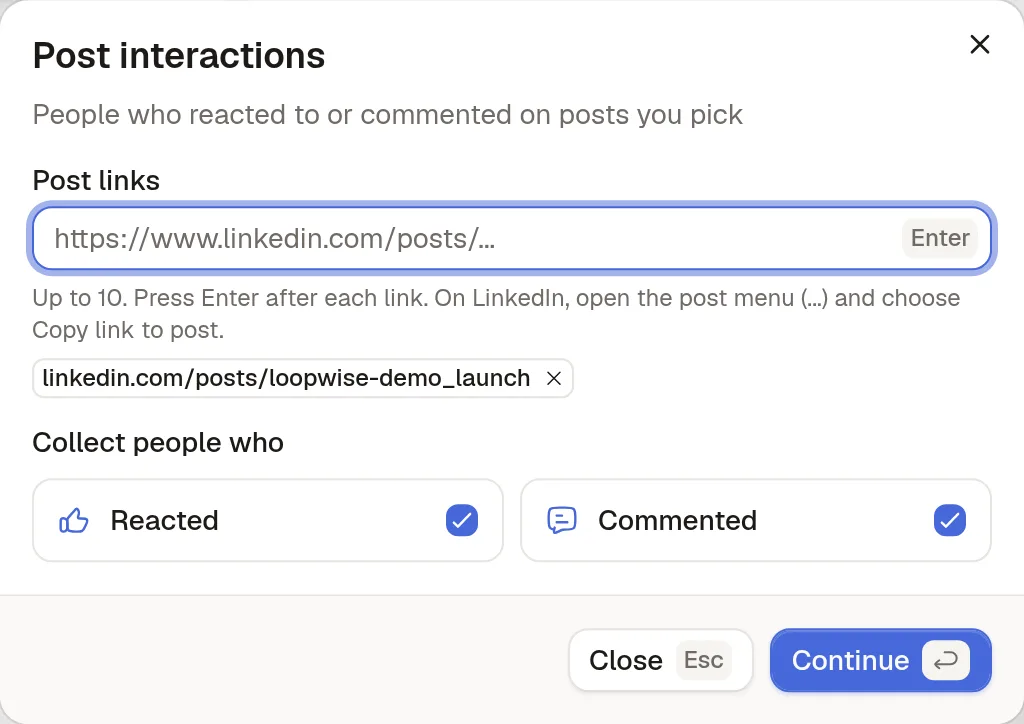
The Post interactions signal collects the people who reacted to or commented on posts you pick: your own launch post, a competitor's, or a post from someone your buyers follow. It takes up to 10 post links, checks for new reactions and comments every day for 3 days, and needs no LinkedIn account to collect.
Step 2: Describe who should get a message
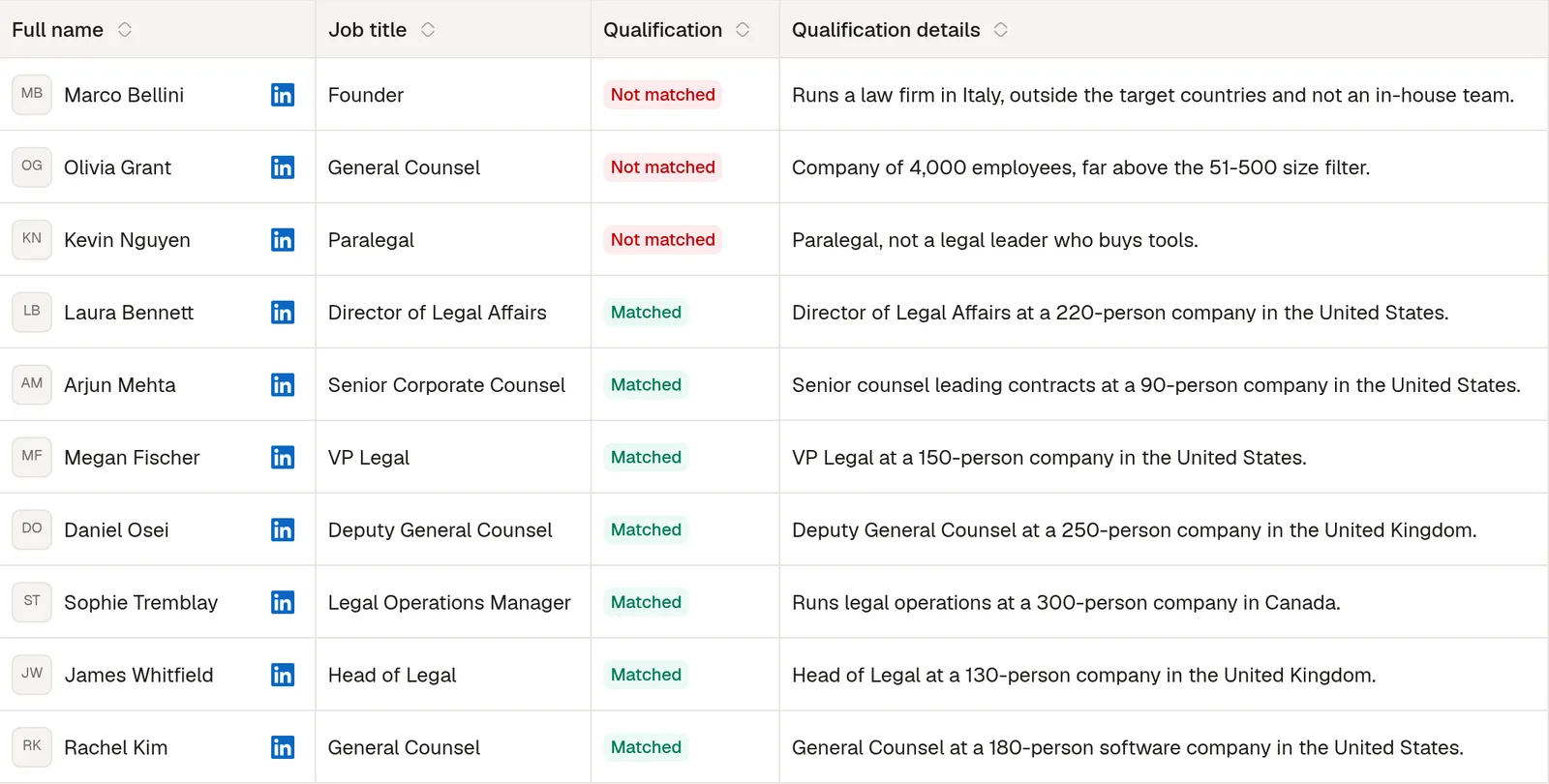
A post draws students, vendors and recruiters as well as buyers. You describe your ideal customer with filters such as job titles, seniority, sector, company size and location, and AI checks every person against it and writes down why they match or not. Set lead approval to Review manually for the first week, so nobody is contacted before you have read the verdicts. A match costs one credit; a reject costs nothing.
Step 3: Write the sequence
A social selling sequence starts small: visit the profile, wait a day, like their last post, then send an invitation that mentions the post they reacted to. If they accept within 7 days, one message a day later asks a question about their work, with one short follow-up. If they do not, the invitation is withdrawn instead of sitting pending. You write every word.
Step 4: Answer from the inbox
A reply stops that person's sequence and lands in the inbox with the conversations of every connected account. From there it is a normal conversation, and the lead and its messages sync to HubSpot or Attio if you use one.