Manage multiple LinkedIn accounts from one shared inbox
To manage multiple LinkedIn accounts, keep one account per person and bring their conversations into one place. LinkedIn allows each member one account and forbids sharing it, and its messaging shows one login at a time. A team that prospects from several profiles needs a shared inbox on top. Sendable's inbox holds the conversations of every account connected to your team, one click apart, with labels, drafts and snooze the whole team shares, and each conversation tied to the lead and the campaign behind it.
By Thomas Bonfils, Cofounder, Sendable. LinkedIn rules and tool prices checked on .
A reply on any account
synced as it arrives
Label, draft or snooze
shared with the team
Open the lead
signal, campaigns, notes
Answer from that account
Stracy
Deluj
M2 Agency
Northbeam
Kindred
NafiNafi
Can you manage multiple LinkedIn accounts?
Yes, as long as each account belongs to a real person who uses it. What is forbidden is one person holding several accounts, or using someone else's. LinkedIn's User Agreement, in force since November 3, 2025, says so in three places:
Section 2.1: "you will only have one LinkedIn account, which must be in your real name".
Section 2.2: "You will keep your password a secret", and "You will not share your account with anyone else and will follow our policies and the law".
Section 8.2, among the things members agree not to do: "use or attempt to use another's account (such as sharing log-in credentials or copying cookies)".
So a sales team, an agency or a founder with an assistant works the same way: each person keeps their own account and their own login. The team then works the conversations somewhere everyone can see them. A company Page is the exception: it has admins rather than an owner, and several of them can answer.
Tools that read or send for you raise a second rule. Section 8.2 also forbids using "bots or other unauthorized automated methods to access the Services", to send or redirect messages among other things. LinkedIn's page on prohibited software adds that members who use such software "risk having their accounts restricted or shut down". No tool can promise otherwise, Sendable included: it reads and sends through each account you connect.
Which kind of "multiple accounts" do you mean?
The phrase covers three jobs, and each one needs a different tool:
Posting for several profiles or Pages. That is a scheduler's job, compared in my guide to LinkedIn scheduling tools. Sendable does not schedule posts.
Answering a company Page's messages. The free Page inbox does it (next section).
Working the conversations of several people's accounts: replies to outreach, follow-ups, handoffs between colleagues. That is what a shared inbox is for, and what the rest of this page covers.
What does LinkedIn's own inbox do with several accounts?
Nothing across accounts: messaging shows the profile you are signed in to. Inside it, LinkedIn Help lists five filters on a computer (Jobs, Unread, My Connections, Starred and InMail) and a search "by keyword or recipient". You can also mark a conversation as unread to come back to it. But there are no labels a colleague can see, no shared drafts, and no way to read a second profile without signing out of the first or keeping a separate browser for each.
Company Pages are the one place LinkedIn shares an inbox. "You must be a super or content admin to view and reply to messages for your Page", says its page on messages for LinkedIn Pages. Admins also see which of them sent each message. The catch for prospecting: "Admins can only send a message to a member if they message the Page first." A Page answers; it does not reach out.
Sales Navigator keeps its own inbox, and its CRM sync is limited to one plan: "Integration between Sales Navigator and your CRM is only available for Sales Navigator Advanced Plus users" (LinkedIn Help).
What is a shared LinkedIn inbox?
A shared LinkedIn inbox is a tool where a team reads and answers the conversations of several LinkedIn accounts in one place, while each one stays its owner's. It adds what native messaging lacks for a team: labels (or tags) everyone sees, drafts a colleague can pick up, snooze, and a view of who owes a reply, often with a link to the person's record and to your CRM.
It comes in two designs. A merged inbox, also sold as a unified inbox, mixes every account's conversations in one list. A per-account inbox keeps them apart and switches in a click. Merged suits people who answer for many client accounts at once. Per-account suits teams where each conversation belongs to the person whose name is on it. And if what you need is deals, stages and a pipeline, you are shopping for a LinkedIn CRM instead.
Which tools manage several LinkedIn accounts' messages?
Five options, compared on what their own pages say, read on November 4, 2026. Sendable is the product I build, so judge it on a trial. Prices are per month in the vendor's currency, before tax.
One inbox per Page, for its super and content admins
No: "Kondo does not support a unified inbox for multiple LinkedIn accounts", one Chrome profile per account
Yes: "all LinkedIn messages in one centralized inbox"
Yes, one account at a time, one click apart, with each account's unread count
Who starts the conversation
You
The member: admins reply once they write first
You, by hand: "We don't automate sending"
Your campaigns or you
Your campaigns, from buying signals, or you
Organizing
Filters (Unread, Starred, InMail...), mark unread, search
Topics, and which admin replied
Labels, snippets, snooze that cancels on a reply
Not detailed on its pricing page
Team labels, shared drafts, snooze, Need reply and Not answered tabs
CRM
Through Sales Navigator Advanced Plus only
Not mentioned on its Help page
CRM integrations from the Business plan
HubSpot among its integrations, plus an API and webhooks
Attio and HubSpot; Pipedrive in beta
Price
Free
Free
From $28 per user, billed yearly; Business $36
$79 per sender, $64 billed yearly
€59 per account; teammates free
Pick by how your team works:
One person per account, who wants a faster inbox:Kondo, which works on your own session and says "We don't automate sending".
The same people answering for many client accounts: a merged inbox such as HeyReach's.
Outreach from several accounts, each reply next to its lead: Sendable.
A company Page's messages: the Page inbox, free.
What does Sendable's shared inbox do for a team?
One inbox for every account of the team, and every conversation tied to its lead.
Every account, one click apart
A row of avatars switches between your team's accounts, each with its unread count; keys 1 to 9 pick one. The sidebar badge adds them all up.
Sorted by what you owe
Unread, Need reply and Not answered split the conversations, so nobody scrolls to find the reply that waits for an answer.
Work the whole team shares
Labels, snooze and one draft per conversation belong to the team, so a colleague picks up where you stopped.
The lead behind every reply
A click on the name opens the lead: the signal that found them, their campaigns and your notes. A reply stops their sequence.
How does Sendable's shared inbox work?
Here it is end to end. The screenshots come from a demo workspace: Harborline and every person in it are fictional. Harborline sells employee onboarding software to HR leaders at UK companies of 51 to 500 people, and its cofounder, Ellie Sutton, writes to the HR leaders who viewed her profile.
Step 1: Connect each person's account
Each person connects their own account on the Senders page, with its password or the Sendable Chrome extension. Each account uses one seat. Sendable then imports the conversations already there, in the background. After that, every new message, reaction and deletion lands as it happens, in both directions: a message you send from LinkedIn's phone app shows up in Sendable. Sendable stores only the last message of each conversation; the thread loads from LinkedIn when you open it.
Step 2: Sort the replies by what they need
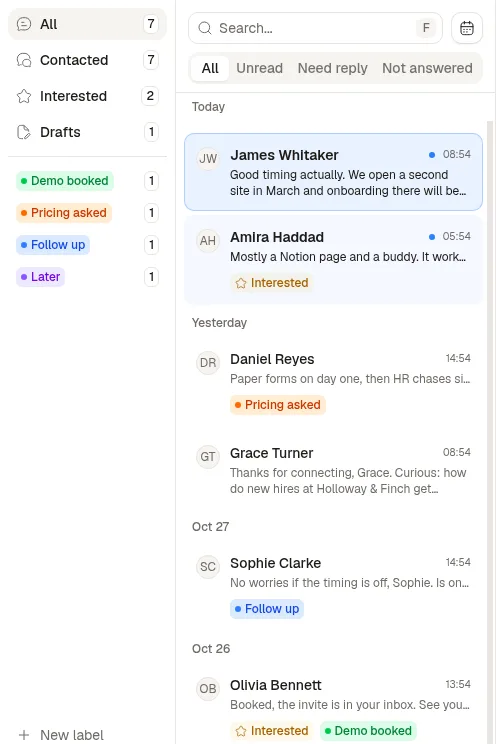
Three tabs split the conversations of the profile you are on. Unread is what you have not opened. Need reply is what you read and have not answered; a reaction you left counts as an answer. Not answered means you wrote last.
On the left sit All, Contacted, Interested, Drafts and your labels. Contacted lists the people a Sendable campaign wrote to from this account, or whose invitation they accepted. Archived and Snoozed open with G then E, or G then S. The search finds a contact by name, and a date filter keeps the last 3, 7, 10 or 30 days.
With two accounts or more, a row of avatars above the list switches between them. The demo below has a single account, so the row is not there.
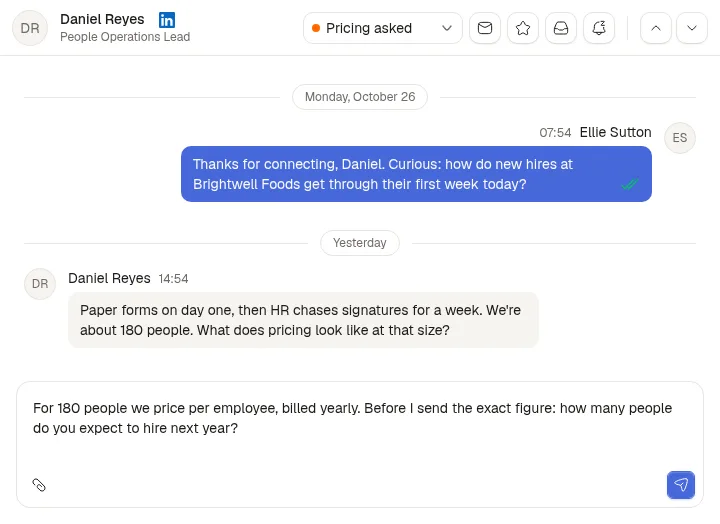
Step 3: Label, draft and snooze from the keyboard
Labels belong to the team. A conversation carries one, which makes it a stage: here Demo booked, Pricing asked, Follow up and Later. Snooze takes a duration or a date in plain words ("2 days", "next friday"). The conversation then shows the date and sits in Snoozed until then, without leaving All.
The draft is saved on the conversation for the whole team and stays until someone sends. Archive puts a conversation away until the person writes again. And Auto Interested, on by default, has an AI model read each new reply in a one-to-one conversation. When the person shows interest, it marks the lead Interested; it never removes the mark.
Shortcuts: E archives, I marks Interested, S snoozes, U marks unread and L labels. G then A, C, I, D, E or S opens a view, G then a digit opens a label, and Cmd or Ctrl + Enter sends. From the composer you can attach up to 10 files (15 MB each, 30 MB in all), quote a message, react where LinkedIn allows it, and edit or delete what you sent.
Step 4: Open the lead behind the reply
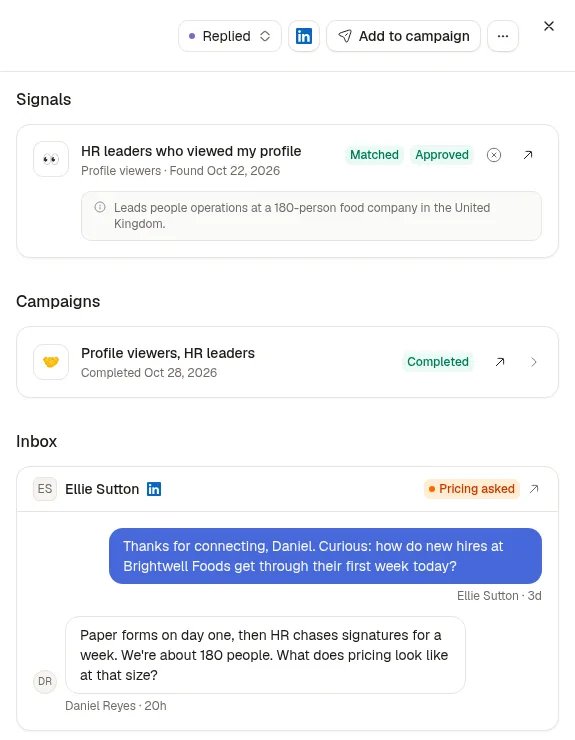
A click on the name opens the lead sheet. On the right: the person's status, the signal that found them with the reason they matched, their campaigns and their conversations. On the left: team notes and your own fields.
A reply links the conversation to the lead and stops that lead's campaign sequence, so nobody gets a follow-up after answering. And marking Interested on a one-to-one conversation with someone who isn't a lead yet creates the lead.
Step 5: Hand the conversation on
Connect a CRM and the conversation follows the person: Attio and HubSpot are open to every workspace, and Pipedrive is in beta. Each message, sent or received, lands on the person's timeline, and a Sendable labels field carries your labels. Once an owner installs the Sendable Slack app, each member can turn on a Lead replied message that quotes the reply. And through the MCP connector, an AI assistant can read conversations and write drafts you check in the Drafts view before sending.
By default, every team member reads all the team's conversations: that is what makes the inbox shared. Some salespeople would rather keep their messages to themselves. For them, an owner sets the member to Own inbox in Settings, Members, Edit member. That member then sees only the conversations of the accounts they connected: in the inbox, on the dashboard, on the lead sheet and in Slack. Owners always read everything, and campaigns, signals and leads stay shared.
Two things to know. First, a CRM sync sends every account's conversations, whatever each member's access in Sendable. Second, most of what you do stays in Sendable. Marking a conversation read or unread updates LinkedIn; labels, drafts, snooze and archive exist only in Sendable.
How much does a shared LinkedIn inbox cost in Sendable?
Sendable costs €59 per LinkedIn account a month, or €590 a year, inbox included. Three accounts cost €177 a month, and teammates who read and answer cost nothing. There is no inbox-only plan: the price also covers signals, AI qualification with 500 credits per account every month, and campaigns. Prices before VAT, last changed on : every plan is on the Sendable pricing page.
The 7-day free trial includes one account, enough to try the labels, drafts and lead sheet. Connecting a second one, to switch between them, takes Pro.
Who is Sendable's shared inbox for, and what does it not do?
It is for:
Founders and sales teams who prospect from several people's accounts and answer the replies together.
Agencies that keep one team per client, each with its own accounts, campaigns, leads and inbox.
Anyone who wants each reply next to the signal and the campaign that started the conversation.
What it does not do:
Other channels. It is LinkedIn only: no email, no WhatsApp, and no company Page messages.
A merged list. You see one profile at a time and switch; only the unread badge adds up every account.
Assignment, comments on a thread, snippets. A conversation belongs to its account, notes live on the lead, and message variants live in campaigns.
Search inside messages. The search finds a contact by name, not a word in a message.
Reminders. A snoozed conversation stays in All with its date, and Sendable sends nothing when the date comes.
Group conversations in the CRM. Groups show in the inbox, but they are not sent to Attio, HubSpot or Pipedrive.
Who builds Sendable?
Thomas Bonfils is the cofounder of Sendable, the LinkedIn prospecting tool that turns buying signals into conversations. He builds it and writes its guides. He started it in 2026 with Antoine Nicolas; it is made in France. Every fact on this page about the inbox was checked in its code on November 4, 2026.
Four companies handed their outreach to our team, which runs it on Sendable. Their numbers and their words, from our case studies; results vary from one market to another and are not guaranteed.
+€208,000 revenue signed in 8 months: Marc Le Vernoy, CEO, 3h18
+55 meetings in 3 months: Alexis Bauer, CEO, Momentum Patrimoine
+€80k pipeline generated in 3 months: Pierre-Baptiste Couette-Barreau, CEO, Céos
+€9,000 revenue signed in 2 months: Sacha Boned, Co-founder, SA Corp
“A great team, very responsive and skilled at speeding up our outbound strategy. The copywriting is excellent and they handle everything. I recommend them without hesitation.”
Marc Le Vernoy · CEO, 3h18
“Antoine and Thibault are really committed. We needed to build our agency's acquisition funnel. Plenty of client meetings were booked, and contracts were signed. I recommend them without hesitation.”
Frequently asked questions about managing multiple LinkedIn accounts
Can I have two LinkedIn accounts?
No. LinkedIn's User Agreement says "you will only have one LinkedIn account, which must be in your real name". A second business does not change it: a company Page gives a business its own presence, run by its admins.
Can my assistant or my agency log in to my LinkedIn account?
Not under LinkedIn's rules: its User Agreement says "You will not share your account with anyone else" and forbids using another's account, "such as sharing log-in credentials or copying cookies". In Sendable, the owner of the account connects it, with its password or the Chrome extension; the password is only used to log in, and the team works the conversations without it. LinkedIn's rules on third-party software apply to Sendable as to any tool that reads or sends for you.
How do I see the messages of all my LinkedIn accounts in one place?
Connect each profile to one tool. In Sendable, every profile connected to your team shares one inbox: a row of avatars switches between them, each with its unread count, keys 1 to 9 jump to one, and the sidebar badge counts unread conversations across all of them. Some tools, such as HeyReach, merge every account into one list instead.
Do the messages I send from LinkedIn show up in Sendable?
Yes. Sendable imports the existing conversations when you connect a profile, then receives every new message in both directions, so a reply you type in LinkedIn's phone app appears in Sendable too. Marking a conversation read or unread in Sendable updates LinkedIn; labels, drafts, snooze and archive stay in Sendable.
Can teammates read each other's LinkedIn messages?
By default, yes: every member of a team reads all its conversations. An owner can set a member to Own inbox, and that member then sees only the accounts they connected. Owners always see everything, and a CRM sync sends all of them whatever these settings.
Does Sendable's inbox include email or WhatsApp?
No. It holds the conversations of the personal profiles you connect, nothing else. Company Page messages stay on the Page, and email stays in your email tool.
How much does Sendable's inbox cost for a team?
€59 per connected account a month, or €590 a year, before VAT, with signals, AI qualification and campaigns included. Teammates cost nothing, and the 7-day trial includes one account.
Is it safe for my account?
No tool can promise it: LinkedIn warns that members who use software that automates activity risk restriction. In Sendable, a message you write leaves when you press send, and a retry never sends it twice. Campaigns keep each sender within daily limits: 30 invitations and 30 new conversations a day to start, with Premium or Sales Navigator. More in is LinkedIn automation safe.