What is a LinkedIn company follower?
A LinkedIn company follower is a member who clicked Follow on a company's LinkedIn Page. Following brings “all posts shared by the Page” into the member's homepage feed, and a member can follow “up to 1,000 Pages”, according to LinkedIn's help page on following a Page. The same help page warns followers that “your public profile information will be visible to all Page admins”.
LinkedIn's newsroom counts more than 1.4 billion members, and a company's followers are the small, self-selected slice of them who asked to hear from it. A follow is public to the company, not to the rest of LinkedIn. That is what makes it a signal worth acting on: the person chose to hear from that business, and its admins can see who they are. Nobody else on LinkedIn can.
Can you see who follows a company on LinkedIn?
Only if you are an admin of its page. LinkedIn's help page on follower analytics says that “All followers shows your current Page followers along with their current place of employment and when they followed your Page”, and that “Followers are listed in order of recency”. Everyone else sees the follower count, a number LinkedIn calls “approximately rounded”.
Several guides that rank for this question say the opposite: that even admins only get anonymous totals. The help page itself settles it, since the People tab of All followers lists members by name. What no LinkedIn screen gives you is a competitor's follower list. Here is what each side sees, from the help pages read on November 3, 2026:
| What you want to see | Your own page, as an admin | A competitor's page |
|---|---|---|
| Follower count | Yes, rounded, without restricted and hibernated accounts | Yes, rounded |
| Who follows, by name | Yes: All followers, then People | No |
| When each person followed | Yes | No |
| Location, seniority, job function, industry and company size of followers | Yes, as totals | No |
| Follower totals over time | Yes | Totals only, in your page's competitor analytics: 1 competitor on a free page, up to 9 with Premium Company Page |
| Who reacts to and comments on its posts | Yes | Yes, on every public post |
| Who registered for its LinkedIn events | Yes, as the organizer | Yes, once you attend the event |
Sources: LinkedIn Help on follower analytics, competitor analytics and event attendees.
How do I see the followers of my own LinkedIn company page?
Open the page in admin view, go to Analytics, then Followers, and scroll to All followers. Select People to list the members who follow the page, newest first, each with their employer and the date they followed; Pages lists the organizations that follow yours. The help page describes no download of that list, so the manual route is reading it and opening each profile.
- Switch to admin view. Only admins see the list: if you are not one, ask an admin to add you.
- Open Analytics, then Followers. The top of the tab shows totals and demographics; the names sit under All followers.
- Select People. Work from the top of the list: the newest followers are the freshest signal.
- Open the profiles that fit. Check the role and the employer, then connect or message from the profile.
That works while you gain a few dozen followers a month. Past that, two tools take over. Sales Navigator has a lead filter, Following your company, that keeps the people who follow the company of your current position, combined with title, seniority or location. Sales Navigator Core costs US$119.99 a month or US$1,079.88 a year on LinkedIn's plan comparison (November 3, 2026). Sendable's Company followers signal reads the list for you about once a day and checks each follower against your ideal customer, as described further down.
How do I find the followers of a competitor's LinkedIn company page?
You can't get that list from LinkedIn: only the competitor's own admins see it. What you can get is the part of its audience that acts in public: the people who react to and comment on its posts, and the people registered for its LinkedIn events. They are often better leads than silent followers, since they did something about the topic this month.
The people engaging with its posts
Reactions and comments on its posts are public. By hand, open each recent post, then its reactions and its comments; the free LinkedIn comment exporter turns the comments and likes of a post into a CSV file. In Sendable, the Company engagement signal watches up to 10 company pages, reads their 5 latest posts from the last 3 to 30 days and collects the people who commented, reacted or both. It waits until a post is 72 hours old, so that its reactions have time to come in, and it needs no LinkedIn account to collect.
The people registered for its LinkedIn events
A competitor's webinar or live event gathers its most engaged audience in one list. The help page on event attendees says that “Organizers and attendees can also view a complete list of attendees from the Event page”, so registering gives you the list. Sendable's Event attendees signal takes up to 10 events, needs your account to attend each one, and checks the list every day until the event starts.
The Sales Navigator profile swap, and why we skip it
The help centers of Waalaxy and Dripify describe a workaround: list the competitor as your current employer, on your own profile or on a second account, then run the Following your company filter, which now returns the competitor's followers. It works, and it costs more than a Sales Navigator seat. For as long as the search runs, your profile tells your whole network that you work for a competitor.
It also breaks LinkedIn's User Agreement. In section 3.1 of the User Agreement, effective November 3, 2025, members promise that their “LinkedIn profile will be truthful”. Section 8.2 lists among the things they agree not to do: “Create a false identity on LinkedIn, misrepresent your identity, create a Member profile for anyone other than yourself”. A second account created for the search fails both.
Follower scrapers
Marketplaces and browser extensions advertise follower exports for any brand. LinkedIn shows a follower list to admins only, so a tool that sells a competitor's full list cannot show where its rows come from, or how complete they are. Section 8.2 also forbids software that will “scrape or copy the Services, including profiles and other data from the Services”. That rule applies to every automation tool, Sendable included: how Sendable limits the risk on your account is explained in Is LinkedIn automation safe?
Which method should you use to reach company followers?
It depends on whose audience it is. For your own page, the admin view is free and complete, and it wins on cost; Sendable adds the daily follow-up, the ideal customer check and the outreach. For a competitor's page, the options that keep your profile truthful all go through the people who act in public.
Comparison of the seven methods
| Method | Competitor's page | Who you get | New people | Cost | Main drawback |
|---|---|---|---|---|---|
| LinkedIn admin view | No, your pages only | Every current follower, by name | You check by hand | Free | No download, one profile at a time |
| Sales Navigator, Following your company | No, the company of your current position | Followers who match your search filters | You run the search again | US$119.99 a month (Core) | Messages and follow-ups stay manual |
| Sales Navigator profile swap | Yes | The competitor's audience that matches your filters | You run the search again | A Sales Navigator seat | A false employer on a profile, against the User Agreement |
| Follower scrapers | Claimed | A list you cannot trace to its source | Depends on the tool | Varies | Scraping is against the User Agreement |
| Engagement on its posts, by hand | Yes | People who reacted or commented | You check each new post | Free, with the comment exporter | Hours of copying and profile checks |
| Sendable, Company followers | No, pages you manage | Every follower, checked against your ideal customer | About once a day | €59 per LinkedIn account a month, 1 credit per match | Needs an admin's account |
| Sendable, Company engagement | Yes, up to 10 pages | People engaging with its latest posts, checked against your ideal customer | About once a day | Same plan | Misses the people who never react |
Prices read on November 3, 2026: Sales Navigator on its plan comparison, Sendable's on its pricing page, before VAT.
Pick by situation
- Your page gains a handful of followers a week: the admin view is enough. Open the newest ones once a week and write to the few who fit.
- It gains followers every day, or you manage several pages: reading the list by hand stops scaling. A Sendable signal reads it daily, drops the people outside your ideal customer and starts the sequence.
- The audience is a competitor's: watch its posts with Company engagement and its events with Event attendees, and skip the profile swap.
- Both: run one signal per audience, up to 5 at once per team, with the same ideal customer and the same campaign. A person both signals find enters the campaign once.
Are LinkedIn company followers good leads?
The people who follow your own page are among the warmest you can reach: they asked to see your posts. Sendable's outreach playbook, the free Claude skill for outreach, rates a follow of your profile or company page as medium to high intent, with about two weeks to act, and engagement with a competitor's page or posts as high intent with the same window. A follower list is still not a lead list, because it also holds people who will never buy:
- Its own employees, past and present, who follow their employer.
- Job seekers and recruiters, more so when it posts job openings.
- Students, partners and vendors, who follow the industry rather than the product.
- Your competitors, who follow each other's pages.
- People outside your market: the wrong country, team size or role for what you sell.
A quick test before you set anything up: open the 20 newest people on the list and count the ones you would sell to. If it is 2 or 3, a qualification step pays for itself. If it is 15, your audience is already the right one, and the work is in the message.
That is why Sendable checks every follower against your ideal customer before anyone is contacted, and why a follower who does not match costs nothing.
How does Sendable turn company followers into conversations?
In four steps, from the follower list to a reply in your inbox. Once the signal is live, Sendable looks for new followers about once a day, between 6 AM and 8 PM in your time zone, and every new follower who fits your ideal customer gets your sequence.
Step 1: connect the admin's account and pick the pages
Connect the LinkedIn account of someone who admins the page with the Sendable Chrome extension, create a signal and choose Company followers. Sendable lists the pages that account manages and refuses any whose followers it cannot read, so a signal never runs blind. Premium and Sales Navigator are not needed.
Step 2: collect the current followers, then the new ones
The first pass reads the whole follower list, newest first, 100 followers per request, over as many runs as the list needs. After that, each run reads only the people who followed since the last one, and when the follower count has not grown, it reads nothing at all.
Step 3: check each follower against your ideal customer
Describe the people you sell to with job titles, seniority, department, company size, industry, location, profile language, keywords and time in their position, each one to include or exclude. AI reads every profile and gives a verdict with a one-line reason. A match uses 1 credit; a rejected profile costs nothing. You can also leave out your blacklist, people already in your inbox, your 1st-degree connections, people you already contacted and your Attio contacts.
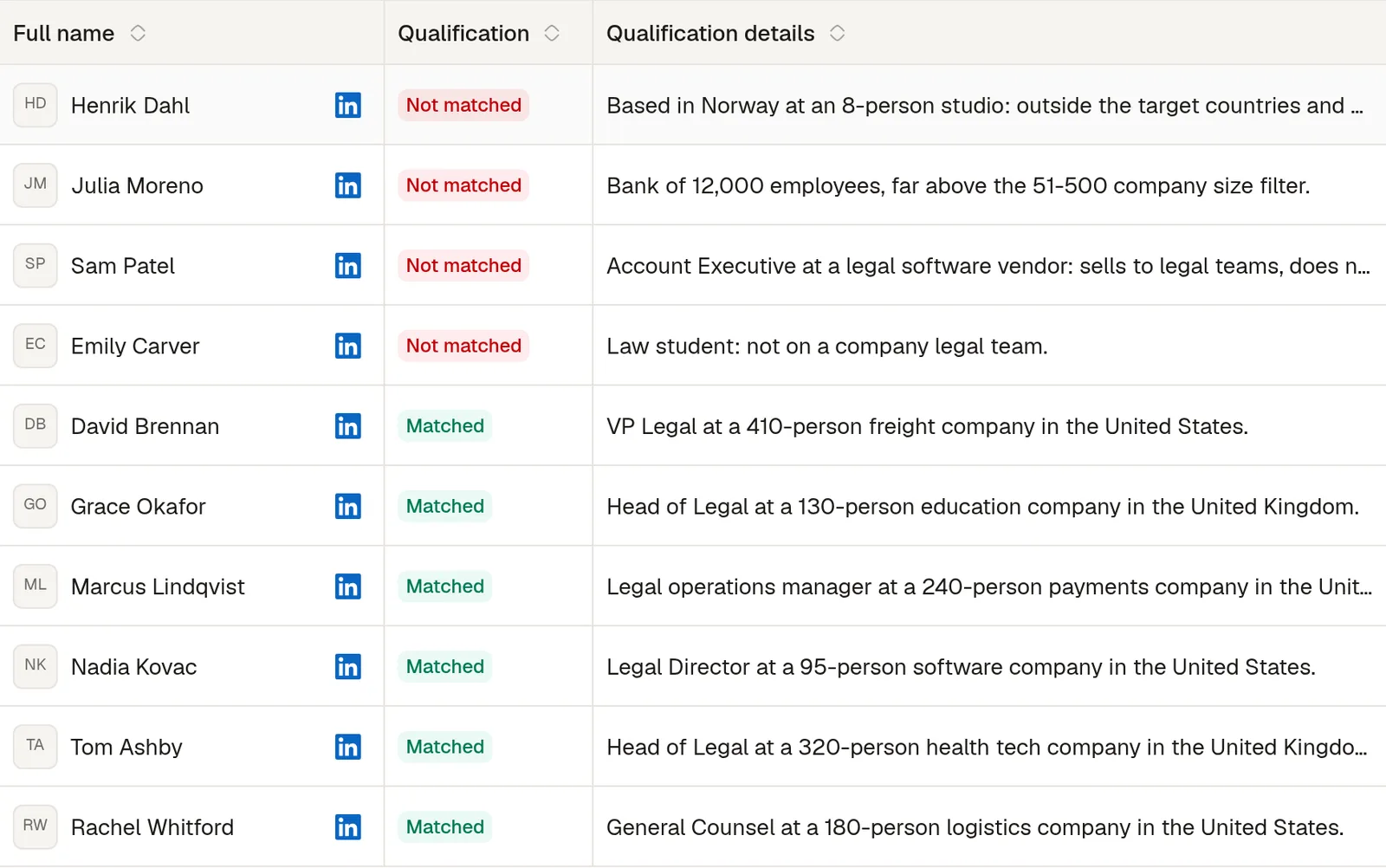
Step 4: start the LinkedIn sequence
Matches are approved automatically, or wait for your review if you switch that off, then enter the campaign linked to the signal: invitation, profile visit, a like on their latest post, messages and voice messages, with waits and conditions between steps. The sequence stops when the person replies, and the reply lands in the shared inbox. Each account starts at 30 invitations and 30 messages a day with Premium or Sales Navigator, 20 without.
For a competitor's page, change the first step: create a Company engagement signal and paste up to 10 company page links. No admin access is needed, and the ideal customer check and the sequence work the same way. Other signals follow the same four steps, like hiring signals, the keyword tracker or LinkedIn lead magnet automation.