
A buying signals tool is only useful if it ends with a person. "Acme is researching CRM software" is a nice chart. "Acme's new Head of Sales started three weeks ago and just commented on a post about pipeline reviews" is a message you can send this afternoon. This page compares the buying signals software built for the second kind of signal: person level, mostly on LinkedIn, with a price you can read on the vendor's site.
I opened the official pricing and product pages of all ten tools in October 2026. The comparison has two parts: what each tool costs, and a matrix of the seven signals that matter most for outbound, marked only where the vendor's own site documents the signal. Where a page says nothing, the cell gets a dash, even when I suspect the tool can do it.
What a buying signals tool has to do
Three jobs, in this order, and most tools are only good at one of them.
- Catch the signal on a person. A job change, a hiring post at their company, a comment on a competitor's post, a visit to your profile or your pricing page. The narrower and fresher the signal, the easier the first line.
- Check that the person is worth writing to. Plenty of the people who like a post about sales tooling are students, vendors or recruiters. A tool that hands you every engager without filtering has moved the work, not removed it.
- Start the conversation while the signal is fresh. A job change is a good reason to write for a few weeks. A profile visit is cold by next week. If the signal lands in a dashboard you check on Fridays, it is already late.
Tools that do all three are recent and mostly LinkedIn native. Tools that do the first job very well, like RB2B, expect you to wire the rest yourself. To read the signals themselves before picking a tool, start with my LinkedIn walkthrough to identify buying signals.
10 buying signals tools compared, with prices
Prices read on each vendor's official pricing page in October 2026, in the vendor's own currency.
| Tool | Published price | Main signals | Where the signal goes |
|---|---|---|---|
| Sendable | $49 a month per connected LinkedIn account ($490 a year) | LinkedIn activity, hiring, job changes, your audience | Your LinkedIn sequence |
| LinkedIn Sales Navigator | $119.99 (Core) or $159.99 (Advanced) per license a month | Alerts on your saved leads and accounts | Alerts, then messages by hand |
| Valley | $199 per seat a month, $149 billed quarterly (Starter) | Hiring, content engagement, profile viewers | LinkedIn outreach, email from Plus |
| Gojiberry | $99 a month (Pro) | LinkedIn engagement, followers, job changes | LinkedIn and email outreach |
| ReactIn | $29 (Basic) or $69 (Growth) per sender a month | 20+ LinkedIn and web signal templates | LinkedIn sequences on Growth |
| Common Room | Essential at $2,500 a month, annual billing | Web, product, LinkedIn page, community, jobs | Spark notifications |
| UserGems | Core $40,000 a year, up to Elite at $150,000 | Job changes, hiring, website visits | Automated campaigns |
| RB2B | Free plan, then $79, $149+ and $199+ a month | Website visitors in the US | Slack, Teams, integrations |
| Koala | Free plan, then $200 or $1,000 a month | Website and product usage | Automations |
| Clay | Free plan, then $167+ a month on annual billing | Job changes, hiring, web intent, custom | Tables, email sequencer |
1. Sendable
Full disclosure: I am building Sendable with my cofounder and it is first on this list because it is mine. Judge it on a trial, not on my word. It covers the three jobs above inside LinkedIn: it catches the signal, runs an AI check of each person against the ideal customer you wrote down, and sends the ones who pass into a sequence of invitations, messages, waits and conditions that you design. Replies land in a unified inbox, and one workspace can hold several LinkedIn accounts. Writing the messages and handling the conversations stays your job. It does no email and does not see your website traffic. Every connected LinkedIn account costs $49 a month, or $490 a year, whether you connect one or ten.
2. LinkedIn Sales Navigator
Not sold as buying signals software, but it is one, limited to the leads and accounts you have saved. Sales Navigator's alert list includes lead changed jobs, lead viewed your profile, senior hires at an account, and, on Advanced, Buyer Intent alerts when people at a saved account engage with your company page or website, plus alerts when a lead engages with your company's organic content. The plans page lists Core at $119.99 per license a month ($1,079.88 a year) and Advanced at $159.99 ($1,799.88 a year), with custom pricing for Advanced Plus. Every alert ends with you reading it and writing by hand.
3. Valley
A LinkedIn outbound tool organized around plays. Valley's homepage describes plays built on people engaging with your content, companies hiring for roles that signal your problem, a competitor's audience and keyword engagement, and lists profile viewers (through LinkedIn Premium) and post engagement among the jobs it brings into one platform. It then researches each person and drafts outreach in your voice. The pricing page lists Starter at $199 per seat a month ($149 billed quarterly, LinkedIn only), Plus at $299 ($249 quarterly) with email, Growth at $499, a done for you Studios plan at $1,499 a month, and Scale on request from 5 seats.
4. Gojiberry
Gojiberry sells AI agents that find and contact prospects. Its FAQ lists the signals: people engaging with your company or content, profile visits, company followers, engagement around competitors, activity around relevant topics, job changes and hiring activity, plus lookalikes of your best customers. Outreach runs on LinkedIn and email. The Pro plan on its site costs $99 a month for 2 AI agents and up to 1,800 prospects contacted a month, with a free trial; teams of three or more get a custom plan. If you are weighing it against tools that work the same way, I compared Gojiberry AI alternatives side by side.
5. ReactIn
The longest documented signal list of the LinkedIn tools. ReactIn's intent signals page names profile visits, post engagers, event attendees, webinar signups, a website pixel, group members, job changes, comment triggers, competitor audiences and followers of any brand page. The pricing page is per sender: Basic at $29 a month covers signal capture and enrichment but no outreach, Growth at $69 adds follow up sequences, and Agency costs $999 a month for up to 50 senders. Every plan starts with a 7-day free trial without a card.
6. Common Room
The most complete multi source signal product here, priced for a sales team rather than a founder. Its signal documentation covers website tracking, product usage, job changes, job listings, community platforms, event platforms such as Bevy and Meetup, and the posts, comments and reactions on your LinkedIn company page. On the pricing page, the entry plan, Essential, costs $2,500 a month on an annual contract and includes 5 seats; Advanced and Enterprise are quoted.
7. UserGems
The champion tracker. When a former user or buyer of your product moves to another company, UserGems flags the new account, which is why it pays off mostly for companies with a large customer base already. Its homepage names job changes, contact level intent, website visits, M&A and hiring among more than 30 native signals. Prices are on the pricing page, and they assume a sales organization: $40,000, $75,000 or $150,000 a year for Core, Advanced and Elite, and the person level website and intent signals only come with the most expensive one.
8. RB2B
One signal, done cheaply: the people visiting your website, identified by name and LinkedIn profile, in the United States only. RB2B's plans start free, but the free tier only names companies. People start at $79 a month (Starter, LinkedIn URLs sent to Slack or Teams, no emails); emails and the other integrations need Pro, from $149, and the higher match rate needs Pro+, from $199. It finds the person and stops there: you decide what happens next.
9. Koala
Built for product led teams: website activity and product usage turned into an account list with intent scoring. Its pricing page goes from a free plan (two seats, 100 credits) to $200 a month for Starter and $1,000 for Growth, with Business on request. If your buyers sign up for a trial before they talk to anyone, Koala tells you which trials deserve a message.
10. Clay
Less a signal tool than a workbench where signals are one ingredient. Clay's signals page lists job changes, promotions, new hires, job postings, funding news, website visits, social mentions on LinkedIn and other networks, and event attendance, and lets you turn any enrichment into a custom signal. The pricing page has a free plan, Launch from $167 a month billed annually ($185 monthly) with job change and signal tracking, and Growth from $446 a month billed annually ($495 monthly), which adds web intent signals. Powerful if someone on the team likes building workflows, a project if nobody does.
A note on Trigify, which earlier versions of this list included for LinkedIn engagement tracking: its own site now says the team has joined HubSpot and the standalone product stops on 22 October 2026, with no account migration. Do not start a new subscription there. In the matrix below, ReactIn, Gojiberry and Valley all document post engagement, the signal Trigify was known for.
Which signals each tool actually tracks
The original part of this page. Seven signals that matter for outbound, and the ten tools above. "Yes" means the vendor's own site documents the signal; a dash means it does not, which is not proof the tool cannot do it.
| Signal | Sendable | Sales Navigator | Valley | Gojiberry | ReactIn | Common Room | UserGems | RB2B | Koala | Clay |
|---|---|---|---|---|---|---|---|---|---|---|
| Job postings (company hiring) | Yes | - | Yes | Yes | - | Yes | Yes | - | - | Yes |
| Job changes | Yes | Yes | - | Yes | Yes | Yes | Yes | - | - | Yes |
| LinkedIn profile visitors | Yes | Yes | Yes | Yes | Yes | - | - | - | - | - |
| LinkedIn post engagement | Yes | Yes | Yes | Yes | Yes | Yes | - | - | - | - |
| Company page followers | Yes | - | - | Yes | Yes | - | - | - | - | - |
| Event attendees | Yes | - | - | - | Yes | Yes | - | - | - | Yes |
| Website visits | - | Yes | - | - | Yes | Yes | Yes | Yes | Yes | Yes |
A few caveats the grid hides. Sales Navigator's signals only cover leads and accounts you already saved, and its website and post engagement alerts need the Advanced plan. Sendable reads profile visitors only when the LinkedIn account has Premium, and company page followers only for pages you administer; Valley also goes through LinkedIn Premium for profile viewers. Common Room's LinkedIn data covers your own company page, and its event data comes from platforms such as Bevy and Meetup. Clay's website visits sit on the Growth plan.
Read down the columns and the market splits in two. The LinkedIn native tools (Valley, Gojiberry, ReactIn and mine) cover the people signals, and only ReactIn documents a website pixel. The data tools (UserGems, RB2B, Koala, Clay) see your website, and some of them job moves, but none documents LinkedIn engagement. Sendable and ReactIn mark six rows, Gojiberry and Common Room five, and no tool marks all seven.
What about Bombora, 6sense, ZoomInfo and G2?
They are absent on purpose. Those four sell account level intent: a spike of research on a topic, a company that read your G2 category page, a predictive score that says an account is in market. None publishes a price, and none gives you a person to write to, which is what this page is about. If account level intent is what you need, I compared them with TechTarget, Intentsify and ten others, with every published price, in intent data providers. Where account data ends and person signals begin is covered on the B2B intent data page.
Best AI tools for buying signals
When people ask for the best AI tools for buying signals, they usually mean one of three jobs, and the tools above split along them.
- Qualifying the person. A model reads the profile behind a signal and decides whether it fits your target customer, so you do not message every student who liked a post. Sendable does this before anyone enters a sequence, Gojiberry says it scores each prospect for fit before reaching out, and ReactIn segments leads with AI on every plan.
- Researching the reason to write. Valley's assistant researches each person before drafting, Clay includes Claygent, its AI research enrichment, from the free plan, and UserGems lists a research agent in every plan.
- Writing the message. Valley drafts in your voice and Gojiberry writes its own copy. My own tool does not: you write the messages, and the AI only decides who gets them.
Be skeptical of any promise that AI will find perfect leads with no input from you. The filter is only as good as the customer description you give it, and the message is only as good as the reason you found to write.
How to choose a buying signals tool
Start from the signal, not the tool. Look at your last ten customers and ask what was true the month before they bought: they were hiring for a role, a new leader had joined, they kept engaging with posts about the problem, they visited your pricing page. Then pick the row of the matrix that matches, and the cheapest column that covers it.
If the answer is a website visit, the free plans of RB2B or Koala show you, before you pay anything, whether the signal produces names worth writing to. If it is LinkedIn activity, pick between the LinkedIn native tools on two questions: do you want the tool to draft the messages (Valley and Gojiberry say they do) or to keep your own words (Sendable), and do you also need email (Valley Plus, Gojiberry). If you want the signal to start the sequence without you copying names between tools, the auto prospecting guide shows how that works on LinkedIn and which steps are better kept manual.
Where Sendable fits
Look at the first column of the matrix: six of the seven rows, all on LinkedIn, and no website visits. That is the honest summary. It fits a founder or a small sales team whose buyers are active on LinkedIn, who wants signals, filtering and the sequence in one place, and who prefers to write their own messages.
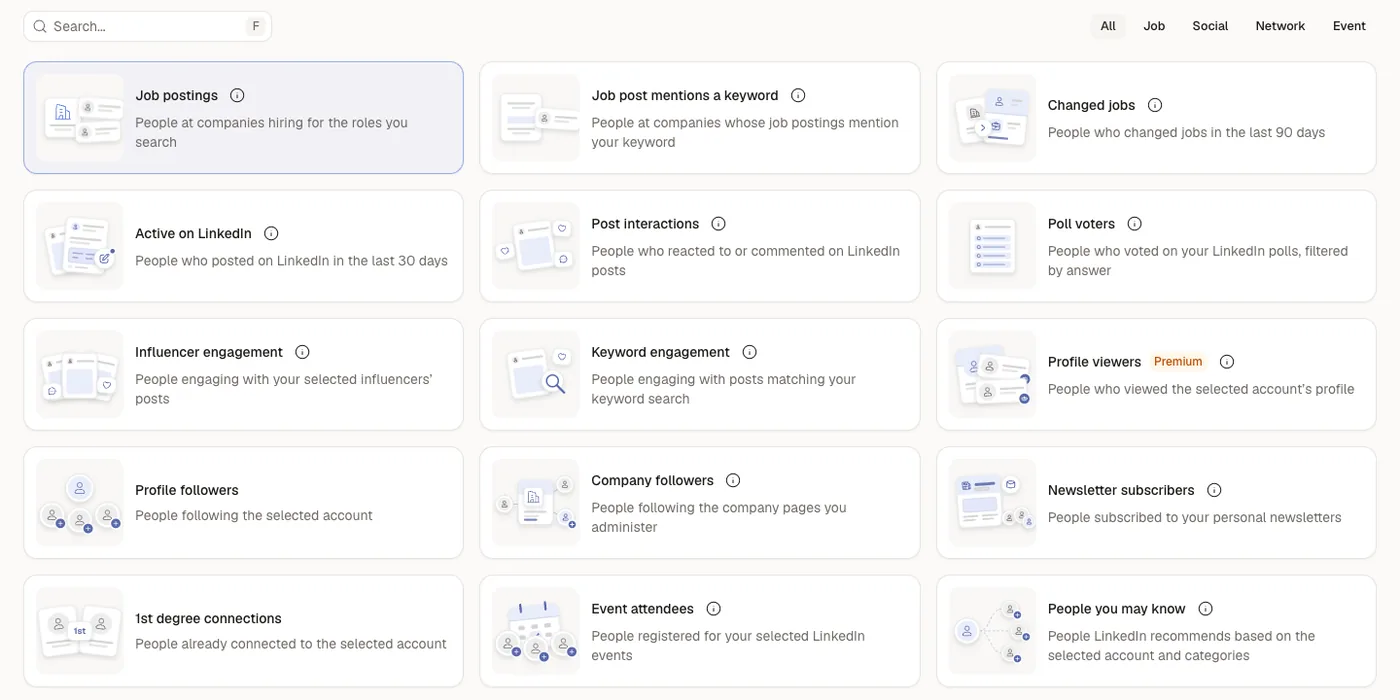
The sixteen signals it offers today, grouped by where they come from:
- Company moves: hiring for the roles you search, job posts containing a keyword, a change of job in the last 90 days.
- Activity on LinkedIn: people who posted in the last 30 days, people who reacted to or commented on posts you pick, voters in a poll (filtered by their answer), engagement on posts matching a keyword, engagement on the posts of influencers you choose.
- Your own audience: profile viewers (LinkedIn Premium needed), your followers, your newsletter subscribers, followers of company pages you administer, attendees of your LinkedIn events, your first degree network.
- Discovery and imports: People you may know, and a CSV of people you already qualified.
What it automates: spotting those signals, the AI filter, and running the LinkedIn sequence. What stays with you: the messages and the replies. If website visitors matter to you, run RB2B or Koala next to it. You can see how Sendable runs signal based LinkedIn outreach, or test it on one account with the 7-day free trial, no card required.
FAQ
What is a buying signals tool?
A buying signals tool watches actions that suggest someone may buy soon, like a job change, a hiring post, a comment on a competitor's post or a visit to your pricing page, and puts the person behind it in front of you. Some stop at reporting the signal; others filter the person and start the outreach.
What is the best buying signals software for a small B2B team?
One that works at the person level, publishes its price, and moves the signal into outreach instead of a dashboard. In this comparison, Sendable ($49 per LinkedIn account), ReactIn ($29 or $69 per sender), Gojiberry ($99) and Valley ($199 per seat) all publish a monthly price, and RB2B, Koala and Clay have free plans for testing a website or data signal first.
Are buying signals the same as intent data?
Not quite. Intent data usually means aggregated, account level research data bought from a third party. Buying signals are individual actions you can see and mention in your first message. For a small team doing its own outbound, the second kind tends to be more useful.
Are there free buying signals tools?
Yes, with limits. RB2B, Koala and Clay publish free plans, and Sendable and ReactIn offer a 7-day free trial without a card. Free plans cap volume, so use them to test whether one signal produces replies before you pay for it.