
Auto prospecting on LinkedIn is a chain of four parts: a signal that finds people at the moment they have a reason to talk, an AI filter that drops the ones who do not fit, a sequence that sends the invitation and messages on schedule, and an inbox where the replies land. Software runs the chain. You decide who it is for, you write what it says, and you answer when someone writes back.
This page walks through each part as it works in Sendable, the tool I build, with the settings that change the result. If you want the wider question first (which layers of outbound to hand to software, and which to keep), read the guide to outbound sales automation. This page is the LinkedIn machine itself.
How auto prospecting works, in one table
| Part | What runs on its own | What you decide |
|---|---|---|
| 1. Signal | Collecting new people from LinkedIn every day | Which signal, and its settings |
| 2. AI filter | Reading each profile and its company, scoring the fit | The description of your ideal customer |
| 3. Sequence | Invitations, profile visits, likes, messages, delays, conditions | The steps, and every word of the messages |
| 4. Inbox | Gathering replies from every account, stopping the sequence | The conversation |
Most tools sold as automation only cover row three. That is a fast way to contact the wrong people: sending speed was never the bottleneck.
Part 1: the signal decides who enters
A list exported once goes stale within weeks. A signal keeps producing, because it watches LinkedIn for a fresh event and adds whoever caused it.
Here are the signals in Sendable, grouped by what they tell you about the person:
| What it tells you | Signals |
|---|---|
| They have a problem and a budget | Job postings for the roles you search; job posts that mention a keyword (a tool you replace, a process you fix) |
| The topic is on their mind right now | Post interactions; keyword engagement; influencer engagement; poll voters, filtered by the answer they chose |
| They already know you | Profile viewers (needs LinkedIn Premium); profile followers; newsletter subscribers; followers of the company pages you administer; attendees of your LinkedIn events |
| Their situation just changed | Changed jobs in the last 90 days; active on LinkedIn (posted in the last 30 days) |
| You are already close | 1st degree connections; people you may know |
| You built the list yourself | CSV import |
A few of them behave in ways worth knowing before you pick:
- Job postings start from up to 1,000 matching postings from the past 14 days, then pick up new ones every day. Sendable looks for up to three people per hiring company, once per company, so a company opening ten roles does not flood your list.
- Post interactions take up to 10 post links and recheck each post daily for three days after the first collection, while the reactions are still coming in.
- Influencer engagement reads the last five posts of up to 10 profiles you pick, keeping posts between 3 and 30 days old.
- Profile viewers return the identifiable viewers of roughly the last 30 days, and only work with LinkedIn Premium on the account.
Start with one signal, run it for a few weeks, then add a second. The first message is easier to write when everyone on the list did the same thing. Which signal fits which offer, and the opening line that goes with each, is in how to identify buying signals. If you publish on LinkedIn (a LinkedIn scheduling tool helps you keep the rhythm), post interactions and poll voters turn each post into a list.
These signals are one slice of what the market calls B2B intent data: the slice where you see the person, not only the company.
Part 2: the AI filter decides who is worth a message
A signal is noisy. A post about outbound attracts your buyers, and also students, recruiters, and vendors who sell the same thing you do. Sending to all of them burns invitations, and LinkedIn caps those.
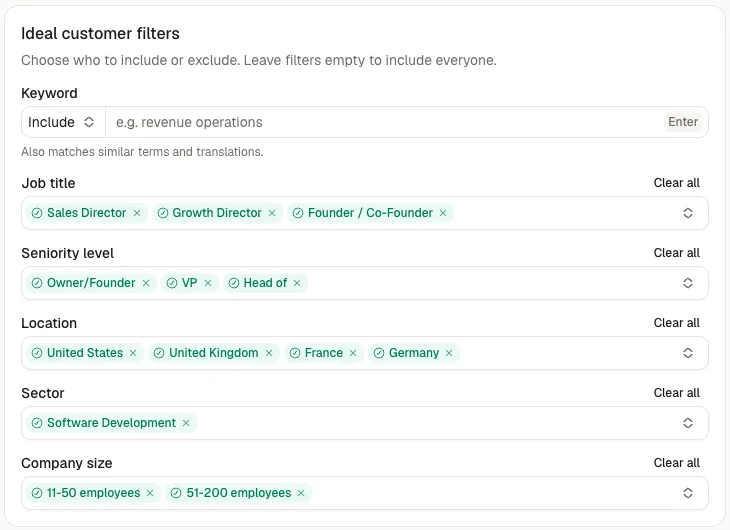
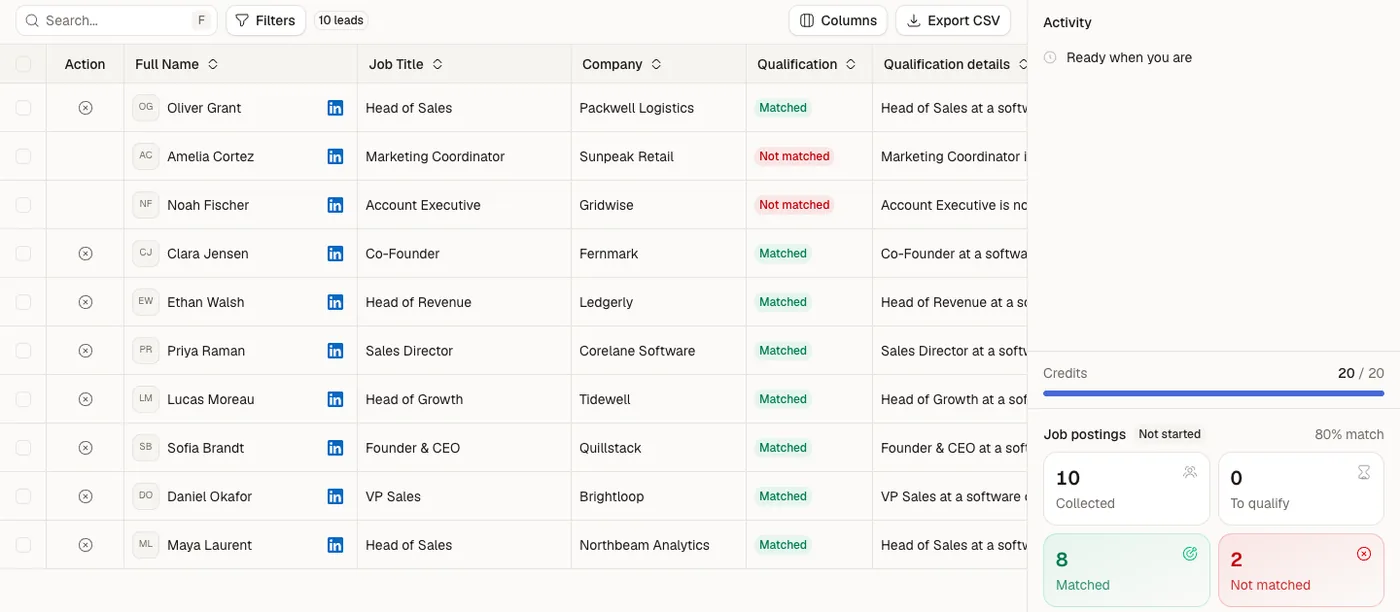
In Sendable, you describe your customer in six fields: keywords, job title, seniority, location, sector and company size. Each field can include values and exclude others, and an exclusion always wins. Sendable then reads each profile and its company, scores it against the customer you describe, and writes down the reason for every match and every rejection. Only matches use a qualification credit. Rejected and excluded profiles cost nothing.
Two controls sit around the filter:
- The team blacklist. Customers, competitors, your own colleagues: anyone on it is never collected and never contacted, on any signal of the team.
- Approval. By default, matches go straight to the campaign linked to the signal. Switch the signal to "Review manually" and every match waits for you to approve it first. Do that for your first week.
The quality of this part depends on one thing: how concrete your description is. "Head of sales, B2B software, 10 to 50 employees, France or Benelux" gives the filter something to check. "Ambitious, growth-focused companies" does not.
Before the first send, read the reasons on 20 matches and 20 rejections. If you disagree with a reason, change the description, then let it run again. Tools that stop at this point and hand you a list, without sending anything, are compared in buying signals software.
Part 3: the sequence decides what gets sent, and when
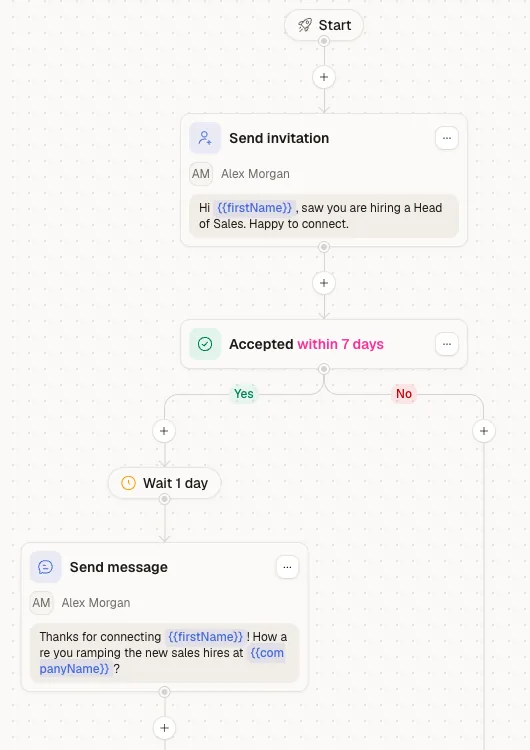
The matches flow into a LinkedIn sequence you build in a visual editor. The steps available:
- send an invitation;
- visit the profile;
- like their last post;
- send a message, with variants if you want to compare two openings;
- wait between two steps;
- branch on a condition, such as "accepted the invitation within 3 days".
The sequence sends from one or several LinkedIn accounts of the same workspace, at the same price per account.
A shape that suits signal-based lists: a profile visit, then the invitation. If it is accepted, a first message about the signal. If it is not accepted after a few days, a like on their last post, and the sequence ends there. Fewer steps than a cold sequence, because the signal does the work a third follow up would have tried to do.
An example built on the poll voters signal:
Hi Marc, you picked "finding the right people" in my poll about what slows outbound down. Curious which part hurts more: building the list, or knowing when to reach out?
No pitch, no calendar link, no compliment about their profile. The signal is the personalization, and the question is easy to answer in ten seconds.
On volume, LinkedIn decides, not the tool. Its help pages on invitation limits and types of restrictions explain that it caps invitations and restricts accounts that push too far, without publishing a fixed weekly number. Keep daily numbers modest, warm up a new account slowly, and connect a second account rather than pushing one harder. Nobody can promise an account will never be restricted.
Part 4: the inbox is where automation stops
When someone replies, Sendable stops their sequence. The replies from every LinkedIn account in the workspace land in one inbox, so a reply to your colleague's account does not sit unread for two days.
From there, it is a conversation, and it is yours. Answer the same day if you can: a reply to a signal-based message is warm for a short time. And answer as yourself, since the person replied to a human message.
The campaign analytics show, for each campaign, how many invitations went out, how many were accepted, how many people were contacted and how many replied. That is enough to tell which signal deserves a second campaign.
What stays manual, and why
I run a LinkedIn prospecting agency, and three jobs have stayed manual in every setup we have built for clients:
- Describing the customer. The filter applies your description at scale. It cannot tell you whether the description is right. Only the first 50 conversations can.
- Writing the messages. A tool can insert the signal. It cannot decide which detail about the person is worth a sentence. Generated personalization reads as generated.
- Answering the replies. The reply is the only step that produces revenue. A tool that answers for you is guessing in your name.
Everything else (collecting, filtering, sending on time, stopping on reply, gathering replies) is repetition, and repetition is what software is for.
Where Sendable fits
Sendable is built around these four parts, on LinkedIn only: no email, and no contact database to export. It costs $49 per connected LinkedIn account per month, or $490 per account per year, the same price for one account or ten.
If you are still comparing, Gojiberry alternatives lists the other tools that pair signals with outreach, including the points where they beat us. To see the four parts run on your own market, start with a 7-day free trial, no card, or look first at how Sendable finds and contacts warm leads on LinkedIn.
FAQ
What is auto prospecting?
Auto prospecting is software running the repetitive parts of prospecting: collecting people from a signal, filtering them against the customer you describe, sending a sequence on schedule, and gathering the replies. The parts that need judgment stay with you: the description of your customer, the messages, and the conversations.
How do you automate LinkedIn prospecting?
Chain four parts. Pick a signal that shows a reason to talk (a job posting, a post interaction, a job change), filter the people it finds against your ideal customer, send a short LinkedIn sequence that opens on the signal, and stop it the moment someone replies. Start with one signal and one sequence before adding more.
Which signal should I start with?
The one closest to your offer. If you replace a tool or a role, start with job postings. If you publish on LinkedIn, start with post interactions on your own posts. If you have LinkedIn Premium, profile viewers are the warmest list you will get.
Is auto prospecting safe for my LinkedIn account?
No tool can promise that. LinkedIn limits invitations and restricts accounts that push past what it considers normal activity. Keep daily volumes modest, warm up new accounts slowly, and spread sending across several accounts rather than raising one.
What is the difference between auto prospecting and a LinkedIn automation tool?
A LinkedIn automation tool sends sequences to a list you bring. Auto prospecting starts earlier: it finds the people from a signal and filters them before anything is sent. If you already have a good list, a sending tool is enough. If finding the right people at the right moment is the problem, you need the whole chain.