

Outbound sales automation is software doing the repetitive parts of prospecting: building the list, sending the sequence, following up on time, and writing the result back somewhere you can read it. It is not software deciding who to contact or what to say. Those two stay with you, and they are the two that decide whether the whole thing works.
I run a LinkedIn prospecting agency and I am building an outbound product, so I see the same failure every month: a founder buys a sending tool, points it at a list nobody checked, and concludes that outbound is dead. The tool was never the problem.
This page splits outbound into five layers, says what each one costs you when it is manual, and marks the ones where handing over to software makes the reply rate go down instead of up.
The five layers of outbound sales automation
Every outbound machine, from a solo founder with a spreadsheet to a twelve person SDR team, is the same five layers stacked in the same order.
| Layer | The job | Should software own it? |
|---|---|---|
| Targeting | Deciding who is worth contacting | No, this is your judgment |
| Sourcing | Finding those people and their details | Yes, mostly |
| Timing | Deciding when to reach out | Yes, if it runs on signals |
| Messaging | Writing what gets sent | Partly, the structure yes, the specifics no |
| Follow up and admin | Sending on schedule, logging, routing replies | Yes, entirely |
Read the table top down. The layers that need a decision resist automation. The layers that need repetition beg for it. Almost every disappointing outbound stack is an attempt to automate a decision layer, and almost every exhausted founder is doing a repetition layer by hand.
Targeting is the layer that decides everything
Nothing downstream can repair a bad list. Sending twice as much to the wrong people gets you twice the silence and a restricted account.
Targeting means writing down, in one paragraph, who you are for and how you would recognize them from the outside. Not "B2B SaaS companies". Something a piece of software could check: a company between 5 and 50 people, selling to sales teams, that just posted a job for a first SDR, whose founder posts on LinkedIn more than once a month.
That paragraph is the input to everything else, and it is the one thing you cannot delegate to a tool. Write it, run 50 contacts against it by hand, then fix it. The version you write on day one is always too wide.
Sourcing: automate it, then check the sample
Sourcing is finding the people who match the paragraph, with a usable profile or contact record attached. This is repetition, so automate it: search filters, exports, enrichment, deduplication against what you already contacted.
The one manual step that pays for itself: open 20 records at random from every new list before anything is sent. You are checking three things. Are these real matches to the paragraph, or matches to a filter that happens to be easy to set? Are the job titles current? Is anyone already in a conversation with you?
Twenty profiles takes ten minutes and it catches most of the mistakes that would otherwise land in front of a thousand people.
Timing: the layer worth automating first
Most outbound tools sell you sending speed. Speed is the cheapest part. The expensive part is reaching someone in the week their problem became real.
A signal is a public event that says the problem exists right now: a job post for a role that only exists when your problem does, a new hire in the job that buys from you, a webinar registration, a comment under a post about the problem, a visit to your profile after you published on the topic. Software can watch for those continuously, which no person will do reliably at nine in the morning every day. The full list I work from, with how long each signal stays useful, is in how to identify buying signals.
This is the difference between a list of 5,000 people who fit and a stream of 30 people a week who fit and just moved. The second one is smaller and it answers.
Messaging: automate the structure, never the specifics
The sequence structure is repetition. Automate it: invitation, wait, first message, condition on acceptance, follow up, stop when they reply. That skeleton should live in software and run without you.
What goes inside the message is not repetition. Two rules I hold to:
One specific line per message. Something true about that person that you could not have written about anyone else on the list. A tool can insert the trigger (the job title in the ad they posted, the event they attended). It cannot decide which detail matters.
Ask for a reply, not a meeting, in the first message. A calendar link in message one asks for thirty minutes from a stranger. A question asks for ten seconds.
Generated personalization at scale usually reads as generated. If the specific line is produced by a model from a scraped bio, expect it to sound like it, and expect the reply rate to reflect that. The reliable version is a narrow signal that gives you a true sentence for free.
Follow up and admin: hand it over completely
This layer has no judgment in it and eats the most hours. Automate all of it:
- Sending each step on schedule, including across time zones.
- Stopping the sequence the moment someone replies.
- Not contacting the same person from two campaigns at once.
- Logging what was sent and when, so the reply you get in three weeks has context.
- Routing replies to one inbox instead of five browser tabs.
If you only automate one thing this year, automate the stop condition. Nothing burns a prospect faster than a follow up sent after they answered.
LinkedIn has rules, and volume is what breaks accounts
If your outbound runs on LinkedIn, the platform's terms are part of your stack whether you read them or not. LinkedIn's user agreement and its help pages on prohibited software and extensions and automated activity set out what the platform does not permit, and accounts do get restricted.
I am not going to tell you any setup carries no account risk, because that is not something a vendor can promise. What I will say from running these campaigns every week: volume and relevance are the two variables you control. A few well aimed invitations a day from a real profile behaves very differently from hundreds of generic ones. Read the pages, decide your own posture, and size your sending accordingly.
A stack that works for a small team
For a founder or a two person team, four moving parts cover it:
- One paragraph describing the target, kept in a document you actually reopen.
- A source of people plus a source of signals. The second matters more than the first.
- One sending tool with sequences, conditions and a stop on reply.
- One inbox where every reply lands.
That is the whole thing. Buying a fifth tool before those four work is how stacks get expensive without getting results.
Outbound automation tools, by layer
Each layer has its own family of tools, and a common way to overpay is buying one tool to cover a layer it was not built for. Prices below were checked on each vendor's official pricing page in October 2026, in the vendor's currency, on the cheapest relevant plan.
| Layer | Tool type | Examples | Price range (October 2026) |
|---|---|---|---|
| Targeting | None: a written paragraph, tested by hand | A document you reopen | Free |
| Sourcing | Prospect search and contact databases | LinkedIn Sales Navigator, Apollo | Apollo has a free plan, paid from 49 USD per seat per month; Sales Navigator Core is 119.99 USD per license per month |
| Timing | Buying signal tools, some with LinkedIn outreach built in | Sendable, Gojiberry, Valley | From $59 per LinkedIn account per month (Sendable) and 99 USD per month (Gojiberry Pro) to 199 USD per seat per month (Valley Starter) |
| Messaging and sequences | LinkedIn sending and sequence tools | Waalaxy, HeyReach | From 19 EUR per user per month, billed yearly (Waalaxy Pro); 79 USD per sender per month (HeyReach Growth) |
| Follow up and admin | CRM where replies and deals are logged | HubSpot | Free CRM for up to 2 users |
| Content, next to outbound | Post schedulers | LinkedIn's native scheduler, Buffer | Free; Buffer paid from 5 USD per channel per month, billed yearly |
How to read it:
- Timing is where the categories blur. Some tools only detect signals and hand you a list; they are compared in buying signals software. Others detect and send on LinkedIn in the same product; those are in Gojiberry alternatives. Account-level research data (which companies are reading about a topic) is a separate category again, covered in intent data providers.
- One tool can cover several rows. When the signal, the filter, the sequence and the inbox run in one product, it is what people call auto prospecting. Fewer tools, fewer exports between them, but you depend on one vendor's choice of signals.
- Content is not outbound, but it feeds it. Posting gives people something to react to, and those reactions are a signal. The tools for that side are compared in LinkedIn scheduling tools.
How to tell if it is working
Four numbers, checked weekly, in this order. Fix them top down, because each one poisons the one below it.
| Number | What it tells you | Where to look if it is low |
|---|---|---|
| Acceptance rate | Whether the person recognizes themselves in you | Targeting, profile, invitation note |
| Reply rate | Whether the first message earned ten seconds | The specific line, the ask |
| Positive reply rate | Whether you are talking to buyers at all | The paragraph, the signal you chose |
| Meetings | Whether the conversation goes somewhere | Your follow up, not your tool |
Here are the first two numbers on a real campaign, the lead magnet campaign we ran from May 31 to June 13, 2026, on a keyword signal:
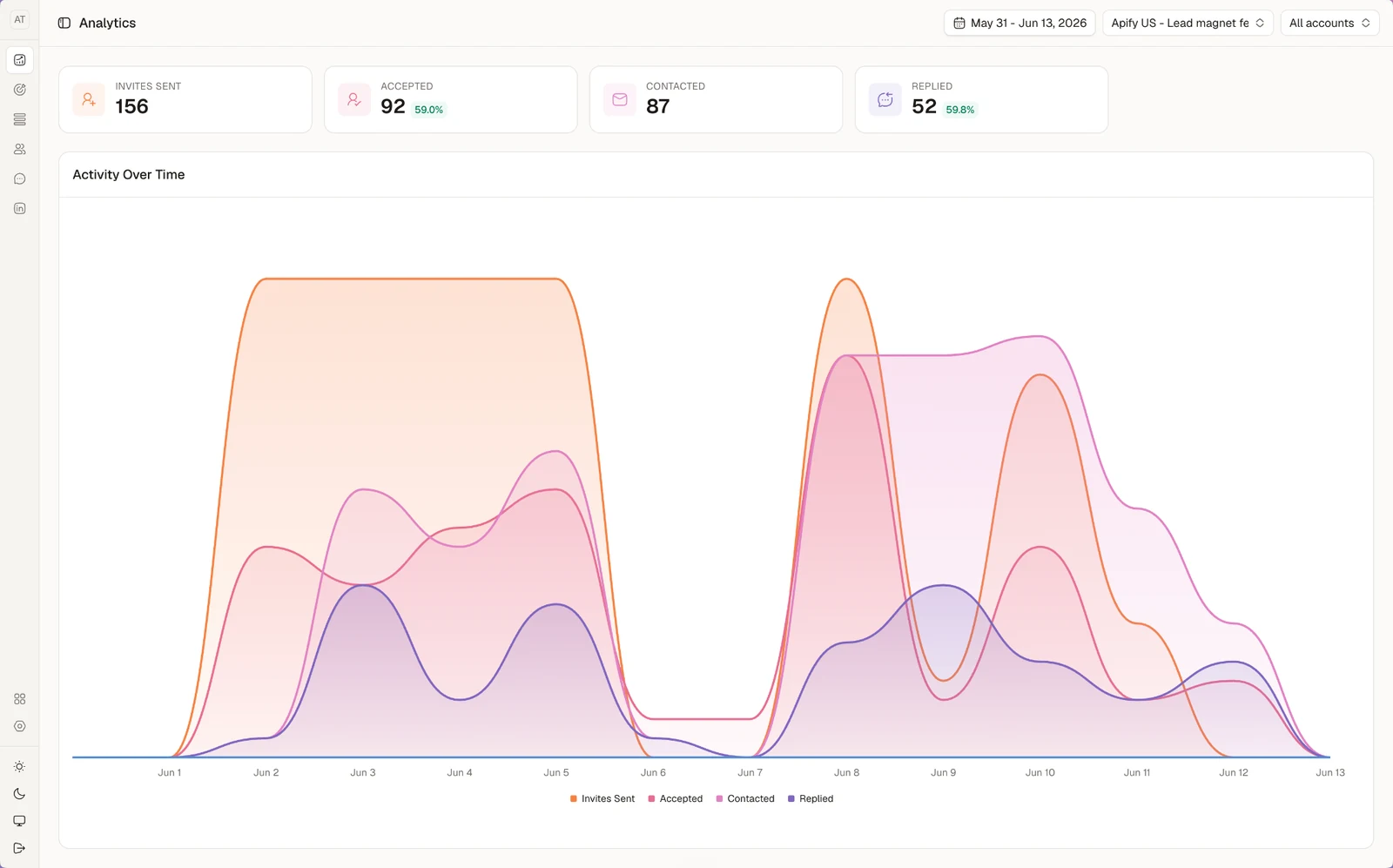
92 of 156 invitations accepted (59%), and 52 replies from the 87 people contacted (59.8%). The screenshot stops at replies. Whether those replies came from buyers, and whether they turned into meetings, is what the last two rows measure: log them where your deals live, in your CRM.
Do not average across campaigns. One campaign on a sharp signal and one on a bought list will produce a middling average that hides both the thing to kill and the thing to scale.
The terms your buyers type when they are close to a decision are the same words that show up in these conversations, which is why I keep the two lists together: see buyer keywords for the search side of the same vocabulary.
Where Sendable fits
Sendable, the product I am building with my cofounder, covers three of the five layers on LinkedIn: timing, the sequence, and the admin around replies.
For timing, it watches signals such as job postings (including job posts that mention a keyword), people who changed jobs in the last 90 days, profile viewers, reactions and comments on posts, engagement with the influencers or keywords you pick, attendees of your LinkedIn events and followers of your company page. It scores each person against the customer you describe, and the ones who fit enter the sequence you built: invitation, messages, delays, conditions. The sequence stops when someone replies, and replies from all your LinkedIn accounts land in one inbox, with campaign analytics next to it.
Targeting and messaging stay with you: you write the description of your customer and every message, and you answer the replies. It does not send email. Pricing is $59 per connected LinkedIn account per month, or $590 per account per year, whatever the number of accounts.
The cheapest way to know whether the timing layer changes your numbers is to run one signal next to your current list: there is a 7-day free trial, and the signal-based LinkedIn outreach behind Sendable is explained on the homepage.
FAQ
What is outbound sales automation?
Outbound sales automation is software handling the repetitive parts of prospecting: building and deduplicating lists, sending sequences on schedule, following up, stopping when someone replies, and logging activity. It does not choose your target market or write the specific line in your message. Those decisions stay with the person running the campaign.
What should you never automate in outbound?
Two things: who you contact and the one specific line that proves you looked. Targeting is a judgment call about your market, and a personal detail generated from a scraped profile usually reads as generated. Automate the schedule, the conditions, the stop on reply and the logging instead.
Do I need an outbound automation tool as a solo founder?
Not on day one. Do 50 conversations by hand first, because that is how you find out which signal and which opening actually work. Once the message is proven and the manual sending is what limits you, a tool multiplies something that already works instead of scaling something that does not.
Is outbound automation allowed on LinkedIn?
LinkedIn's user agreement and its help pages on prohibited software restrict third party tools that automate activity on the platform, and accounts can be restricted. No vendor can promise you an outcome there. Read LinkedIn's own pages, keep volumes low and relevance high, and decide your own posture before you buy anything.
How many touches should an outbound sequence have?
Three or four on LinkedIn is enough when the timing is right: an invitation, a first message after acceptance, one follow up, and a last short one. Longer sequences mostly add annoyance. If four touches on a real signal get nothing, the problem is the target or the offer, not the number of messages.