
Knowing how to identify buying signals comes down to one question: what public trace does a person leave when the problem you solve becomes urgent for them?
I run a LinkedIn prospecting agency. Every month, my team and I contact thousands of profiles for our clients.
Some campaigns book meetings. Others get ignored. The difference is rarely the copy, and rarely the offer. It is who you contact, and when.
That "when" has a name: buying signals.
Most articles on the topic are written by people who have never sent a connection request. This one is not. It is the list I use every week, with real numbers, how long each signal stays useful, and the exact first message that goes with it.
What are buying signals in sales?
A buying signal is a public action that tells you someone is more likely to buy. You can see it before you ever talk to them.
A company posts a job ad for an SDR? They have a prospecting problem. Someone visits your profile? They are curious about you. A company gets a bad review? There is an opening.
Buying signals in sales come in two types:
- Strong signals: the person is dealing with your problem right now. They are hiring for it, complaining about it, or asking questions about it.
- Weak signals: the person looks like a good fit (right role, right industry, right size), but nothing says the problem is on their mind today.
Most sales content only covers signals inside your funnel: demo requests, email opens, pricing page visits. Useful, but by then the prospect has already found you. The other big family is account-level research data, the kind intent data providers sell: it tells you a company is reading about a topic, not which person to write to.
This article is about the signals you can spot outside your funnel, mostly on LinkedIn, at the level of one person. You start the conversation first.
Cold outreach vs. signal-based outreach: the numbers
Here is why this matters. Across our own LinkedIn campaigns in 2026:
| Metric | Cold list | Signal-based list |
|---|---|---|
| Connection acceptance rate | 20-30% | 40-70% |
| Reply rate | 10-20% | 25-50% |
Same channel. Same daily volume. Very different results.
The reason is simple. When you target from a signal, your first message can mention that signal. And a message that opens with something true about the person no longer feels cold.
It is also why, if you automate a single layer of your outbound sales automation, it should be timing, not sending speed.
How to identify buying signals: the 14 I actually use
On LinkedIn
1. Job postings. My favorite strong signal. A company that hires an SDR, a marketer or a support rep announces two things in public: a problem, and a budget. If your product touches that role, this is as warm as it gets without a referral. Read the text of the ad too: a posting that asks for "experience with Salesforce" tells you which tool they run, and which one you could replace.
2. Profile viewers. Very underrated, and my personal favorite. I call them the LinkedIn ghosts. They never like, never comment, never post. But ghosts often hold the budget. They act instead of talking, and a profile visit is the only trace they leave. Ignore your profile viewers and you ignore your warmest prospects.
3. Incoming connection requests. Someone asked to connect with you. That is not a lead, that is a raised hand. Treat it like one.
4. Your first-degree network. These people already accepted you once. Reply rates are in another league. Most people simply forget to reactivate them.
5. Likes and comments on your posts. The classic engagement signal. They know you, they read you, the door is already half open. If you publish on a schedule (any of these LinkedIn scheduling tools will do, including LinkedIn's free one), every post becomes a list. To grab it by hand, you can export everyone who commented on a post to a spreadsheet for free. Polls are the same signal with a bonus: each voter told you which answer, so which problem, is theirs.
6. Likes and comments on your competitors' posts. Same idea, slightly cheekier. These people follow what your competitor does, so they care about what you do. Your competitor warms up your leads for free. The free comment exporter works on their posts too, since it takes any public post.
7. Keyword tracking. Anyone who posts about a keyword in your niche. This one is a goldmine. It only catches people who are active on LinkedIn, so they will actually see your message and answer it. Start with the phrases people use when they are close to a decision, the same buyer keywords they type into Google: "looking for a tool", "any recommendation for", "alternative to". More on this below: it is the signal behind my best campaign.
8. Webinar and event attendees. Nobody gives up 45 minutes for a topic they do not care about. Attendee lists of events in your niche, including the LinkedIn events you host, are pre-qualified audiences.
9. Company followers. People who follow your company page. Easy to collect, surprisingly high intent. LinkedIn only shows that list to the page's admins, so for a competitor's page, use the people who react to its posts instead (signal #6).
10. Recent job changes. New role, new priorities, new budget. And about 90 days to prove they can change things. One of the best moments to show up.
11. Sales team size. A company with 5 to 10 salespeople is big enough to have a budget and small enough to decide fast. A company with zero salespeople and a growth target? The founder is selling, and drowning. Both are signals. It depends on what you sell.
Outside LinkedIn
12. Recent fundraising. Unpopular opinion: this is the most overrated signal on the list. Yes, they have money. The problem is that everyone knows it. The day the round is announced, every SDR on the planet jumps in. You will be the fifteenth "congrats on the raise 🎉" of the week. It works combined with other signals. On its own, skip the gold rush.
13. Bad reviews on competitors. A 2-star review of your competitor on G2 or Capterra is a free brief. The person just wrote down what they need. Painful to collect, worth every minute.
Custom signals
14. Whatever your niche makes visible. The best signals are the ones nobody else uses. Real example: for a solar panel client, we used Google Earth to find companies that already had panels on the roof. Proof they buy this kind of equipment. Signals are not a fixed list, they are a way of thinking. Ask yourself one question: what public trace does my ideal customer leave?
How long each buying signal stays useful
Every signal has a shelf life. Act after it expires and your "saw you're hiring" lands after the hire. Here is the window I work with for each one, and where to look.
| Signal | Window to act | Where to see it |
|---|---|---|
| Job posting | About two weeks after it goes live | LinkedIn Jobs, the company's careers page |
| Profile view | The same week | "Who viewed your profile" (the full list needs Premium) |
| Incoming connection request | The day you accept it | My Network, invitations |
| Like or comment on a post | While the post is still in the feed, a few days | The reactions and comments under the post |
| Poll vote | Until the poll closes, and the week after | The poll results, by answer (your own polls) |
| Keyword post | The week it is published | LinkedIn content search |
| Event registration | Before the event, and the week after | The event page, once you join it |
| Job change | The first 90 days in the new role | The profile's experience section |
| Company page follow | Weeks: a slow signal, combine it with another | Your page's follower list (admins only) |
| First-degree connection | No expiry, but reactivate once, not every month | Your connections list |
| Fundraising | Three days to be early, then it is noise unless combined | Press, the founder's announcement post |
| Bad competitor review | Weeks to months: it is a written brief | G2, Capterra |
| Sales team size | Months: it changes slowly | The company page, People tab |
Two consequences. Check the short-lived signals daily, or let a tool do it. And never let a list built on a short-lived signal sit for a week before the first message.
How to act on each signal: the icebreaker rule
One rule, no exceptions. Your first message must mention the signal that put the person on your list.
- Profile viewer → "Hey, saw you stopped by my profile, figured I'd say hi."
- Job posting → "Saw you're hiring an SDR, quick question about that."
- Content keyword → "Saw your post about [topic], loved the point on X."
- Competitor engagement → "Noticed you follow [competitor], are you using them?"
That is it. No pitch in the first message. Its only job is to prove you are not a bot spraying a list. And you are not: the signal is why you are writing.
One last thing: write like you talk. Every inbox is already full of polished corporate sequences.
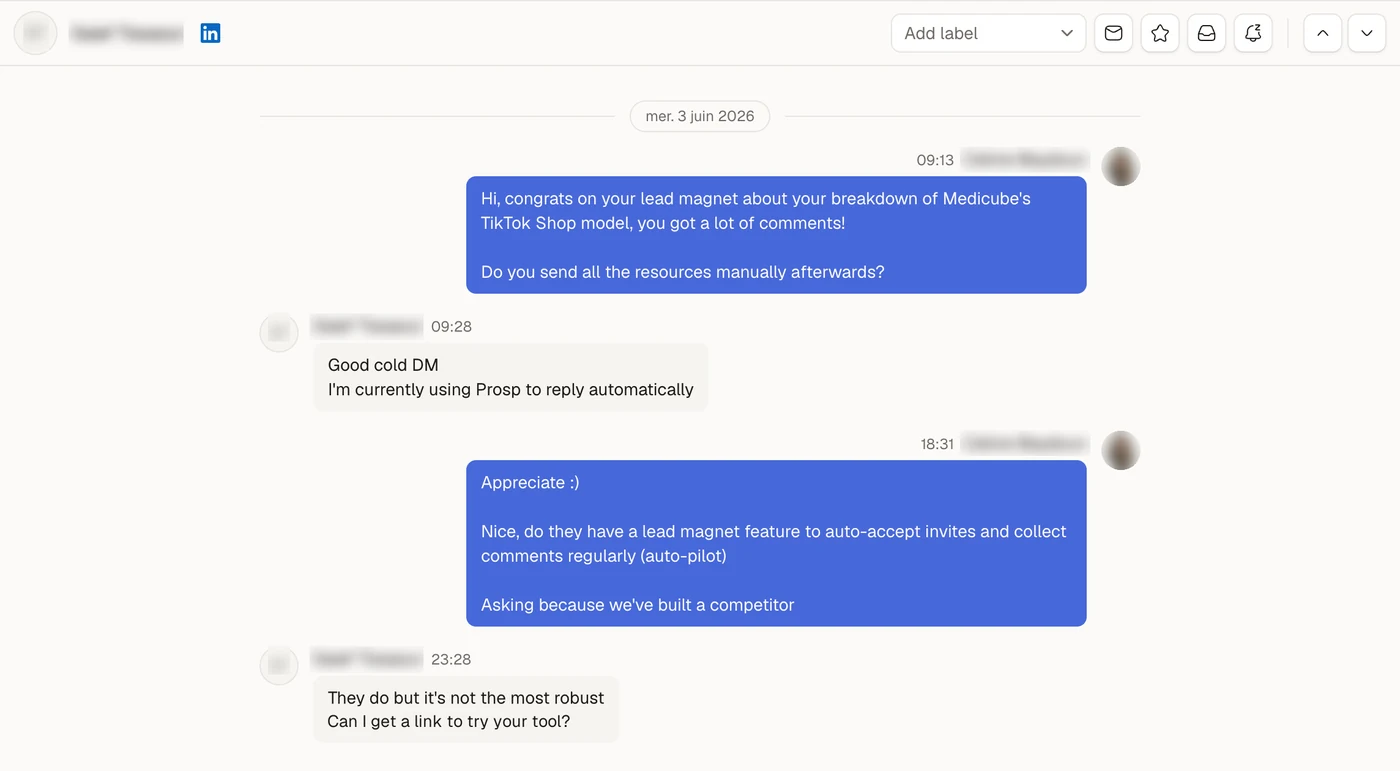
Here is one of those first messages in the wild. It only mentions the signal: a lead magnet post that pulled a lot of comments. The reply says the rest.
A real campaign example
For Sendable, from May 31 to June 13, 2026, we targeted people who post lead magnets on LinkedIn. You know the type: "comment and I'll send you the resource".
We used keyword tracking (signal #7) on phrases like "comment and receive" and "comment and I'll send you". So everyone on the list was active on LinkedIn, and already trying to get leads there. Exactly our user: someone who sends a resource to every commenter by hand is the person who needs LinkedIn lead magnet automation.
The list wrote its own first message, because we knew what each person had posted. Here are the two weeks:
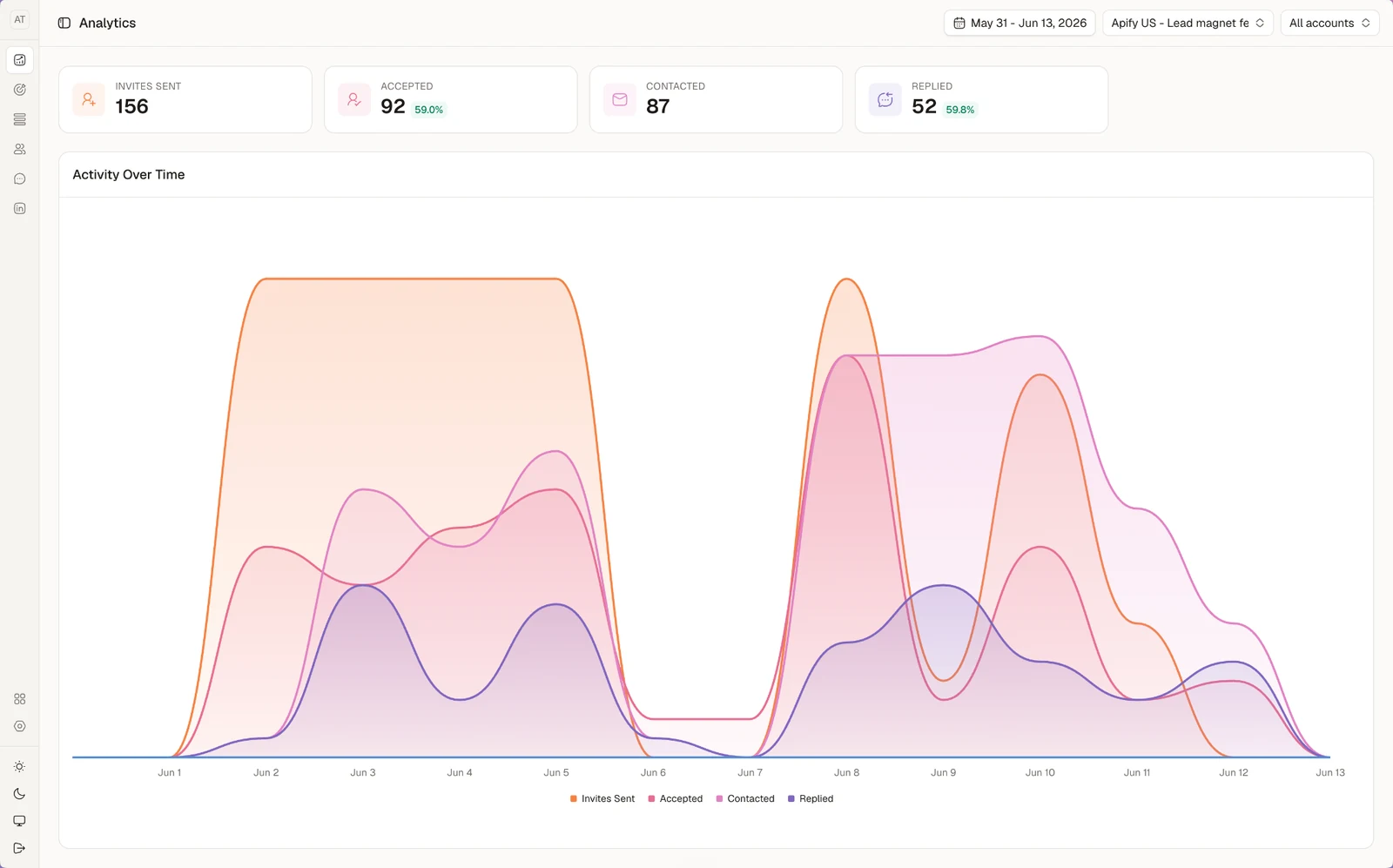
156 connection requests. 92 accepted, a 59% acceptance rate. And of the 87 people we then messaged, 52 replied: 59.8%.
Compare that to a cold list: 20-30% accepted, 10-20% replies. Same channel, same effort. That is the whole argument for signal-based targeting.
The reply rate is even above our usual range. That happens when the signal is sharp enough to write the first message for you.
How to collect buying signals data (without losing your mind)
Knowing how to identify online buying signals is one thing. Collecting them every day is another. This is where most people give up.
Check your profile viewers. Scroll competitor posts. Export commenters. Cross-check job boards. Done by hand, that is a part-time job.
You have two options.
- Do it manually. Fine at the start. Block 30 minutes a day, pick two signals maximum (I would take profile viewers and competitor post engagement), and keep a spreadsheet.
- Automate it. Let software watch the signals and hand you a filtered list. Tools split into two families: those that only detect signals, compared in buying signals software, and those that also run the LinkedIn outreach, compared in Gojiberry alternatives. Once collection runs on its own, the rest of the chain (filter, sequence, inbox) is what auto prospecting covers.
Whatever you pick, the rule is the same. Fresh buying signals data beats a big static list, every time.
Where Sendable fits
We built Sendable to stop doing the manual version. It watches these signals on LinkedIn, most of them straight from the list above:
- Hiring: job postings for the roles you search, and job posts that mention a keyword (#1).
- Engagement: people who react to or comment on posts, yours or a competitor's (#5, #6), people engaging with the influencers you pick (#6), people engaging with posts that match a keyword (#7), and poll voters, filtered by answer.
- Your own audience: profile viewers (#2, needs LinkedIn Premium on the account), profile followers, newsletter subscribers, and followers of the company pages you administer (#9).
- Network and moves: 1st degree connections (#4), people you may know, people who changed jobs in the last 90 days (#10), and people who posted on LinkedIn in the last 30 days.
- Events: attendees of your LinkedIn events (#8).
- Your own list: a CSV import, for custom signals like the solar roofs in #14, or for fundraising, reviews and team size (#11 to #13), which it does not watch for you.
Here is one of those lists. Everyone in it liked or commented on a post, and Sendable scores each profile against the customer you describe before you contact anyone.
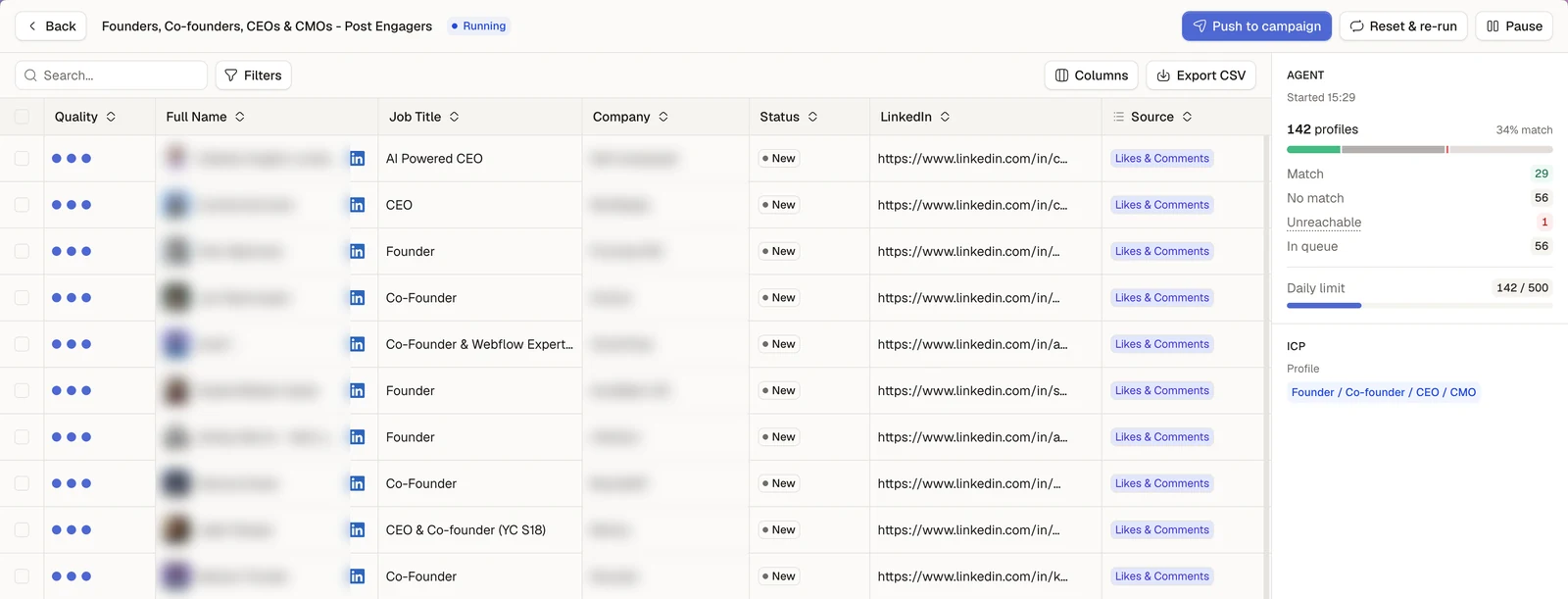
The profiles that fit go into the LinkedIn sequence you build: invitation, messages, delays, conditions. You still write the messages, and you answer the replies yourself.
It costs $49 per connected LinkedIn account per month, or $490 per account per year, the same price whatever the number of accounts. Test it on your own signals with a 7-day free trial, no card, or see first how Sendable turns buying signals into LinkedIn conversations.
FAQ
What is a buying signal? A buying signal is a public action that shows someone may need your product now: a job posting, a profile visit, a comment, a job change. You see it before you contact them.
What are the strongest buying signals on LinkedIn? Job postings, profile viewers, and engagement on competitor content. All three mix clear intent with easy targeting.
How long does a buying signal stay useful? It depends on the signal. A profile view is worth acting on the same week, a job posting for about two weeks, a job change for the first 90 days in the role. The table above lists the window for each of the 14.
How do you recognize buying signals before your competitors do? Track the signals nobody else watches: keyword tracking, competitor reviews, custom signals. Then move fast. A job posting is worth gold for two weeks. A fundraising announcement is burned in three days.
What's the difference between buying signals and intent data? Intent data is aggregated, third-party data about companies researching a topic. Buying signals are individual actions you can see yourself, and mention directly in your message. The full picture, with the four types of sources, is in this guide to B2B intent data.