LinkedIn job change alerts, from new job to first message
LinkedIn job change alerts come from three places. LinkedIn notifies you for free when one of your connections shares a new job. Sales Navigator alerts you when a lead you saved changes jobs. For prospecting people you do not know yet, Sendable finds everyone who started a new job in the last 90 days and fits your ideal customer, checks each profile with AI and contacts the matches from your own account.
read at most per search, the first ones that match
1 credit
per lead who matches your ideal customer
How do I get alerts when my LinkedIn contacts change jobs?
Turn on LinkedIn’s job change notifications. They are free and cover your 1st-degree connections: when a connection adds a new position and shares it, you are told in the app, and on your phone if you allow push notifications. On desktop it takes a minute:
Click Me in the top bar, then Settings & Privacy.
Open Notifications in the left column.
Under Notifications you receive, open Network catch-up updates, then Job changes.
Switch on in-app notifications, and push notifications for your phone.
One condition sits on the other side: the person has to share the update. LinkedIn’s Share profile updates setting lets every member decide whether a new job reaches their network, and an update can take up to two hours to be shared (help center). Menu names follow the notifications help page and Guideflow’s walkthrough, updated in March 2026.
How do I get job change alerts with Sales Navigator?
Save the person as a lead. The official guide puts it this way: save your leads and “let Sales Navigator send you alerts when they make a move, like changing jobs” (Sales Navigator guide). It works for anyone you save, connected or not. Sales Navigator Core costs $119.99 a month, or $1,079.88 a year, per seat (plans page, checked on November 3, 2026).
For people you have not saved, the Changed jobs spotlight of the lead search narrows any search to recent movers. It was introduced in 2016: “The Job Changes spotlight identifies prospects who have changed jobs within the last 3 months” (LinkedIn Sales Blog). You still run the search yourself and write to each person by hand.
What do LinkedIn’s own alerts leave to you?
The alert tells you who moved. Everything after it is yours to do:
Only people you already know. Notifications cover your connections and Sales Navigator alerts your saved leads. A new head of sales who fits your market but has never heard of you never shows up.
No filter on fit. Every connection’s move arrives, your former classmates’ next to your best customer’s.
The move must be shared. Someone who turns off Share profile updates changes jobs silently.
No outreach. You read the alert, check the company, write the message and remember the follow-up, one person at a time.
How does Sendable automate LinkedIn job change alerts?
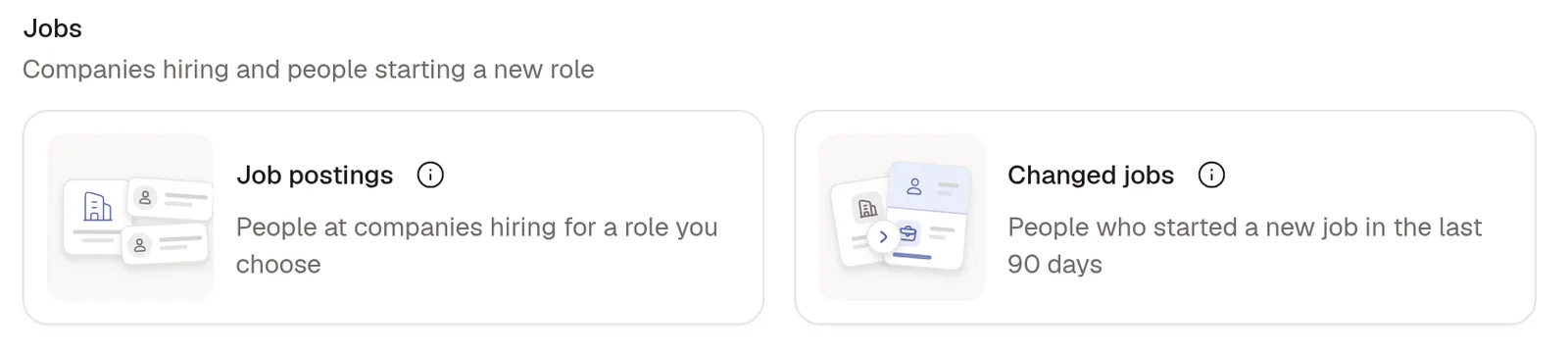
Sendable turns the alert into a signal that runs on its own. You describe who you sell to, Sendable finds the people in that profile who started a new role in the last 90 days, AI keeps only those who match, and your campaign contacts them from your own account. The signal is called Changed jobs, in the Jobs group of the signal catalog.
The Jobs group of the Sendable signal catalog.
Step 1: describe your ideal customer
Job titles, seniority, company size, sector, location, keywords, profile language and time in the role. At least one filter has to include someone, a title or a location for example. A search that matches more than 1,000 people reads the first 1,000 each time: narrow it to reach the people who fit best.
Step 2: Sendable searches LinkedIn every 7 days
The first run, when you launch the signal, collects everyone who matches and moved in the last 90 days. Each person stays in that list for 90 days, so a search every 7 days finds each new hire within a week of the move. The search needs no account of yours: it never browses LinkedIn as you.
Step 3: AI checks every profile against your ideal customer
It reads the profile (current positions, headline, location, experience) and, when your filters need it, the company page. Each verdict comes with one sentence, such as “Company size does not match your filters: 51-200 employees”. A lead who matches costs 1 credit; rejected profiles are free. Reject a lead with a reason (“No agencies or freelancers”) and the signal applies it to every new profile.
Step 4: your campaign contacts the matches
Approve leads automatically, or review each one before any outreach. The campaign visits the profile, sends an invitation with or without a note, then your messages and follow-ups, from your own account within its daily limits. A reply stops the sequence and lands in the shared inbox.
What do you get from job change alerts in Sendable?
New hires you did not know
The search covers everyone who fits your filters, not only your own network.
Only the people who fit
AI checks every profile against your ideal customer. You pay for matches, never for rejections.
A message while the move is fresh
The search reruns every 7 days inside the 90-day window, so you write while the role is still new.
Follow-ups you never forget
The sequence sends them, a reply stops it, and Slack tells you when a lead replies.
Why do job changes make good leads?
Because they are rare, and they reset the decisions of the person who moves. US workers had been with their employer a median of 4.1 years in January 2026, up from 3.9 years in 2024, according to the Bureau of Labor Statistics (September 2026). A move is one of the few moments when that person starts over: a new team, new priorities, and tools and providers chosen by someone else.
The window is short. Sales Navigator’s spotlight looks back three months, and Sendable’s signal uses the same 90 days. Write inside it and the first line comes easily: you mention the new role, which the person announced in public.
What does the Changed jobs signal find, and what does it not?
It finds people who started a new job in the last 90 days and match your filters. Your own connections are among them when they fit, unless you switch on the Already connected exclusion. By default the signal skips people your team already contacted and people found by another active signal. What it does not do:
It does not watch a list of your contacts. You cannot upload past customers or champions and wait for them to move. The free notifications and Sales Navigator alerts do that, and so do job change tracking tools: UserGems, which lists job changes among its “30+ native signals”, starts at $40,000 a year (UserGems pricing, checked on November 3, 2026).
It does not write your messages. You write the sequence, with variables such as {{firstName}} and {{companyName}}, and up to 10 variants to A/B test.
It sends no email. Campaigns run on profile visits, invitations, messages and likes.
It reads 1,000 people per search at most. Split a large market into several signals, by country or role; a team runs up to 5 signals at once.
LinkedIn alerts, Sales Navigator or Sendable: which one fits?
Each answers a different question. The three side by side, with prices checked on November 3, 2026:
Criterion
LinkedIn notifications
Sales Navigator alerts
Sendable Changed jobs
Who it covers
Your connections who share their move
Leads you saved, plus searches with the Changed jobs spotlight
Everyone who matches your filters and started a new job in the last 90 days
People you already know
Yes, once you are connected
Yes, once saved as leads
Only when they match your filters: no list to watch
Filter on your ideal customer
None
Search filters, then you read each result
Search filters, then an AI check of every profile
After the alert
You write to them by hand
You write to them by hand
A sequence of invitation, messages and follow-ups, stopped by a reply
Price
Free
From $119.99 a month per seat (Core)
€59 per account a month, 500 credits included
Best for
Keeping up with your network
Following leads and accounts you already work
Prospecting new hires who fit what you sell
For the people you already know, your warmest list, the free notifications win: they cost nothing and follow your network as it is. Sendable is for the opposite list, the new hires you have never met who now hold the role you sell to.
How much do job change alerts cost in Sendable?
€59 per LinkedIn account a month, or €590 a year, on the Pro plan, with 500 credits per account every month. A credit pays for one lead who matches your ideal customer: at 500 matches, a qualified new hire costs about €0.12. Profiles the AI rejects, campaign steps and replies cost nothing. The 7-day free trial includes 20 credits and 3 signals. Prices before VAT, last changed on ; every plan is on the pricing page.
Is it safe for my LinkedIn account?
The job change search runs without your account, so finding new hires puts nothing on it. Only the campaign acts as you, within daily limits you can lower: a newly connected account starts at 20 invitations and messages to 20 people a day, 30 each with Premium or Sales Navigator, and sends on weekdays during working hours unless you change the schedule. The full answer is in is LinkedIn automation safe for your account.
Who is it for, and who is it not for?
Sendable’s job change alerts fit you when:
You sell to a role. A new head of sales, finance or marketing reviews what they inherited, and you want to be part of that review.
You want new hires found and contacted without checking every day.
You run outreach for several offers or clients, with one signal per ideal customer and teams to keep them apart.
They do not fit when:
You want to follow a list of past customers or champions. LinkedIn’s alerts or a dedicated tracker do that.
Your outreach is email first. Sendable runs sequences of invitations and messages.
You need one list, once. The Sales Navigator spotlight and a spreadsheet are enough.
Who builds Sendable?
Thomas Bonfils · Cofounder, Sendable
Thomas Bonfils is the cofounder of Sendable, the LinkedIn prospecting tool that turns buying signals into conversations. He builds it and writes its guides.
Sendable is made in France, founded in 2026 by Thomas Bonfils and Antoine Nicolas.
Two clients of Done for you, the service where our team runs your outreach for you. Their words are about that service, not about the job change signal alone, and their results are their own, not a promise.
“A great team, very responsive and skilled at speeding up our outbound strategy. The copywriting is excellent and they handle everything. I recommend them without hesitation.”
Marc Le Vernoy · CEO, 3h18
“Antoine and Thibault are really committed. We needed to build our agency's acquisition funnel. Plenty of client meetings were booked, and contracts were signed. I recommend them without hesitation.”
Does LinkedIn notify you when a connection changes jobs?
Yes, when the person shares it. Turn on Job changes under Settings & Privacy, Notifications, Network catch-up updates, and you are told in the app or by push. The other side decides: a member who switches off Share profile updates changes jobs without notifying anyone, and a shared update can take up to two hours to reach the network.
Can I get LinkedIn job change alerts without Sales Navigator?
Yes. The free notifications cover your 1st-degree connections. Sendable's Changed jobs signal finds new hires who match your ideal customer without Sales Navigator, and the search itself needs no account of yours at all.
How quickly does Sendable find someone who changed jobs?
At the next search. The signal runs its search every 7 days, and a person stays in the list of recent movers for 90 days after the change, so each new hire who fits is found within a week of the move. The first run, when you launch the signal, collects everyone who already matches.
Can Sendable alert me when my past customers change jobs?
Not as a watch list: you cannot upload your customers and wait for them to move. Past customers appear only when they match the filters of a Changed jobs signal. To follow a list of people you know, save them as leads in Sales Navigator, or use a dedicated tracker.
Can I review the leads before Sendable contacts them?
Yes. Choose Review manually and you approve each lead before any outreach; Approve automatically sends every match to the campaign right away. Each lead shows the reason for the AI's verdict in one sentence, and rejecting a lead can refund its credit when nobody has contacted it yet.
Does Sendable write the messages with AI?
No. You write the invitation note and the messages, with variables such as {{firstName}}, {{companyName}} and {{jobTitle}}, and up to 10 variants to A/B test. AI checks the leads against your ideal customer and flags the replies that show interest.
What happens when a lead replies?
The sequence stops for that lead and the reply lands in the shared inbox. With Slack connected you get a Lead replied message, and with HubSpot or Attio connected the lead is synced to your CRM with its activity.
What if my filters match more than 1,000 people?
Each search reads the first 1,000 of them, and LinkedIn orders the list differently at the next search, a week later. Narrow your filters, or split the market into several signals, by country or by role for example, to reach the people who fit best. Signals per plan.