AI lead qualification, with a reason for every lead
AI lead qualification means an AI model reads each lead's job title, company, headcount and location, then decides whether the person fits your ideal customer. Every verdict comes with a reason. To qualify leads automatically with AI, write your ideal customer as concrete filters, feed the model each profile and company, and check the first verdicts yourself. Sendable does this for every person its LinkedIn signals find; only the ones who match go to your campaign.
By Thomas Bonfils, Cofounder, Sendable. Product facts checked in Sendable's code, other tools on their own sites, on .
A signal finds someone
a post, a job change, a profile view
AI reads profile and company
title, seniority, size, sector, location
Matched, with its reason
"CTO of a 42-person software company"
Enters your LinkedIn campaign
Stracy
Deluj
M2 Agency
Northbeam
Kindred
NafiNafi
What is AI lead qualification?
Lead qualification is the decision to spend your sales team's time on a lead or not. AI lead qualification hands that decision, lead by lead, to an AI model. The model compares what is known about the person and their company with your ideal customer profile, and answers match or no match. A useful verdict carries its reason, such as "VP Engineering at a 120-person software company in Canada". You check it at a glance instead of opening the profile again.
It is not lead scoring. A score adds points and ranks leads; a qualification gives a decision. HubSpot's help center splits scoring the same way. Fit scores "qualify records based on their demographic information through property values", such as job title or company size. Engagement scores "qualify records based on their actions and interactions". Qualifying against an ideal customer is the fit half, written as a yes or no with a reason.
What can AI qualify from a LinkedIn profile?
Fit, meaning who the person is. Job title, seniority, company size, sector, location and time in the role all sit on a LinkedIn profile and a company page, and an AI model reads them well, in any language.
Intent, meaning why now, comes from somewhere else: a job change, a post that uses buyer keywords, a visit to your profile, or the account-level research topics sold by intent data providers. Budget, authority and timeline, the BANT questions, need a conversation: no profile states them. So the honest setup is a buying signals tool for the timing, AI qualification for the fit, and your first call for the rest.
How do you qualify leads by hand?
Manual lead qualification is the same check done by a person. Start there, even if you plan to automate: it is how you learn which criteria actually decide.
Write your ideal customer as facts you can check: job titles, seniority, company size, sector, country. "Fast-growing tech companies" cannot be checked; "VP Engineering, software, 11 to 200 employees, United States" can.
Write who you never want next to it: competitors, consultancies that sell what you sell, students, recruiters. They decide as often as the people you want.
Open the profile and the company page for each lead. Title, seniority, size and sector must hold on the same current job, not across two of them.
Write the verdict and one line of reason in a spreadsheet: match or no match, and the fact that decided.
Review after 20 leads. If you hesitate on the same kind of profile again and again, the rule is missing from step 1.
It works for a few leads a day. Past that, every lead costs two page loads and a judgment call, and the criteria drift from one person to the next.
How do I qualify leads automatically with AI?
Automate the same routine, step for step. Whatever the tool, five habits make the verdicts reliable:
Turn the ideal customer into rules, inclusions and exclusions, as in the manual version. The model applies what you write, nothing more.
Feed it facts, not a name: the current job titles, the company's headcount and sector, the location. A model asked about a bare name guesses.
Ask for a fixed answer: match or no match, plus one sentence naming the criterion that decided. The reason is what makes 50 verdicts quick to audit.
Decide what a missing fact means. Without a headcount, is the lead in or out? Pick one rule and apply it to everyone.
Read the first verdicts and fix the rules. Every wrong verdict points to a rule that is missing or too loose.
Tools do it in different places. In Clay you write the prompt yourself. Its guide to generating B2B leads asks Claygent to "Return: fit = "Strong" / "Partial" / "No"; a one-line reason citing the evidence you used", and to answer "Unconfirmed" rather than guess. In HubSpot, fit scores rate the contacts already in your CRM, and building one with AI takes Marketing Hub Enterprise and at least 50 contacts, 25 converted and 25 not. Sales Navigator narrows a search with its "50+ advanced search filters", but gives no verdict and no reason per person.
Which way of qualifying leads fits your team?
Five ways to check leads against an ideal customer, compared on what each one actually does. Each fits a different place where the leads already are.
Method
What it checks
Answer per lead
Outreach
Cost
By hand
Whatever you read on the profile and the company page
Your own note
You write to them yourself
Your time
LinkedIn Sales Navigator
Its "50+ advanced search filters" on LinkedIn data
In or out of the search, no reason
Messages sent by hand from LinkedIn
From US$119.99 a month (Core)
Clay with Claygent
The prompt you write, on your table and the web
What your prompt asks, such as Strong, Partial or No with a reason
Another tool sends: "Campaigns cannot be created from within Clay"
Actions and data credits; Claygent on every plan, Free included
HubSpot fit score
CRM property values, such as job title or company size
A score
Segments, workflows and reports in HubSpot
Marketing Hub Professional or Enterprise; AI scores on Enterprise only
Sendable
Your ideal customer filters, on the LinkedIn profile and company page
Matched or Not matched, with one sentence of reason
A LinkedIn sequence from your own account
€59 per account a month, 1 credit per match
Sources, read on November 4, 2026: LinkedIn's Sales Navigator plans, Clay's pricing and HeyReach integration, HubSpot's lead scoring tool. Pick by where your leads are. Already in a CRM: score them there. In a table you enrich: Clay gives you full control of the prompt. On LinkedIn: Sendable finds, qualifies and contacts them in one tool. By hand stays the right start while the volume is small.
What does Sendable's AI qualification do?
The routine above, applied to every person a signal finds: only qualified leads get a message.
A verdict and its reason for every lead
Each person gets Matched or Not matched with one English sentence naming the criterion that decided, whatever the language of the profile.
Rules first, AI for the judgment calls
Country, time in the role, company size, excluded sectors and profile language are checked in code; the AI judges titles, seniority, sectors and keywords by meaning.
It learns from your rejections
Reject a lead with a reason and the signal applies it to the next people, with up to 20 reasons of your own per signal.
You pay for matches only
A person who matches uses 1 credit. People who don't match, exclusions and unreadable profiles cost nothing.
How does Sendable qualify leads with AI?
Here is how it works, end to end. The screenshots come from a demo workspace: Certlane and every person in it are fictional. Certlane sells SOC 2 compliance software; its buyers are CTOs, heads of security and engineering leaders at software companies of 11 to 200 people in the United States and Canada.
Step 1: A signal finds the people
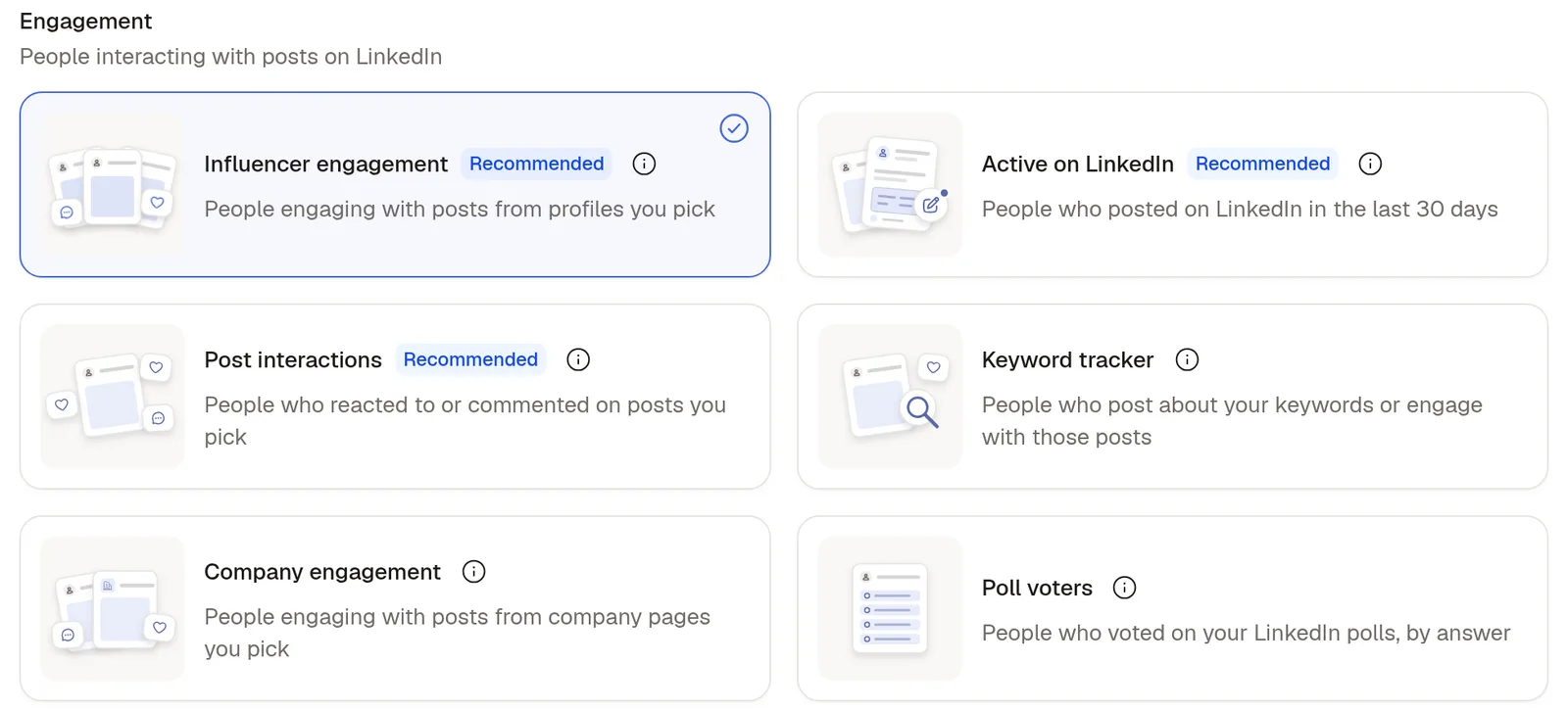
Qualification starts from a signal: people engaging with posts you pick, a keyword tracker, job changes, job postings, profile viewers, company followers, event attendees and more, or a CSV of LinkedIn profiles. Certlane picks Influencer engagement, the people who react to and comment on the posts of three creators who write about SOC 2 audits. The two search signals, Changed jobs and Active on LinkedIn, also send your filters to LinkedIn's search first, so the AI only confirms.
Step 2: Describe your ideal customer
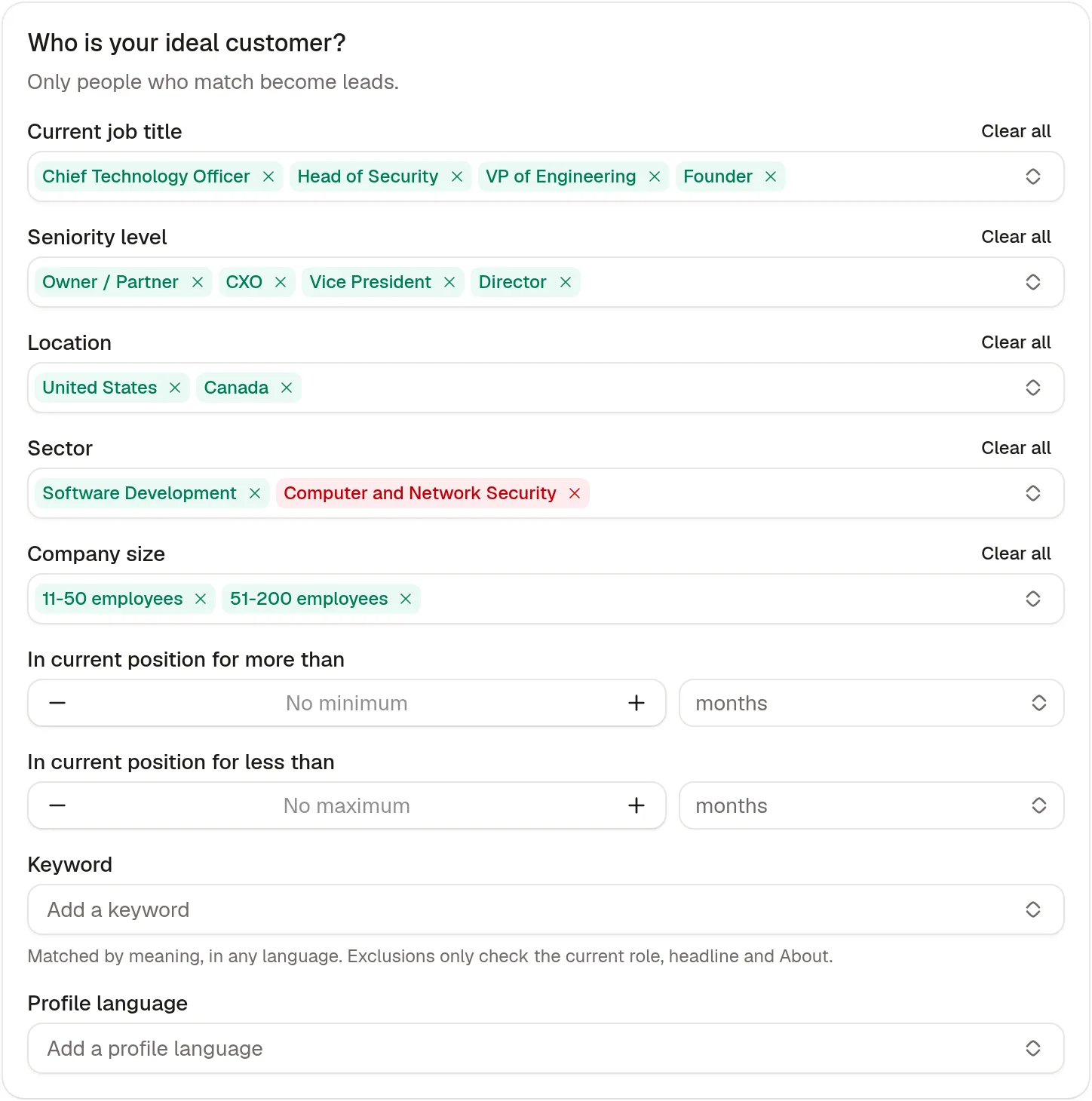
Eight filters: current job title, seniority level, location, sector, company size, time in current position, keyword and profile language. Each value is included or excluded, an exclusion always wins, and title, seniority, company size and sector must all hold on the same current job. Seniority uses LinkedIn Sales Navigator's ten levels and company size LinkedIn's bands, from 1-10 to 10,001+ employees; time in the position takes a "more than", a "less than", or both.
Certlane includes four job titles (Chief Technology Officer, Head of Security, VP of Engineering, Founder), four seniority levels, the United States and Canada, the Software Development sector and companies of 11 to 200 employees. It excludes the Computer and Network Security sector, where the consultancies selling the same thing sit.
Step 3: Choose who approves, and who to skip
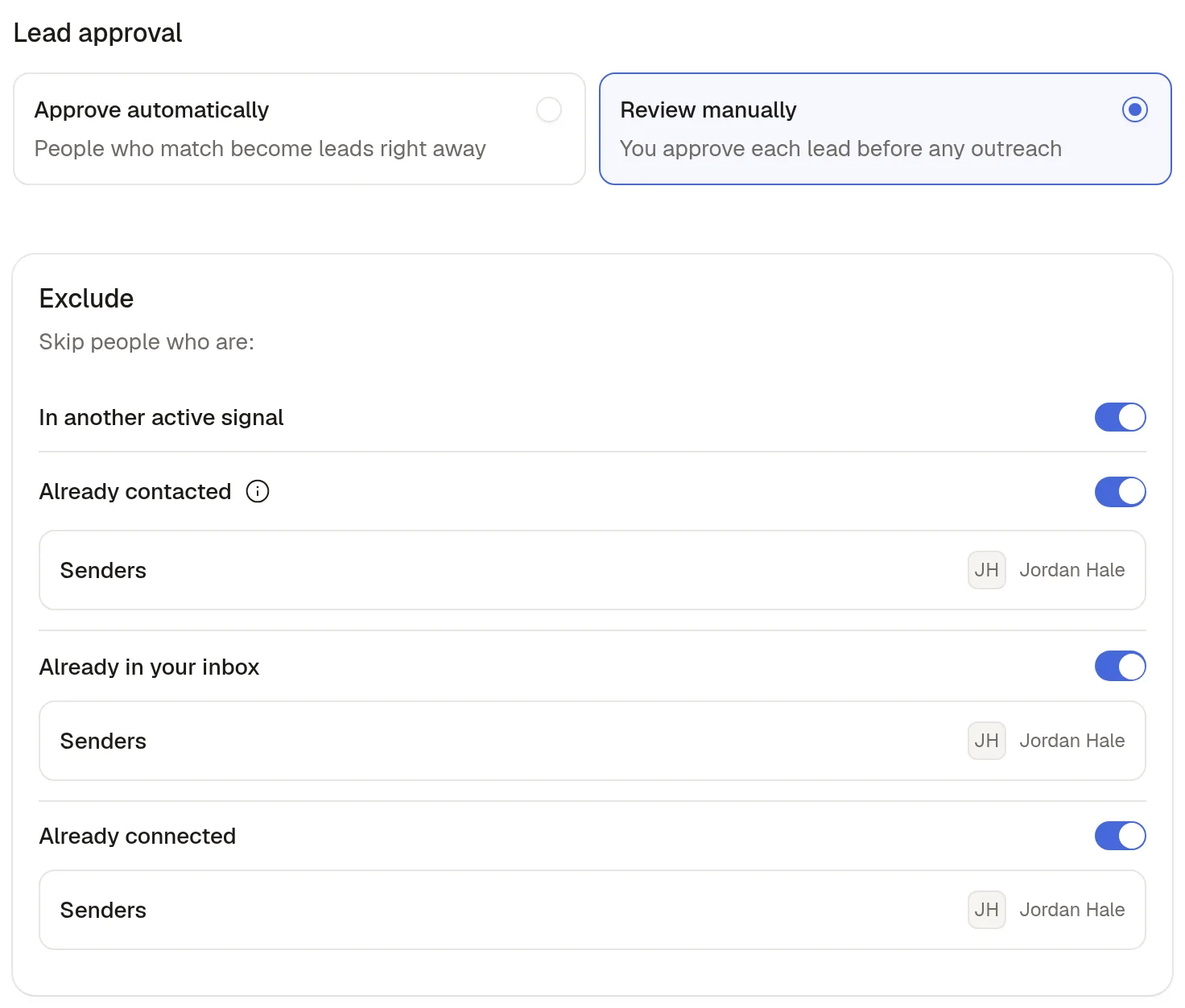
Approve automatically sends the people who match straight to your campaign; Review manually waits for your approval before any outreach. Start with Review manually, then switch once you agree with the verdicts.
Excluded people never reach your campaign, and they cost nothing. A new signal skips the people in another active signal and the people your team already contacted; you can add your connections, the people already in your inbox and your CRM contacts. The team blacklist applies to every signal: customers, competitors and colleagues on it are never collected.
Step 4: Read the verdicts
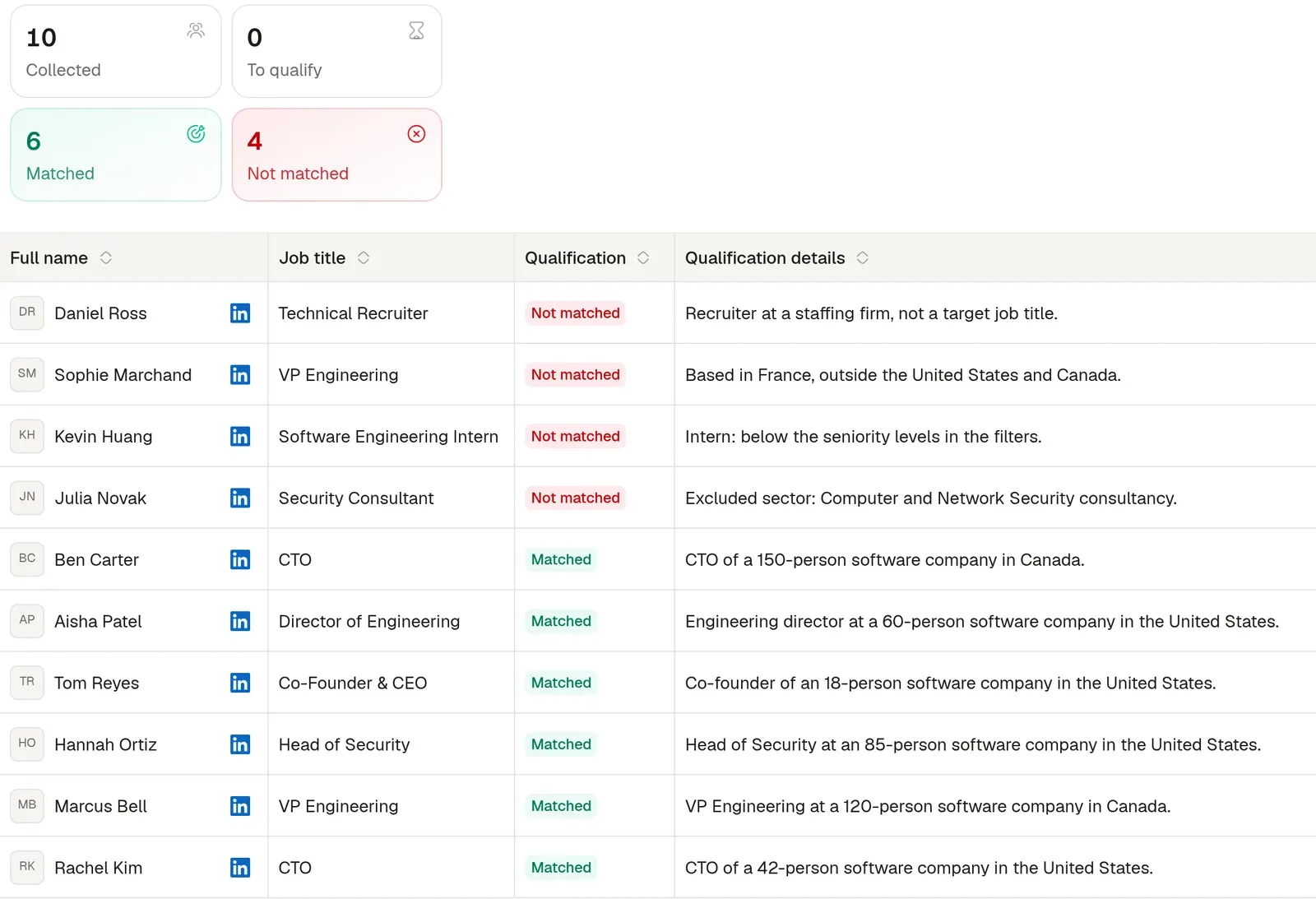
The Leads tab counts Collected, To qualify, Matched and Not matched, and the Qualification details column gives the reason for each person; the CSV export keeps both columns. In the demo, 6 of the 10 people matched. The four rejects: a recruiter at a staffing firm, a VP Engineering based in France, a software engineering intern, and a security consultant from the excluded sector.
Step 5: Correct a verdict, and the signal learns
Reject a match and Sendable asks why: job title, seniority level, sector, company size or location, a reason you gave before, or a new one in your own words. A filter reason teaches the signal that value, generalized to its concept: a rejected "Senior Tax Notary" rejects every notary. A reason in your own words becomes a rule, up to 20 per signal, applied to every person checked afterwards, without pausing the signal and without changing past verdicts.
To change the filters themselves, pause the signal. When you resume it, choose New leads only or Recheck all leads, which checks again the people no campaign has contacted yet. During a recheck, each lead keeps its previous verdict until the new one is in, and the campaign waits before its first step.
How does Sendable's AI decide whether a lead matches?
The check runs in the same order for every person:
It reads the profile and, when your filters need it, the company page. The profile gives the current jobs, location, headline, About, experience and skills; the company page gives its sectors, headcount, headquarters and what it sells.
Rules come first, in code. Five filters are checked before the AI: the country of the location, the time in the role, the profile language, the company size and the excluded sectors. A profile that fails one gets a plain reason, such as "Company size does not match your filters: 201-500 employees".
The AI judges the rest by meaning, on up to three current jobs: job titles in any wording or language, seniority, sectors, places and keywords. A company that sells software counts as Software Development, whatever its LinkedIn label.
A debatable fit passes; an exclusion never does. A wrongly rejected lead is lost for good, while a wrongly matched one is easy to remove. So a borderline title or a neighboring sector passes, but any excluded value fails the profile.
A missing fact fails. When your filters need a company size and the company page shows none, the person is rejected with "Company headcount is missing": nothing is assumed.
The headline is never read as a job title. "I help Heads of Sales..." names an audience, not a role: the verdict rests on the current jobs.
The reason is one sentence in English, whatever the language of the profile, and it names the criterion that decided.
Profile text is data, not instructions. The qualification rules tell the AI to ignore any instruction written into a profile or a company page.
A profile that cannot be read, or a technical error, is marked Failed rather than Not matched, and costs nothing. Verdicts belong to your team: two teams with different filters get different answers on the same person.
"On a popular post, most people will not fit. That is why qualification is not optional." Thomas Bonfils, cofounder of Sendable, in the LinkedIn keyword tracker guide.
How much does AI lead qualification cost in Sendable?
Sendable costs €59 per LinkedIn account a month, or €590 a year, with 500 credits per account every month. One credit pays for one person who matches, even if another signal found them before. People who don't match, exclusions and unreadable profiles use none; neither do visits, invitations or messages. When the credits run out, the signal pauses and starts again when credits arrive, while your campaigns keep running. Prices before VAT, last changed on : every plan and the credit packs are on the pricing page.
The 7-day free trial comes with 20 credits and 3 signals running at once; Pro runs 5 at once per team.
What are the limits of Sendable's AI qualification?
It judges fit, not budget or timing. It reads what a LinkedIn profile and a company page say. The timing comes from the signal that found the person, the budget from your first conversation.
It qualifies the people Sendable finds: from its LinkedIn signals, or a CSV of LinkedIn profiles added to a signal. It does not score inbound form leads or the contacts in your CRM, and a CSV imported straight into a campaign skips it.
It can be wrong both ways. It leans toward a match when the fit is debatable, and a sparse profile is rejected when your filters need the missing fact. Review manually until you trust the verdicts.
No score to rank by. You get Matched or Not matched and a reason, not a number.
Filter changes need a pause. Your rejection reasons apply while the signal runs; editing the filters themselves requires pausing it.
With no filter at all, there is no AI check: every readable profile is accepted with "No qualification required".
LinkedIn only. The matches go to a LinkedIn sequence; Sendable sends no email.
Who is Sendable's AI qualification for, and who is it not for?
It is for:
Teams whose LinkedIn signals bring in more people than they can check by hand.
Founders and salespeople who want the reason behind each lead before a message goes.
Anyone who writes their own sequence and wants only the right people to receive it.
It is not for:
Inbound leads from forms, chat or calls. Conversational tools that ask the qualifying questions themselves fit that job better.
Ranking the contacts already in your CRM. Your CRM's own lead scoring does it where the data is.
Email-first outreach. Sendable sends on LinkedIn; see the lead generation tools for email.
Who builds Sendable?
Thomas Bonfils is the cofounder of Sendable, the LinkedIn prospecting tool that turns buying signals into conversations. He builds it and writes its guides. He started it in 2026 with Antoine Nicolas; it is made in France.
Four companies handed their LinkedIn outreach to our team, which runs it on Sendable. Their numbers and their words, from our case studies; results vary from one market to another and are not guaranteed.
+€208,000 revenue signed in 8 months: Marc Le Vernoy, CEO, 3h18
+55 meetings in 3 months: Alexis Bauer, CEO, Momentum Patrimoine
+€80k pipeline generated in 3 months: Pierre-Baptiste Couette-Barreau, CEO, Céos
+€9,000 revenue signed in 2 months: Sacha Boned, Co-founder, SA Corp
“A great team, very responsive and skilled at speeding up our outbound strategy. The copywriting is excellent and they handle everything. I recommend them without hesitation.”
Marc Le Vernoy · CEO, 3h18
“Antoine and Thibault are really committed. We needed to build our agency's acquisition funnel. Plenty of client meetings were booked, and contracts were signed. I recommend them without hesitation.”
Frequently asked questions about AI lead qualification
What is AI lead qualification?
It is the use of an AI model to decide whether each lead fits your ideal customer, from the facts known about the person and their company, with a reason for every verdict. It replaces opening each profile by hand, not the sales conversation.
Is AI lead qualification the same as lead scoring?
No. Scoring adds points and ranks leads; qualification answers match or no match against your criteria and says why. Many teams use both: qualification keeps the wrong people out, scoring orders the rest.
Can AI qualify leads from a LinkedIn profile?
On fit, yes: job title, seniority, company size, sector, location and time in the role all sit on the profile and the company page. It cannot read budget or timing. For timing, start from a buying signal; for budget, ask.
Which filters can I set in Sendable?
Eight: current job title, seniority level, location, sector, company size, time in current position, keyword and profile language. Each value can be included or excluded, and an exclusion always wins.
Does a lead who doesn't match cost a credit?
No. Only a person who matches uses 1 credit. Rejections, exclusions and profiles that could not be read are free. Rejecting a match by hand gives its credit back, unless a campaign already contacted the person or the credits that paid for it have expired.
What if the AI gets a verdict wrong?
Reject the wrong match and give the reason: the signal applies it to the next people. If good people are rejected, the reason names the filter that decided: loosen it, then resume the signal with Recheck all leads.
Does AI lead qualification replace a person?
No. It applies the same criteria to every lead, where a person's judgment drifts over a long list, but it only knows what the profile says and it can be wrong. Keep a person on the first verdicts (Review manually in Sendable) and on every reply.
Does it understand job titles in other languages?
Yes. Job titles and keywords are matched by meaning, in any language: "Directeur Commercial" counts as Head of Sales. The reason is always one sentence in English.
Which Sendable signals use AI qualification?
Every signal: people engaging with posts, the keyword tracker, job changes, job postings, profile viewers, company followers, event attendees and the others. A CSV of LinkedIn profiles added to a signal with filters is qualified too; without filters, every profile is added for free. More in how to identify buying signals.