Lead generation tools find the people who could buy from you, or catch them when they come to you, and give you a way to reach them. For most B2B teams that sell outbound, the best lead generation tool is Apollo.io: one subscription finds the contact, gives you a verified email and sends the sequence, starting on a free plan. If your leads come to your website, start with HubSpot. If your buyers spend their day on LinkedIn, Sendable and Sales Navigator find them there. Whatever you pick, most of the people it finds are not buying yet: the LinkedIn B2B Institute says "95% of your potential buyers aren't ready to buy today".
Full disclosure: I build Sendable, one of the ten tools below. It comes ninth, where the order announced before the list puts it. Every price comes from the vendor's own site, opened on November 3, 2026.
My verdict: pick the tool by where your next customers are right now, not by the size of its database. A database tells you who fits your target; only timing data tells you who might be ready this month.
The best lead generation tools at a glance
Prices checked on November 3, 2026, on monthly billing, in US dollars as each vendor shows them, for the first paid plan of the tool's main job. Sendable bills in euros: at the European Central Bank rate of November 3, 2026 (1 EUR = 1.1179 USD), €59 is about $66.
| # | Tool | Best for | Free plan | Paid from, a month | One limit |
|---|---|---|---|---|---|
| 1 | Apollo.io | B2B data and email outreach on one bill | Yes, 75 credits | $65 a seat (Basic) | Credits do not roll over |
| 2 | HubSpot | Leads that come to your website, in a CRM | Yes, CRM for 2 users | $10 a seat for new customers (Starter) | Sequences start at $100 a seat |
| 3 | Hunter | Work emails and cold email on a small budget | Yes, 50 credits | $49 (Starter), unlimited users | No phone numbers |
| 4 | Clay | Lists built from many data providers | Yes, 100 data credits | $185 (Launch) | Billed in actions and credits |
| 5 | ZoomInfo | Enterprise data with phone numbers | No, 7-day trial | Quote only | No public price |
| 6 | Instantly | Cold email at volume, to a list you have | No, 14-day trial | $47 (Growth, 5,000 emails) | Leads are a second plan |
| 7 | Leadfeeder | Seeing which companies visit your site | Yes, 100 companies | $113 (Discover) | Companies, not people |
| 8 | OptinMonster | Popups and forms that turn traffic into subscribers | Yes, 500 impressions | $21 (Basic) | Finds nobody new |
| 9 | Sendable | Contacting people who just did something on LinkedIn | No, 7-day trial | €59 per LinkedIn account (about $66) | LinkedIn only, no email |
| 10 | LinkedIn Sales Navigator | Searching LinkedIn and prospecting by hand | No, trial with a card | $119.99 a license (Core) | Sends nothing on a schedule |
The numbers follow the job, not a quality score: the order is explained in how I picked these tools.
What is a lead generation tool?
A lead generation tool is software that finds people who could buy from you, or catches them when they come to you, and gives you a way to reach them. It does one or more of five jobs, and most "best of" lists mix tools from all five without saying which job each one does.
| Job | What you get | Tools on this list |
|---|---|---|
| Capture | Visitors leave their email through a form, a popup or a landing page | HubSpot, OptinMonster |
| Identify | The companies visiting your site without filling a form | Leadfeeder |
| Find | People who fit your target, from a database, with an email or a phone | Apollo, Hunter, Clay, ZoomInfo |
| Time | People doing something now that shows interest: a new job, a post, a visit | Sendable, Sales Navigator, Apollo |
| Reach | The email or LinkedIn sequence that contacts them and follows up | Apollo, Hunter, Instantly, HubSpot, Sendable |
Inbound tools (capture, identify) work on people who already found you. Outbound tools (find, time, reach) go after people who have never heard of you. A team with website traffic starts inbound; a team without it starts outbound, and most B2B teams end up with one tool of each.
Who fits, or who is ready now?
A contact database answers who fits your target. It cannot answer who is buying, and most people who fit are not. The LinkedIn B2B Institute's 95-5 rule says "95% of your potential buyers aren't ready to buy today", and LinkedIn's joint research with the Ehrenberg-Bass Institute found that "75% of companies buy computers once every 4 years" and "80% of companies change banking services once every 5 years". Professor John Dawes of the Ehrenberg-Bass Institute, who wrote the 95-5 report in May 2021, estimates that "only 20% of business buyers are 'in the market' over the course of an entire year; something like 5% in a quarter".
So a list of 1,000 people who fit holds about 50 who are buying this quarter, and nothing in the database says which 50. That is the job of timing data: an intent topic, a visit to your pricing page, a new job, a comment on a competitor's post. It does not replace fit. A signal with no filter behind it fills your list with students, vendors and recruiters who liked the same post. Tools that only find signals, without sending anything, are compared in my roundup of buying signals software.
Dawes also warns against stopping at the ready few:
"…do some targeting for people who are ready to buy, but if that's all you do, you will never build the widespread mental availability needed to become (or remain!) a big brand."
John Dawes, Ehrenberg-Bass Institute, 2021
In practice: send outreach to the people showing interest now, and keep publishing for the 95% who will buy later.
How I picked and ordered these tools
A tool made the list if B2B teams use it for at least one of the five jobs and its own site documents its plans. ZoomInfo publishes no price, but it is the database most lists name, so it stays with "quote only". Each entry then says, from the vendor's pages opened on November 3, 2026, whether the tool does four things:
- Finds new people for you: a database, a search or signals, rather than only the people who fill your form.
- Shows who is ready now: intent data, website visits, job changes or activity.
- Gives you an email or a phone number.
- Sends the outreach, with follow-ups, from the same tool.
| Tool | Finds new people | Shows who is ready now | Email or phone | Sends the outreach |
|---|---|---|---|---|
| Apollo.io | Yes, 240M+ contacts | Intent topics, job changes, website visits | Verified emails and phones | Email sequences on every plan |
| HubSpot | Prospecting agent, $1 a lead | Intent signals from Starter | Enriched emails and phones | Sequences from Professional |
| Hunter | B2B company database | Job postings and funding news | Verified emails, no phones | Email sequences on every plan |
| Clay | Search with Audiences | Job changes (Launch), web intent (Growth) | Searched across 150+ providers | Clay's email sequencer |
| ZoomInfo | Yes, 500M+ contacts | Job changes, website visits, intent add-on | Direct dials | Sequences |
| Instantly | 450M+ contacts, on a credits plan | Website visitors, job postings | Verified emails | Email and LinkedIn sequences |
| Leadfeeder | Companies visiting your site | Visits, intent filters on Activate | From Activate | No |
| OptinMonster | No, it captures your visitors | No | Only what visitors type | No |
| Sendable | 14 LinkedIn signals | The signals themselves | Through your own FullEnrich account | LinkedIn sequences |
| Sales Navigator | 50+ filters, 1+ billion members | Alerts; Buyer Intent on Advanced | No | InMail by hand, 50 a month |
Six of the ten do all four for email: Apollo, HubSpot, Hunter, Clay, ZoomInfo and Instantly. The list goes from the tools that cover the most jobs to those that cover one channel: all-in-one platforms first, then data, email, your website and LinkedIn. Within a group, the tool that does more of the four comes first, then the cheaper one. That puts Sendable ninth: three of four, on LinkedIn only.
1. Apollo.io
Apollo.io puts a contact database and the outreach in one tool. It says it holds "240M+ contacts and 30M+ accounts", gives verified emails and phone numbers, and that "email campaigns are included on every Apollo account". Timing data sits on top: intent topics, job changes and website visits, with 20 identified companies a month on the free plan. Its AI agents "research, build lists, write outreach, follow up, and book meetings".
Price (checked November 3, 2026): the free plan gives 75 credits per seat a month, 2 sequences and 1 intent topic, with Gmail accounts only. Basic is $65 per seat a month on monthly billing ($49 billed annually) with 2,500 credits, and Professional $99 ($79). Organization needs 3 seats and annual billing. An email costs 1 credit and a phone number 8. 14-day trial.
Best for: B2B teams that sell by email and want the list, the emails and the sequences on one bill.
Limits: credits "do not roll over if unused", a phone number costs eight times an email, and every seat on an account must be on the same plan.
2. HubSpot
HubSpot starts from the leads who come to you. Its free CRM is "100% free with no expiration date" for up to 2 users, with forms and 2,000 marketing emails a month that carry HubSpot branding. From Starter, a prospecting agent "researches accounts, finds the right contacts, and drafts personalized outreach", and intent signals watch for "funding rounds, leadership changes, and site visits". Sequences, the automated follow-ups, start on Sales Hub Professional, and "LinkedIn actions require a Sales Navigator subscription".
Price (checked November 3, 2026): the CRM is free. Sales Hub Starter is $10 per seat a month for new customers ($20 list price) with 500 HubSpot credits, and the prospecting agent costs "$1/per lead" when it recommends outreach. Professional is $100 per seat a month, with an annual commitment even when you pay monthly, plus a one-time onboarding fee of $1,500. 14-day trial of the sales tools.
Best for: teams whose leads already come through their website and who want one CRM for marketing and sales.
Limits: the follow-ups that make outbound work start at $100 a seat plus $1,500 of onboarding; Starter has no sequences.
3. Hunter
Hunter started as an email finder and now covers the whole loop for email. Its Discover database searches companies, it finds the addresses of their people ("150M Professional email addresses indexed") and checks them: "Find the verified email address of any professional." Its Signals add "job postings and funding news" for free, and Hunter "will send your cold emails for you" on every plan, the free one included.
Price (checked November 3, 2026): the free plan gives 50 credits a month, 1 connected email account and 500 recipients per sequence. Starter is $49 a month ($34 billed yearly) with 2,000 credits and 3 email accounts; Growth $149 and Scale $299. Prices are per account, with unlimited users. A credit finds one email; verifying one costs half a credit.
Best for: small teams that need work emails and a simple cold email sequence for under $50 a month.
Limits: no phone numbers and no LinkedIn steps, and the credits cap how many emails you get each month.
4. Clay
Clay is a table that fetches its own data. You start from a list or a search ("Run unlimited search with Audiences"), then each row is filled from "150+ providers": for an email or a phone, Clay will "search sequentially across multiple tools until you find a valid match". Launch adds "Track job changes and other signals", Growth adds web intent, and Clay's own email sequencer can send what you built. On LinkedIn it only builds ad audiences.
Price (checked November 3, 2026): the free plan includes 500 actions and 100 data credits a month, 200 rows per table and no phone enrichment. Launch is $185 a month ($167 billed annually) with 15,000 actions and 2,500 data credits, and Growth $495 ($446). Every plan has unlimited seats. 14-day trial.
Best for: a team with someone who likes building list logic and wants every data source in one table.
Limits: you pay in actions and data credits, so the bill follows how many rows and providers your tables use. No LinkedIn outreach.
5. ZoomInfo
ZoomInfo is the enterprise database most lists name. It says it covers "500M+ contacts globally and 110M+ companies", with direct dials, and lets you "take instant action when prospects change jobs, visit your website". The same platform can "find buyers, run sequences, build pipeline", and its Streaming Intent "is available as an add on".
Price (checked November 3, 2026): not published. "ZoomInfo offers custom packages based on your B2B data use cases and needs", priced on features, number of licenses and credit usage. Each package includes "a predetermined number of monthly credits", and "each export costs one credit". ZoomInfo says it "typically offers a 7-day free trial", with no card.
Best for: sales teams with many reps, a budget, and a need for phone numbers at scale.
Limits: no price before a sales call, and integrations "require a minimum purchase of bulk credits".
6. Instantly
Instantly is built to send cold email at volume: unlimited email accounts from the first outreach plan, and "automated follow-ups trigger on a schedule you set". Its sequences can mix steps ("Run email, LinkedIn, and webhook sequences"). Its Lead Finder "gives you access to 450 million verified B2B contacts", and website visitor identification is paid from the same data credits.
Price (checked November 3, 2026): two plan families. Outreach: Growth is $47 a month for 5,000 emails and 1,000 uploaded contacts, Hypergrowth $107 and Light Speed $358. Data credits: Growth is $47 for 1,500 to 2,000 credits, Supersonic $97 and Hyper from $197. A bundle of both, when offered, is 10% off. The 14-day trial needs no card and sends up to 1,000 emails.
Best for: teams that already know who to email and need volume across many inboxes.
Limits: finding people and emailing them are two subscriptions, and Growth's 1,000 uploaded contacts "is a fixed limit across all campaigns, not per month".
7. Leadfeeder
Leadfeeder, part of Dealfront, "reveals the B2B companies visiting your site, even if they never fill a form", and says it identifies "up to 45% of your B2B visitors on a company-level". Activate adds "Verified emails and phones" for people at those companies and filters by intent signals. It sends nothing itself: visits go to your CRM, or to email and Slack alerts "when specific companies visit your website".
Price (checked November 3, 2026): Lite is free forever, with the last 100 companies a month, a 7-day visitor history and unlimited users. Discover starts at $113 a month ($79 billed annually) for up to 50 identified companies, Activate at $527 ($369) and Scale at $599, billed annually only. The 14-day trial needs no card.
Best for: B2B sites with steady traffic, to see which accounts read your pricing page this week.
Limits: it names the company, not the visitor: "we identify the company behind a visit, not the individual." The contacts it offers work there, but are not necessarily the person who visited.
8. OptinMonster
OptinMonster turns visitors you already have into subscribers: popups, floating bars, inline forms, scroll boxes and fullscreen overlays, from 700+ templates, shown by page, time on site or scroll depth. Its Exit Intent® trigger, on Pro, targets visitors about to leave. Subscribers go to your email tool: "we integrate with every major email marketing service".
Price (checked November 3, 2026): on monthly billing, Basic is $21 a month for 1 site and 2,500 campaign impressions, then Plus $57, Pro $87 and Growth $147. Annual plans start at $9 a month for the first year and renew at $210 a year. The free plan has "all the features of Basic with just 500 impression credits" and "Auto-Upgrades to Plus when impressions are exceeded". 14-day money-back guarantee.
Best for: content sites and online stores with traffic and a lead magnet to offer.
Limits: it finds nobody and contacts nobody: it only works on the traffic you already earn.
9. Sendable
This is the product I am building. Read this entry with that in mind, and judge it with a trial rather than on my word.
Sendable finds people from what they just did on LinkedIn instead of from a database. It watches 14 signals, plus a CSV of your own profiles, among them people who started a new job in the last 90 days, companies hiring for a role you choose, people who reacted to or commented on posts you pick (yours, a competitor's, an influencer's), people who post about your keywords, profile viewers, newsletter subscribers and event attendees. AI checks each person against the ideal customer you describe and writes down why they match or not. The ones who match enter the LinkedIn sequence you write (visits, invitation, likes, text or voice messages, waits, a condition on acceptance, withdrawal of unanswered invitations), sent from your account within the days, hours and daily limits you set, 30 invitations a day per account by default. Replies from every account land in one inbox, and leads sync to HubSpot or Attio.
Price (checked November 3, 2026): €59 per LinkedIn account a month (about $66), or €590 a year, with no tiers. Each account includes 500 credits a month, one per person who matches your ideal customer; rejections are free. A team runs up to 5 signals at once. The 7-day trial needs a card and charges nothing before it ends; it includes 20 credits, one LinkedIn account and 3 signals. Every plan detail is on the pricing page.
Best for: founders and small B2B teams whose buyers are active on LinkedIn, who want a reason to write before they write, and who write their own messages.
Limits: LinkedIn only: no email steps and no contact database. A work email or a phone comes only through a "Find email or phone" step that runs on your own FullEnrich account. No AI writes your messages, and no tool, this one included, can promise replies.
10. LinkedIn Sales Navigator
LinkedIn Sales Navigator is LinkedIn's own prospecting tool. You "search with 50+ filters" across "1+ billion members", save leads and accounts, and get alerts on "real-time signals like job changes and new content". Advanced adds Buyer Intent, which "shows you which companies are actively showing interest". You reach people by hand, with 50 InMails a month on every plan: it sends nothing on a schedule.
Price (checked November 3, 2026): Core starts at $119.99 per license a month, or $1,079.88 a year; Advanced at $159.99 a month, or $1,799.88 a year; Advanced Plus is quoted on request. LinkedIn calls these prices estimates. The free trial asks for a card and is open to members without a paid LinkedIn subscription who have not used a free trial in the past 365 days.
Best for: anyone who prospects on LinkedIn by hand and wants sharper search and alerts on saved leads.
Limits: no email or phone, no sequences, and Buyer Intent starts on Advanced.
Which lead generation tools are free, and what does the first paid plan buy?
Six of the ten have a free plan, and two of them, Apollo and Hunter, find emails and send a sequence without a card. Prices checked on November 3, 2026, on monthly billing, with the annual price in parentheses when the vendor shows one.
| Tool | Free plan | First paid plan | What it buys |
|---|---|---|---|
| Apollo.io | 75 credits per seat a month, 2 sequences | Basic, $65 a seat ($49) | 2,500 credits a month; an email costs 1, a phone 8 |
| HubSpot | CRM for 2 users, 2,000 branded marketing emails a month | Starter, $10 a seat for new customers ($7) | 500 HubSpot credits; sequences need Professional at $100 |
| Hunter | 50 credits a month, 1 email account | Starter, $49 ($34) | 2,000 credits a month, 3 email accounts |
| Clay | 100 data credits and 500 actions a month | Launch, $185 ($167) | 2,500 data credits and 15,000 actions a month |
| ZoomInfo | None, 7-day trial without a card | Quote | A set number of monthly credits, one per export |
| Instantly | None, 14-day trial without a card | Growth outreach, $47 | 5,000 emails a month to 1,000 uploaded contacts; leads cost $47 more |
| Leadfeeder | The last 100 companies a month | Discover, $113 ($79) | Up to 50 identified companies a month with full profiles |
| OptinMonster | 500 impressions, then an automatic upgrade | Basic, $21 ($9 the first year) | 1 site and 2,500 campaign impressions |
| Sendable | None, 7-day trial with a card | €59 per LinkedIn account | 500 credits a month, one per matched person, 5 live signals |
| Sales Navigator | None, trial with a card | Core, $119.99 ($1,079.88 a year) | 50 InMails a month, search filters and alerts |
Apollo and Hunter give the most for nothing: both free plans find emails and send a sequence. Free plans are for testing a channel, though: 75 or 50 credits a month is a few dozen people, enough to learn whether they reply. The trials differ as well: ZoomInfo (7 days), Instantly (14 days) and Leadfeeder (14 days) ask for no card, while Sendable (7 days) and Sales Navigator ask for one.
Lead generation from a LinkedIn signal, step by step in Sendable
Here is one lead generation run in Sendable, from the signal to the first message. The screenshots come from a demo workspace: Apvio and every person in it are fictional. Apvio sells accounts payable software to finance leaders at US companies of 51 to 500 employees. Its signal: finance leaders who just started a new job. A job change is worth acting on for about the first 90 days in the role, and a new title is news the person shared on purpose, so the first message can mention it.
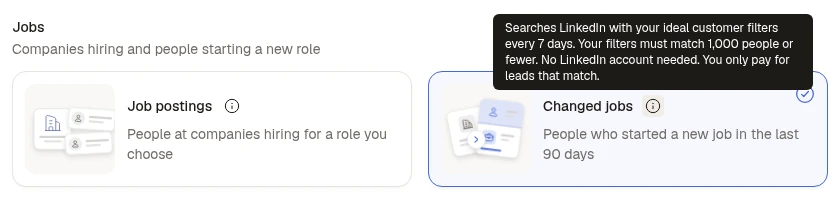
Step 1: Pick the signal
Changed jobs finds people who started a new job in the last 90 days. It searches LinkedIn with your ideal customer filters every 7 days, needs no LinkedIn account to collect, and you only pay for the people who match. Each search reads the first 1,000 people who match, so narrow filters keep the target close enough to write to.
Step 2: Describe who should get a message
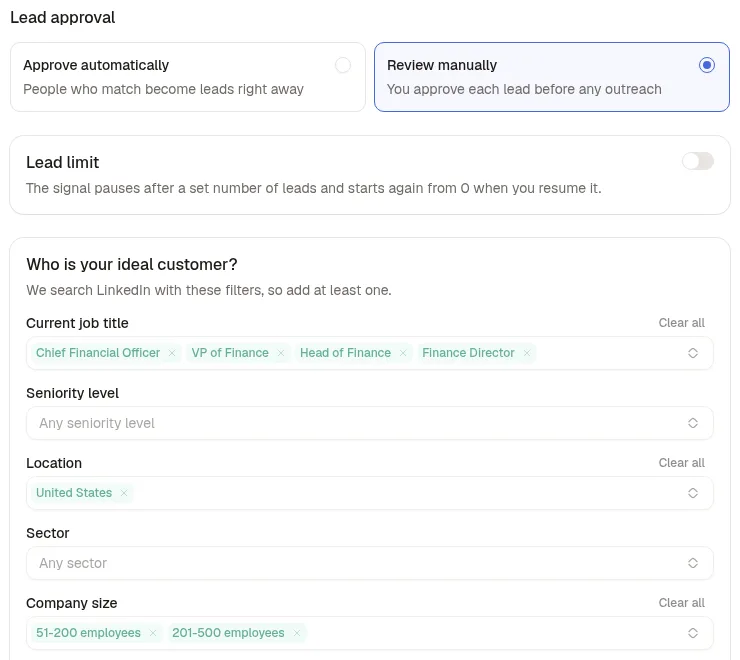
Apvio's ideal customer takes three filters: four job titles (Chief Financial Officer, VP of Finance, Head of Finance, Finance Director), the United States, and companies of 51 to 500 employees. Lead approval is set to Review manually for the first week, so nobody is contacted before Apvio has read the verdicts.
Step 3: Read the verdicts
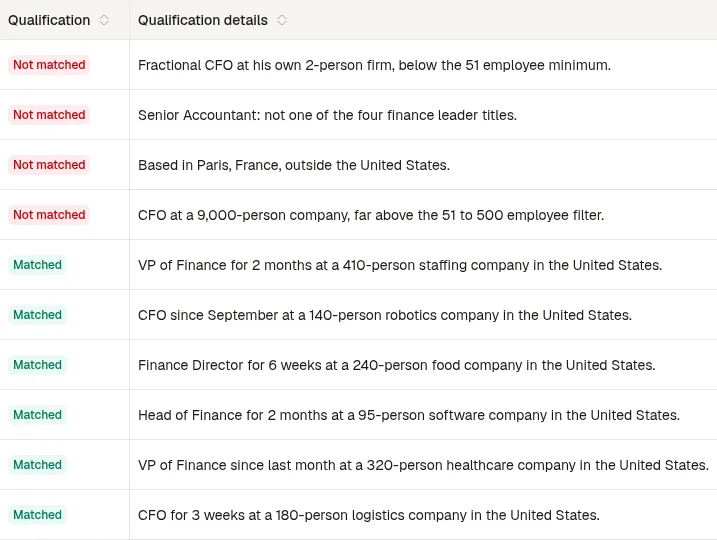
Six of the ten people collected matched, each with the reason written out. The four rejects: a fractional CFO at his own 2-person firm, a senior accountant, a head of finance in Paris and a CFO at a 9,000-person group. Each match costs one credit; a reject costs nothing.
Step 4: Write the sequence
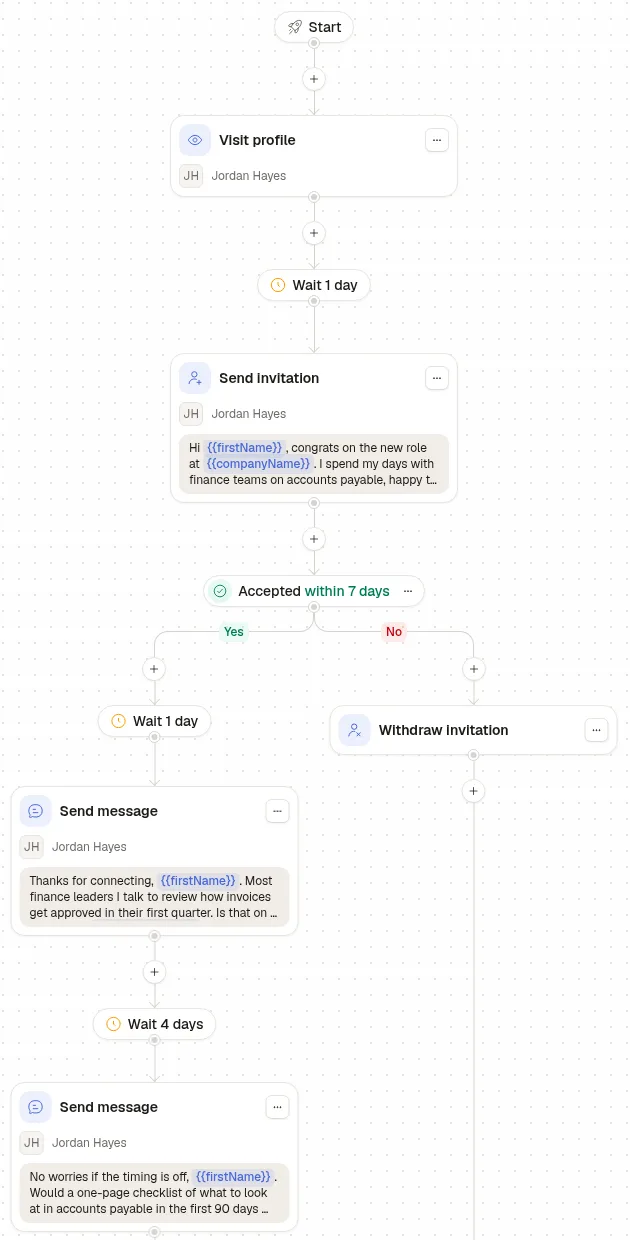
The sequence visits the profile, waits a day, then sends an invitation that congratulates the person on the new role, and gives it 7 days. Accepted: one question a day later about how invoices get approved, and one short follow-up 4 days after. Not accepted: the invitation is withdrawn instead of sitting pending. If Apvio also wants the work email for its CRM, a Find email or phone step can sit anywhere in the sequence.