Who viewed my LinkedIn profile? See them and reach out
To see who viewed my LinkedIn profile, open your profile and click the number of views in its Analytics section. A free account shows your three most recent viewers of the last 90 days; LinkedIn Premium shows the full list for up to 365 days. Then comes the part that brings meetings: checking who fits your market and writing to them the same week. Sendable does that part for you: it reads the list every day, checks each one against your ideal customer and starts a LinkedIn sequence with the ones who fit.
By Thomas Bonfils, Cofounder, Sendable. LinkedIn facts checked on LinkedIn Help on .
New profile viewer
read every day
Fits your ideal customer
AI verdict with its reason
Send invitation
"Hi {{firstName}}, saw you stopped by…"
Reply in your inbox
Stracy
Deluj
M2 Agency
Northbeam
Kindred
NafiNafi
How do I see who viewed my LinkedIn profile?
LinkedIn lists them on a page called Who's viewed your profile. On a computer it takes three clicks, as described on LinkedIn Help:
Click Me at the top of the homepage, then View Profile.
Scroll down to the Analytics section.
Click the profile views number. The page lists who looked, newest first.
On the mobile app, tap your profile picture, tap it again to open your page, then tap the number of views under Analytics. If nobody visited in the past 90 days, the page stays empty.
What does a free account show, and what does Premium add?
The difference is the length of the list. A free (Basic) account names your three most recent viewers of the last 90 days; Premium gives the full list for up to 365 days, with filters, viewer insights and a weekly trend. The rows below come from LinkedIn Help's comparison of Basic and Premium and its page on private mode, read on November 3, 2026.
What you get
Free (Basic) account
Premium
Names shown
Your three most recent
The full list
History
Last 90 days
Up to 365 days
Filters and sorting
Not available
Filters, sort by recency or relevancy
Weekly trend graph
Not available
Included
Your own list while you browse in private mode
Hidden
Still visible for the last 90 days
People browsing in private mode
Shown as LinkedIn Member
Shown as LinkedIn Member
One condition on the free plan: your own profile viewing option has to show your name and headline. Browse in private mode on a free account and your own list is hidden from you too.
Why do some viewers show as "LinkedIn Member"?
Because they browse in private mode. Every member has three profile viewing options: their name and headline, private profile characteristics (only a job title and an industry), or private mode. Someone in private mode appears as "LinkedIn Member", and LinkedIn says no other information is shared. Premium does not reveal them, and Sendable doesn't either: it only collects the people LinkedIn shows by name.
Is a profile view a buying signal?
Sometimes. A visit is deliberate, often right after a post, a comment or an invitation of yours, so the person already knows your name. But a viewer list mixes buyers with recruiters, peers, job seekers and people who sell to you. A view is worth a message only when the viewer fits your ideal customer, and only while the visit is recent: act the same week.
"I call them the LinkedIn ghosts. They never like, never comment, never post. But ghosts often hold the budget. They act instead of talking, and a profile visit is the only trace they leave." Thomas Bonfils, cofounder of Sendable, in how to identify buying signals.
How do I reach out to someone who viewed my LinkedIn profile?
Start by hand: it takes a few minutes per viewer and tells you whether the signal works for your market before you pay for anything.
Check the fit. Open their page and look at three things: their title, their company and its size. No fit, no message.
Send a connection request with a short note, or a message if you are already connected. One sentence on why you write, no pitch.
Follow up once, a few days after they accept, with a question about their work rather than a demo request.
Keep a log of who you wrote to, when, and who replied. After 20 people you know if the replies are worth the time.
Should the note mention the visit? Opinions differ. A visit is something the person did on purpose, so naming it lightly is fair; if that feels too direct, open on the topic that likely brought them, such as your latest post. Two notes that work either way:
Invitation: "Hi Maya, saw you stopped by my profile. I work with people leaders on onboarding, happy to connect."
First message after the invitation is accepted: "Thanks for connecting, Maya. How does your team onboard new hires today?"
What does Sendable do once someone views your profile?
The routine above, run every day by software, from the viewer list to the reply.
Every viewer, while the visit is fresh
Sendable reads the list every day, so nobody who looked this week waits for you to open the list on Friday.
Only the people who fit get a message
Each viewer gets an AI verdict with its reason against your ideal customer. Anyone outside it, such as recruiters or peers, stays out and costs nothing.
Nobody hears from you twice
People your team already contacted are skipped by default, your connections and CRM contacts on request, and a reply stops the sequence.
Your account stays within its limits
A Premium account starts at 30 invitations and 30 new conversations a day, spread over the hours you choose.
How does Sendable automate outreach to LinkedIn profile viewers?
Here is how it works, end to end. The screenshots come from a demo workspace: Tenurio and every person in it are fictional. Tenurio sells employee onboarding software to people leaders at US companies of 51 to 500 employees, and its founder posts about onboarding every week.
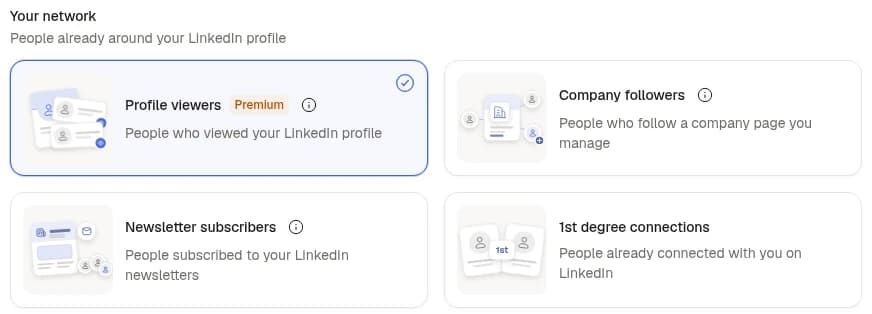
Step 1: Pick the Profile viewers signal
Connect an account that has Premium and pick Profile viewers: there is nothing else to fill in. Sendable reads the account's list about once a day, between 6am and 8pm in your time zone, keeps those from about the last 30 days and skips the people it already found. Before each read it checks that the account still has Premium, and the read waits its turn on the account like any campaign action.
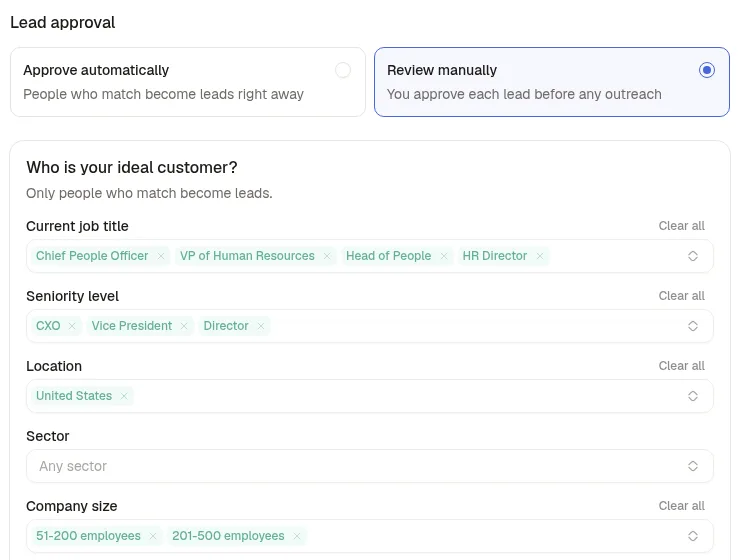
Step 2: Describe who should get a message
Set the people you sell to: job titles, seniority, location, sector, company size, time in the current role, profile language or keywords. An AI reads each viewer's experience and company and gives a verdict with its reason. A viewer who matches uses 1 credit; a viewer who doesn't costs nothing. Choose Review manually to approve each lead before any outreach, or Approve automatically once you trust the verdicts.
Reject a viewer with a reason, such as "recruiter at a staffing agency", and the signal applies it to the next people. A new signal also skips the people your team already contacted and the people in another active signal; turn on the other exclusions to skip your connections, the people already in your inbox and your CRM contacts (HubSpot or Attio).
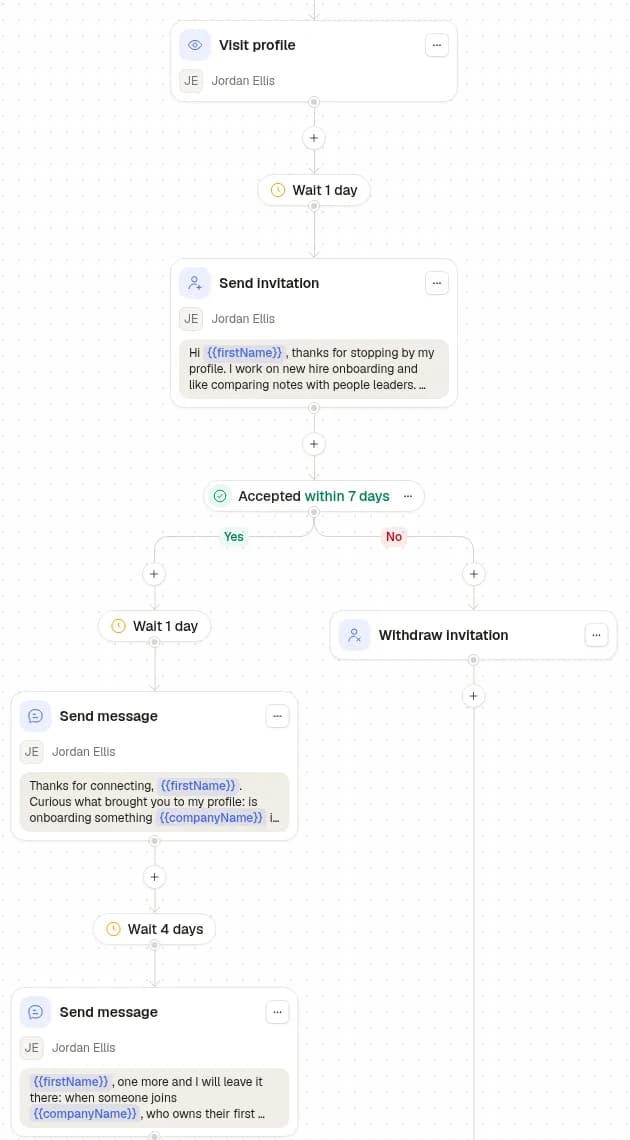
Step 3: Write the sequence
Push the signal to a campaign and every approved viewer enters your sequence. The steps: visit profile, send invitation (with or without a note), wait, invitation accepted within a number of days, send message (up to 10 variants to test), send voice message, like last post, withdraw invitation, and find an email or a phone number with FullEnrich, on your own FullEnrich account. The campaign sends on the days and hours you pick, within the account's limits: 30 invitations and 30 new conversations a day to start, on a Premium account.
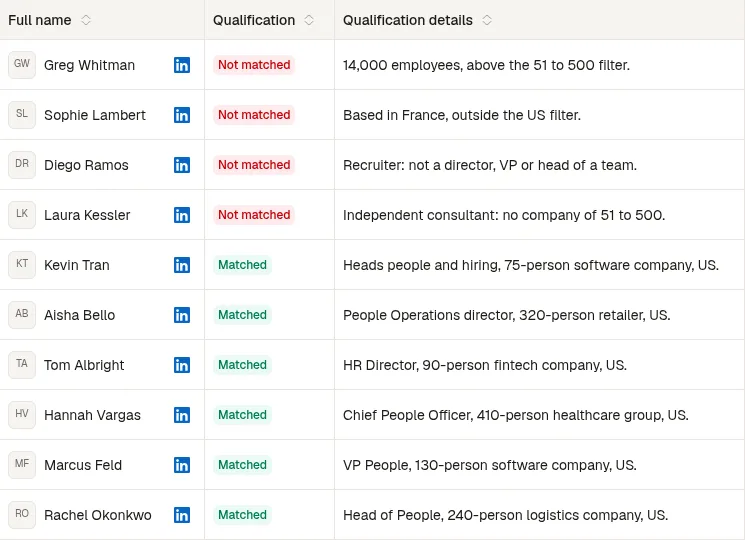
Step 4: Read the verdicts, then the replies
In the demo, 6 of the 10 viewers matched. The four rejects, each with its reason: a 14,000-person freight group, a Head of People in France, a recruiter at a staffing agency and an independent consultant. A reply stops that person's sequence; the conversation lands in the shared inbox, and the lead's sheet shows the signal that brought them in and why they matched.
How much does it cost to automate profile viewer outreach?
Sendable costs €59 per LinkedIn account a month, or €590 a year, with 500 credits per account every month. On the Profile viewers signal, a viewer who matches your ideal customer uses 1 credit; people who don't match, visits, invitations, messages and replies use none. Prices before VAT, last changed on : every plan is on the Sendable pricing page.
Premium is the other cost: LinkedIn bills it, and Sendable doesn't include it. The 7-day free trial comes with 20 credits and 3 signals running at once; Pro runs 5 at once per team.
Sendable or LinkedIn Premium alone: which one fits?
Three ways to act on the list, compared on what each one actually does. Premium on its own wins on history; Sendable wins on the daily work.
Criterion
By hand, free account
By hand, on Premium
Sendable, on a Premium account
People you can act on
Your three most recent
Every viewer LinkedIn names
Every viewer LinkedIn names, read each day
History
90 days
365 days
About the last 30 days
People browsing in private mode
Hidden
Hidden
Hidden
Checking the fit
By eye, one person at a time
By eye, with filters on the list
AI verdict against your ideal customer, with its reason
Outreach
By hand
By hand
A sequence of visits, invitations and messages, up to 30 invitations a day to start
Duplicates and existing contacts
Your memory or a spreadsheet
Your memory or a spreadsheet
Already contacted skipped by default; connections, inbox and CRM on request
Your time
A check every day
A check every day
Setup once, then the replies
Cost
Free
The Premium price
Premium, plus €59 per account a month
If you get a handful of views a week, the free list and ten minutes a day are enough. Sendable earns its price when views come in faster than you can check them, or when you already run LinkedIn outreach. Other tools work on this list too: Valley says it scores each viewer against your ideal customer and writes a message you approve, from $149 a month billed quarterly or $199 monthly, and Waalaxy says it can add these visitors to its campaigns (both pages read on November 3, 2026).
Who is the Profile viewers signal for, and who is it not for?
It is for:
Founders, consultants and salespeople who post on LinkedIn and get views from buyers.
Teams that already pay for Premium on the accounts they prospect from.
Anyone who wants to write to them the same week without checking the list every morning.
Job seekers who want to know which recruiters looked: Premium alone does that.
Visits to a company page: Sendable doesn't read them. The Company followers signal reads the followers of the pages you manage instead.
Email-first outreach: Sendable sends on LinkedIn, not by email.
Who builds Sendable?
Thomas Bonfils is the cofounder of Sendable, the LinkedIn prospecting tool that turns buying signals into conversations. He builds it and writes its guides. He started it in 2026 with Antoine Nicolas; it is made in France. Profile viewers are, in his words, "very underrated, and my personal favorite" among the signals.
Four companies handed their LinkedIn outreach to our team, which runs it on Sendable with several signals, not with this signal alone. Their numbers and their words, from our case studies; results vary from one market to another and are not guaranteed.
+€208,000 revenue signed in 8 months: Marc Le Vernoy, CEO, 3h18
+55 meetings in 3 months: Alexis Bauer, CEO, Momentum Patrimoine
+€80k pipeline generated in 3 months: Pierre-Baptiste Couette-Barreau, CEO, Céos
+€9,000 revenue signed in 2 months: Sacha Boned, Co-founder, SA Corp
“A great team, very responsive and skilled at speeding up our outbound strategy. The copywriting is excellent and they handle everything. I recommend them without hesitation.”
Marc Le Vernoy · CEO, 3h18
“Antoine and Thibault are really committed. We needed to build our agency's acquisition funnel. Plenty of client meetings were booked, and contracts were signed. I recommend them without hesitation.”
Frequently asked questions about LinkedIn profile viewers
Can I see who viewed my LinkedIn profile without Premium?
Yes, partly. A free account shows your three most recent viewers of the last 90 days, as long as your own profile viewing option is set to your name and headline. Premium shows the full list for up to 365 days.
Can someone see that I viewed their LinkedIn profile?
Yes, while you browse with your name and headline. Switch to private profile characteristics or private mode in Settings & Privacy, Visibility, Profile viewing options to hide it. On a free account, private mode also hides your own viewers from you.
Do I need Sales Navigator?
No. The Profile viewers signal needs LinkedIn Premium on the account it reads: Premium is the plan that lists every named viewer. Sendable checks the subscription before every read.
What happens if my Premium subscription ends?
The signal stops reading and says why: only Premium accounts get the full list. The people it already found keep going through the ideal customer check and your campaign.
Will Sendable show the people who browse in private mode?
No. Sendable only collects the people LinkedIn shows by name. Someone in private mode stays anonymous for you, for Premium and for Sendable.
How fast should I write to a profile viewer?
The same week, while they still remember the visit. Sendable reads the list every day, and with Approve automatically on, a viewer who matches enters your campaign right away; the first step goes out within the campaign's sending hours and daily limits.
Does a viewer already in my leads use a credit again?
Yes: a viewer who matches uses 1 credit, even if another signal found them before. People who don't match cost nothing, and rejecting a match gives its credit back unless a campaign already contacted them.
Is it safe for my LinkedIn account?
No tool can promise it: members who use automation software risk having their accounts restricted. Sendable keeps the risk low with daily limits (30 invitations and 30 new conversations a day to start, on a Premium account), one action at a time per account, and reads of your viewers that wait their turn like a campaign action. More in is LinkedIn automation safe.