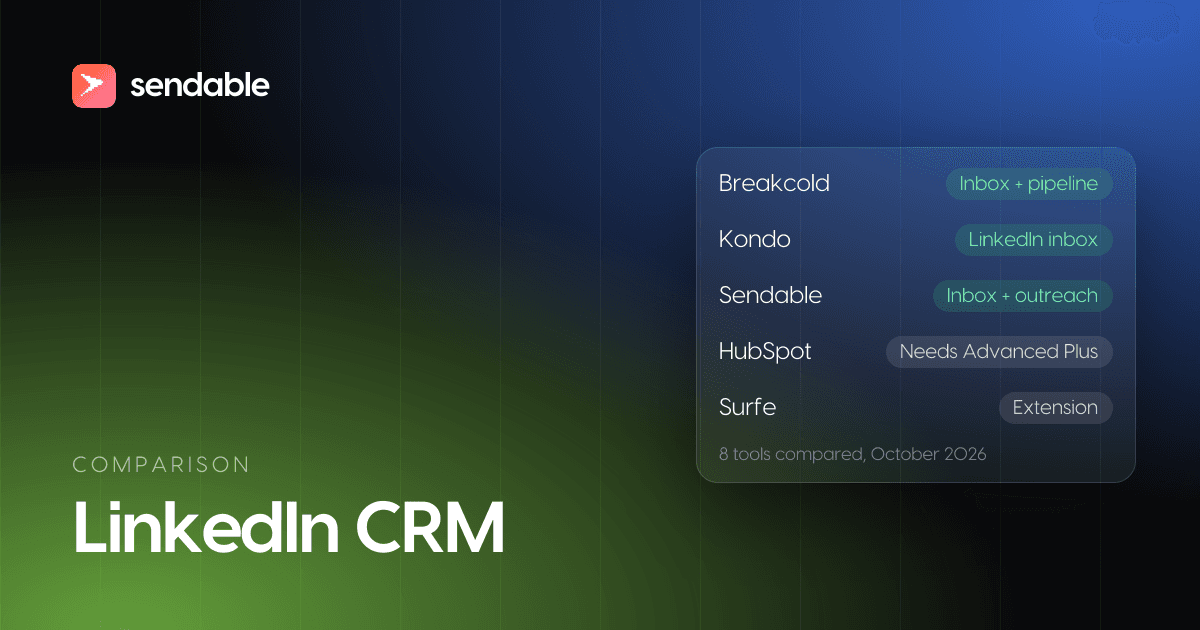
A LinkedIn CRM keeps your LinkedIn conversations and the people behind them in one place, with notes, a stage and a reminder to follow up, which LinkedIn's own inbox does not give you. LinkedIn sells no CRM: Sales Navigator syncs with four CRMs, and only on its top tier. What you buy under the name is one of four things: a LinkedIn inbox with labels and reminders, a CRM built around LinkedIn, an extension that saves profiles into your CRM, or a regular CRM with the Sales Navigator integration.
My verdict: if your deals happen in LinkedIn messages, pick a tool that reads and answers those messages next to the person's record, such as Breakcold (with pipelines) or Kondo (on top of your current CRM). If your deals have amounts, several buyers and a close date, buy a real CRM such as HubSpot; LinkedIn will be one source in it. With a handful of live conversations, you need neither yet.
I am the cofounder of Sendable, a LinkedIn prospecting tool whose inbox overlaps with this category. It ranks third, by criteria stated before the list.
A note on prices. Every price comes from the vendor's pricing page, checked on October 29, 2026, in the vendor's currency, per user and per month unless noted. Sendable is billed in euros: at the European Central Bank rate of October 28, 2026 ($1.1133 per euro), €59 is about $66.
8 LinkedIn CRM tools compared, with prices
Prices checked in October 2026.
| # | Tool | Best for | Starting price | Your LinkedIn messages in the tool | One limit |
|---|---|---|---|---|---|
| 1 | Breakcold | Deals that live in LinkedIn messages, with pipelines | $99 a month (1 seat, 2 LinkedIn accounts) | Yes: messages, InMails, invitations, Sales Navigator threads | The most expensive here after the native route |
| 2 | Kondo | A keyboard-first inbox on top of your CRM | $35 a month, $28 billed yearly; CRM sync from $45 ($36 yearly) | Yes, on your own LinkedIn session | No pipeline of its own |
| 3 | Sendable | Conversations that start from outreach, synced to Attio or HubSpot | €59 (about $66) per LinkedIn account, €590 a year | Yes, for every account of the team | No deals; the price includes the outreach |
| 4 | LeadDelta | Selling through your team's pooled networks | $69.30, billed yearly | Yes, in an AI inbox | No pipeline named on its pricing page |
| 5 | folk | A simple CRM with pipelines, filled as you browse | $30 a month, $24 billed yearly | Captured through its extension | You still answer in LinkedIn |
| 6 | HubSpot with Sales Navigator | Teams already on HubSpot Sales Hub Professional | $90 to $100 per seat, $1,500 onboarding, plus Sales Navigator Advanced Plus | InMails only, not saved to the timeline on their own | No contact import from LinkedIn |
| 7 | Salesflare | Founders who hate data entry | $39 a month, $29 billed yearly | No: its sidebar creates contacts | LinkedIn is a source, not where you talk |
| 8 | Surfe | Reps who live in Salesforce, HubSpot, Pipedrive or Copper | Free for 1 contact a day; $49 a month or $39 yearly, plus a $29 CRM connector | No: it adds profiles to your CRM | You still pay for the CRM |
What a LinkedIn CRM is, and whether LinkedIn has one
LinkedIn has no CRM. Sales Navigator is a prospecting tool, and "Integration between Sales Navigator and your CRM is only available for Sales Navigator Advanced Plus users" (LinkedIn Help). Every other LinkedIn CRM tool belongs to one of four kinds:
| Kind | What it does with LinkedIn | Examples | Weak at |
|---|---|---|---|
| LinkedIn inbox | Reads and answers your messages with labels, reminders and shortcuts, then pushes people to your CRM | Kondo, Sendable | Deals and forecasting |
| CRM built around LinkedIn | The same inbox plus contacts, fields and pipelines | Breakcold, LeadDelta | Reporting across email and calls |
| Extension into a CRM | Saves the profile you are viewing as a contact | Surfe, folk's folkX, Salesflare's sidebar | The conversation stays in LinkedIn |
| CRM with Sales Navigator | Shows LinkedIn data on records, sends InMail from them | HubSpot, Salesforce, Microsoft Dynamics 365, Oracle Sales | Cost, and your plain LinkedIn messages |
The native route is narrow. LinkedIn's plans page says "CRM Sync is available with HubSpot, Microsoft Dynamics 365, Oracle Sales, and Salesforce", and Advanced Plus can "Log InMails, messages, notes, and Smart Links back to CRM". It has no published price: LinkedIn's compare plans page lists Core at $119.99 and Advanced at $159.99 per license a month, and says Advanced Plus pricing "is customized based on your sales team's size, CRM integration, and onboarding/training needs".
Outreach tools that send invitations for you show up under the same searches. None is a CRM; the one ranked here is ranked for its inbox.
Do you need a LinkedIn CRM yet?
Not with a handful of live conversations. LinkedIn lets you mark a conversation as unread, archive it and search your messages, and Sales Navigator adds notes and tags that "are only visible to you" (LinkedIn Help). A spreadsheet with the name, LinkedIn URL, stage and next step does the rest.
My rule: buy a LinkedIn CRM when LinkedIn's inbox starts losing deals, not before. That usually means one of these:
- A second person answers, and two people guess who owes a reply.
- A second LinkedIn account, and you switch browsers to read replies.
- Replies get buried: Tuesday's warm reply sits under twenty newer messages by Friday.
- You need to know where people came from: which post, campaign or signal.
If your deals have amounts, several stakeholders and a forecast, skip this category and buy a real CRM. What to automate in outbound and what to keep by hand is in my guide to outbound sales automation.
How I picked these tools
I took the tools the top results list most often, kept those whose official pages I could read today, and ranked them on four questions, in this order:
- Do your LinkedIn conversations live in the tool? You read and answer them next to the person's record. It is what LinkedIn's inbox does worst.
- Can you work the record? Notes, fields, a stage or status, and a task, reminder or snooze.
- Does it reach a CRM? It is one, or it pushes people and conversations into one.
- What does one seat cost? The published price breaks ties.
How each tool reaches LinkedIn is in every entry, because that is where the account risk sits.
Full disclosure: Sendable is the product I am building. It answers the first question as well as Breakcold and Kondo, but it has no deals or pipeline (Breakcold does), and Kondo syncs to more CRMs for less money.
1. Breakcold
Best for: a founder or small team whose deals live in LinkedIn messages and who wants pipelines in the same tool.
Its LinkedIn page says "LinkedIn DMs, InMails, connection requests and Sales Navigator threads all sync on their own and land on the right record. Reply from Breakcold, the prospect sees the message in LinkedIn." Around that inbox: contacts, fields, pipelines, a feed of your prospects' posts, AI reply drafts and an MCP server. It reaches LinkedIn through "a stable integration designed to keep your account safe, not through a scraper", and says no more.
Price (checked October 2026): on the pricing page, X1 is $99 a month with 1 seat and 2 connected accounts, X5 $199 with 5 of each; extra seats or accounts cost $10. Quarterly or yearly billing takes 10% or 20% off.
Limits: the pricing page says the 14-day trial takes a card, the LinkedIn page says "no credit card"; check at signup.
2. Kondo
Best for: a fast, keyboard-first LinkedIn inbox on top of the CRM you already have.
Kondo calls itself "Superhuman for DMs". Its LinkedIn page lists labels and split inboxes, snooze reminders that cancel if the person replies first, shortcuts, snippets, and CRM sync to "HubSpot, Salesforce, Attio, Clarify, Notion, or Google Sheets". It "layers on top of your existing LinkedIn session on your own computer and never automates sending".
Price (checked October 2026): on the pricing page, Basic is $35 a month or $28 billed yearly; Business, which adds CRM sync and the Sales Navigator inbox, $45 or $36. The page offers a 14-day full refund guarantee.
Limits: no contacts database or pipeline, and CRM sync only from Business.
3. Sendable
Best for: teams whose LinkedIn conversations start from outreach and who want every account's replies, labels and statuses in one inbox, synced to Attio or HubSpot.
This is the product I am building, so judge it on a trial. It finds people from LinkedIn signals, checks them against the customer you describe and sends the sequence you wrote. Replies land in a keyboard-first inbox with labels, snooze, shared drafts and a model that flags interested replies, and each person has a record with the signal that found them, their campaigns, notes and your fields (step by step below). You connect each account with its password or the Chrome extension, and Sendable keeps its own session to sync the inbox and send campaigns.
Price (checked October 2026): €59 a month per LinkedIn account (about $66), or €590 a year, with 500 credits a month for signals. The 7-day trial needs a card and includes 20 credits, one account and 3 signals.
Limits: no deals, pipeline board, tasks or email, and no extension that saves profiles while you browse. There is no inbox-only plan. The sync is one way, and HubSpot is a beta you ask for.
4. LeadDelta
Best for: teams that sell through their combined networks and want an AI inbox with tags, notes and tasks.
Its homepage offers to import every connection, yours and your team's, add leads from any profile or search with its sidebar, and "work every conversation from one AI inbox". Its pricing page adds "tags, notes, and tasks in one CRM", pooled networks to find who knows whom, and LinkedIn and email sequences, and says it "works alongside LinkedIn without risky automation or scraping".
Price (checked October 2026): Growth is $69.30 a month billed yearly ($831.60), with a 7-day trial and no card; no monthly price is shown.
Limits: no pipeline named on the pricing page, and a yearly commitment.
5. folk
Best for: small teams that want a simple CRM with pipelines and add people from LinkedIn as they browse.
folk's LinkedIn side is folkX, a Chrome extension. Its folkX page says it captures people "from LinkedIn, Sales Navigator, and all your favorite social channels", finds emails, and lets you "set tasks, create shared notes, and add people to your pipeline without leaving LinkedIn".
Price (checked October 2026): Standard is $30 a month or $24 billed yearly on the pricing page, LinkedIn extension included, with a two-week trial.
Limits: folk holds the record, not the conversation.
6. HubSpot with Sales Navigator
Best for: teams already on HubSpot Sales Hub Professional who want LinkedIn context on their records.
LinkedIn's own integration. HubSpot's help article says it shows "profile details, shared connections, and account updates" on records and sends InMails from them. Two sentences matter more: "It is not possible to import contacts from LinkedIn using the integration", and an InMail sent from HubSpot "will not automatically save to the record's timeline". Salesforce, Microsoft Dynamics 365 and Oracle Sales use the same CRM Sync; Salesforce's Starter Suite costs $25 per user a month on its pricing page.
Price (checked October 2026): HubSpot's CRM is free for 2 users, but the integration needs "an assigned Sales Hub Professional or Enterprise seat", listed at $90 to $100 per seat a month on the pricing page plus $1,500 onboarding, and a Sales Navigator Advanced Plus seat, priced on request.
Limits: your plain LinkedIn messages stay in LinkedIn. Pick it for the CRM, not for LinkedIn.
7. Salesflare
Best for: founders who hate data entry and sell mostly by email.
A small business CRM that fills itself from your emails, signatures, meetings and calls. Its LinkedIn page promises to "create contacts and accounts for LinkedIn profiles, without needing to switch tabs" from a sidebar, then find their email.
Price (checked October 2026): Growth is $39 a month or $29 billed yearly on the pricing page, with a 30-day trial and no card.
Limits: nothing says it syncs your LinkedIn conversations.
8. Surfe
Best for: reps who live in Salesforce, HubSpot, Pipedrive or Copper and add LinkedIn profiles in one click.
A Chrome extension, not a CRM: it adds the profile you are viewing to your CRM as a contact, lead or deal, finds emails with credits, and syncs both ways.
Price (checked October 2026): on the pricing page, the free plan adds 1 contact a day; Essential is $49 a month or $39 billed yearly, and the CRM connector is a separate $29 a month.
Limits: it adds people, not conversations.
A LinkedIn inbox run like a CRM, step by step
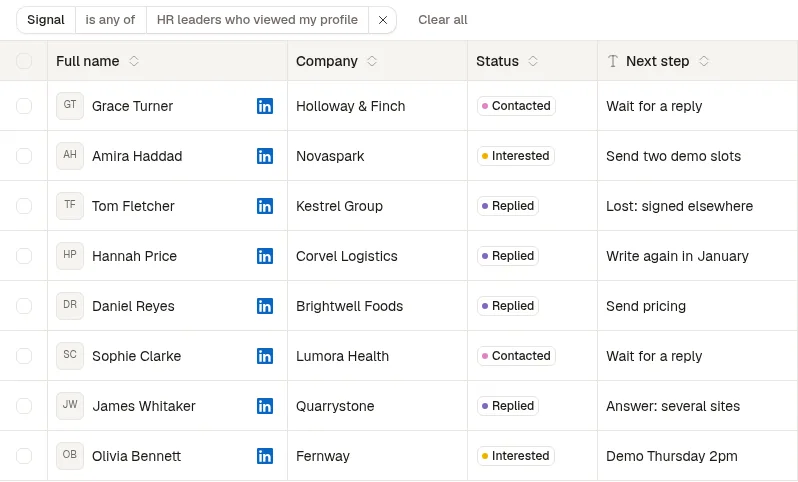
The screenshots come from a demo workspace: Harborline and every person in it are fictional. Harborline sells employee onboarding software to HR leaders at UK companies of 51 to 500 people. Its cofounder, Ellie Sutton, writes to HR leaders who viewed her profile, a signal worth acting on the same week (signal windows are in my guide to identify buying signals).
Step 1: Sort the replies by what they need
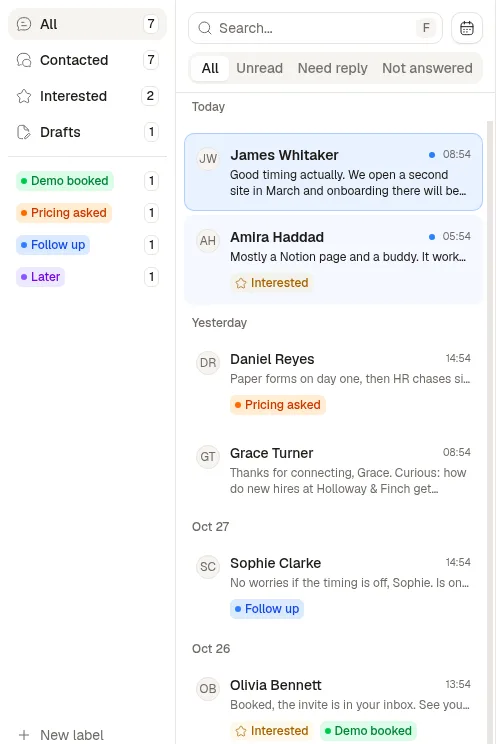
Three tabs split the inbox by what you owe: Unread, Need reply (you read it and have not answered) and Not answered (you wrote last). On the left, Contacted, Interested, Drafts and your labels. With several LinkedIn accounts, a row of avatars switches between them, each with its unread count.
Step 2: Label, snooze and draft from the keyboard
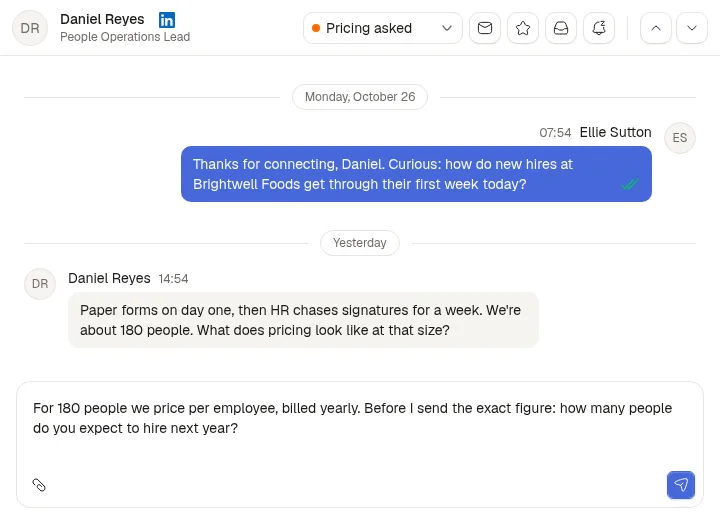
One label per conversation acts as its stage: Demo booked, Pricing asked, Follow up, Later. Snooze takes a date in plain words ("next friday", "2 days"). The draft is saved on the conversation and shared with the team, and Auto Interested has a model flag replies that show interest; it never removes the flag.
| Key | Action |
|---|---|
| J and K | Next and previous conversation |
| E, I, S, U, L | Archive, Interested, Snooze, Mark as unread, Label |
| G, then A, C, I, D, E or S | Go to All, Contacted, Interested, Drafts, Archived or Snoozed |
| G, then 1 to 9 | Go to a label |
| Cmd or Ctrl + Enter | Send |
Step 3: Open the person, not just the thread
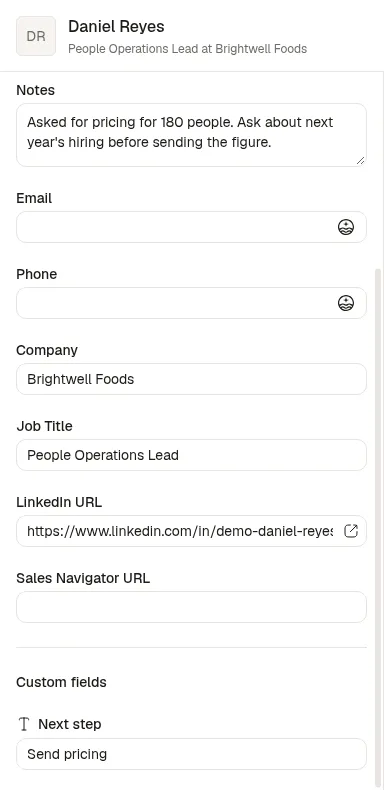
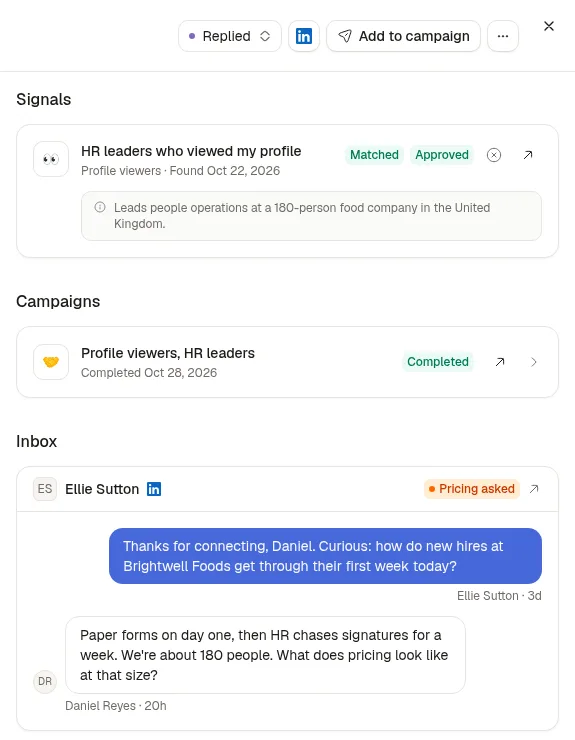
A click on the name opens the lead sheet: fields, team notes and your own fields on the left; on the right, a status, the signal that found the person with the reason they matched, their campaigns and every conversation. Statuses move on their own: a campaign step makes a lead Contacted, a reply Replied, and Interested comes from you or Auto Interested.
Step 4: Work the list
The Leads page filters by signal, campaign, status or any field, lets you add fields (text, number, date, boolean, URL, phone, select) and edit them in the table, and exports to CSV.