The best LinkedIn outreach tool is the one that handles the whole conversation, not only the first message: it sends the invitation and the follow-ups, withdraws the invitations nobody accepts, switches to email when LinkedIn stays silent, stops the moment someone answers and puts every reply in one inbox. Scored on those moments, We-Connect and Reply.io cover all four. Speed matters at the reply end: LinkedIn's own data on InMail, published on its Talent Blog, says "65% arrive within 24 hours and 90% arrive within one week".
Full disclosure: I build Sendable, one of the nine tools below. It comes third, where the scoring rule announced before the list puts it, three dollars ahead of the fourth. Every price and feature comes from the vendor's own site, opened on November 4, 2026.
My verdict: sending invitations is the easy part, so judge a LinkedIn outreach tool by what it does with silence and with answers. For LinkedIn and email in one sequence, start with We-Connect, or Reply.io if you also call. For LinkedIn only, pick the tool that cleans up ignored invitations and keeps replies in one place.
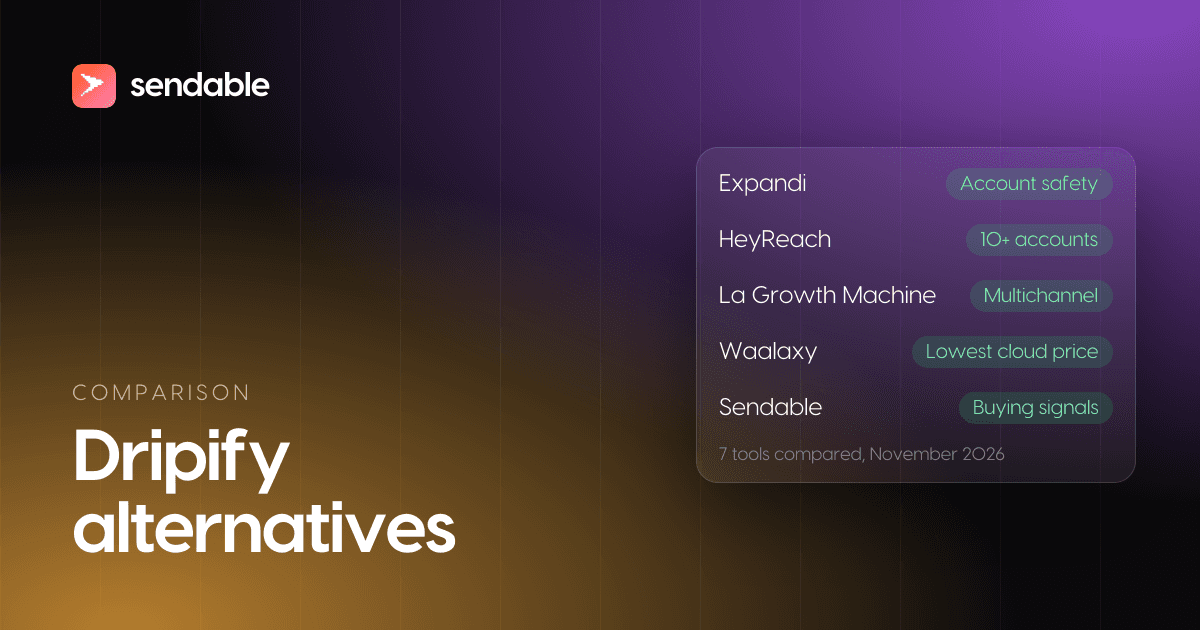
The best LinkedIn outreach tools at a glance
Prices checked on November 4, 2026, for one account on monthly billing, in US dollars as each vendor shows them, on the cheapest plan that has every point the tool scores. Sendable bills in euros: at the European Central Bank rate of November 3, 2026 (1 EUR = 1.1179 USD), €59 is about $66.
| # | Tool | Best for | Price, one account | Score | One limit |
|---|---|---|---|---|---|
| 1 | We-Connect | LinkedIn and email from one cloud seat, with a CRM sync | $79 (Professional) | 4 of 4 | Email and CRM start on Professional |
| 2 | Reply.io | Teams that sell by email, calls and LinkedIn | $99 (Multichannel) | 4 of 4 | Priced per user, not per account |
| 3 | Sendable | LinkedIn conversations that start from a signal | €59 (about $66) | 3: no email | LinkedIn only |
| 4 | Meet Alfred | LinkedIn, email and X for under $70 | $69 (Multi-Channel) | 3: native CRM from Agency | Native HubSpot sync needs 3 Agency seats |
| 5 | SalesRobot | LinkedIn and email, with InMails to open profiles | $79 (Advanced) | 3: no documented withdrawal | Basic has no inbox |
| 6 | Overloop | Email-first teams adding LinkedIn steps | $99 (Growth) | 3: no documented withdrawal | Replies do not sync to HubSpot |
| 7 | Aimfox | The cheapest cloud seat, LinkedIn only | $49 | 2: no email, no documented withdrawal | Email only through Instantly or Smartlead |
| 8 | Botdog | LinkedIn only, with an AI inbox | $79 (Solo) | 2: no email, no native CRM | CRMs only through Zapier |
| 9 | Octopus CRM | The lowest price, from your browser | $9.99 (Starter) | 0 of 4 | A Chrome extension |
The score counts how much of a conversation one subscription handles after the first invitation. It says nothing about how good your messages are, and nothing about account safety, which no one can measure from outside.
What is a LinkedIn outreach tool?
A LinkedIn outreach tool is software that contacts people for you on LinkedIn: it visits their profile, sends a connection request with a note, waits for the acceptance, sends a message and one or two follow-ups, and stops when the person replies. The better ones add what happens around that sequence: an email step for people who never accept, one inbox for every reply, and a sync of interested leads to your CRM.
It is not the tool that decides who to contact. Finding people (searches, lists, contact data, buying signals) is a different job, ranked on its own in LinkedIn prospecting software, and most outreach tools expect you to bring a list or a search. This page covers what happens once you know who to write to.
The tools come in three kinds, and the difference decides how much runs without you:
| Kind | Who clicks Send | Examples | Trade-off |
|---|---|---|---|
| Cloud tool | The vendor's servers, from your session | We-Connect, Reply.io, Sendable, Meet Alfred, SalesRobot, Overloop, Aimfox, Botdog | Keeps going with your laptop closed; acts against LinkedIn's rules |
| Browser extension | Your own browser, in an open tab | Octopus CRM | Runs from your machine; LinkedIn names extensions in its ban |
| Task in a sales engagement platform | You, one click per step | HubSpot, Apollo, Outreach | No software acts on LinkedIn for you; every send is manual |
Do HubSpot, Apollo and Outreach send LinkedIn messages for you?
No. All three put LinkedIn steps in their email sequences, and Reply.io's list of the best LinkedIn outreach tools, one of the top results for the query, names all three, but their own help pages describe those steps as tasks: the platform reminds you, opens the profile, and you send the invitation or the message yourself.
- HubSpot. With its Sales Navigator integration, "you can create a task reminder to manually send a connection request", says the sequences help page. The note you prepare "will not automatically populate in the LinkedIn Sales Navigator pop-up box".
- Apollo. "LinkedIn tasks need to be manually completed, like by manually visiting a contact profile to send a connection request. Apollo doesn't automatically complete LinkedIn tasks for you", per its help center.
- Outreach. Its LinkedIn step "Creates a task to send a connection request to the prospect", and the Sales Navigator integration that opens the profile "requires a Sales Navigator Team or Enterprise license", according to its support article.
HubSpot gave the reason when it shipped the feature. A HubSpot team member wrote on its community forum in September 2020:
"Please note, these messages will not be sent automatically, as it is against LinkedIn's API terms of use to send messages automatically without personal intervention."
So a sales engagement platform is the choice when you want LinkedIn in your sequence and are ready to send every step by hand. If you want the invitations and follow-ups to go out on their own, you need one of the nine tools below, and you accept LinkedIn's risk with it.
How I scored these tools
A tool made the list if it sends invitations and messages from your own account on a schedule, by itself, and publishes a price. I started from the tools the ranking pages for this query name, then left out the sequencers already compared in my guide to LinkedIn automation tools, so the two pages do not repeat each other.
Each tool then earned one point for each of four moments of a conversation, when its own pages document it:
- Nobody accepts. The tool withdraws invitations left pending, so they do not pile up. LinkedIn lists invitations "ignored, left pending, or marked as spam" among the reasons it restricts an account.
- Nobody answers on LinkedIn. An email step can sit in the same sequence, so the person hears from you another way.
- Someone replies. Replies land in one inbox inside the tool, included in the price.
- The reply turns into a deal. A native sync sends the lead to a CRM (HubSpot, Salesforce, Pipedrive, Attio or similar), without a Zapier recipe.
"Not documented" means I found no page that says the tool does it, not proof that it cannot. Ask during the trial. Ties go to the lower monthly price for one account, on the cheapest plan that has every point counted.
| Tool | Withdraws ignored invitations | Email in the same sequence | One inbox for replies | Native CRM sync |
|---|---|---|---|---|
| We-Connect | Yes, every plan | From Professional | Yes, every plan | HubSpot, Salesforce, Pipedrive, Zoho |
| Reply.io | "Cleans up pending requests" | Yes, plus calls, SMS and WhatsApp | Yes, with AI sorting | HubSpot, Salesforce, Pipedrive |
| Sendable | A Withdraw invitation step | No | Yes, every account | HubSpot, Attio |
| Meet Alfred | An Auto Withdrawal setting | From Multi-Channel | Yes, every plan | Salesforce and HubSpot on Agency only |
| SalesRobot | Not documented | Yes | From Advanced | HubSpot, Pipedrive, Salesforce from Advanced |
| Overloop | Not documented | Yes, as a fallback | Yes | HubSpot and Pipedrive from Growth |
| Aimfox | Not documented | Only through an email tool | Yes, the Unibox | HubSpot, Pipedrive, Salesforce, Close |
| Botdog | After 30 days, or 1 to 91 | No | Yes, with an AI assistant | No, through Zapier |
| Octopus CRM | Not documented | No | No | No, through Zapier |
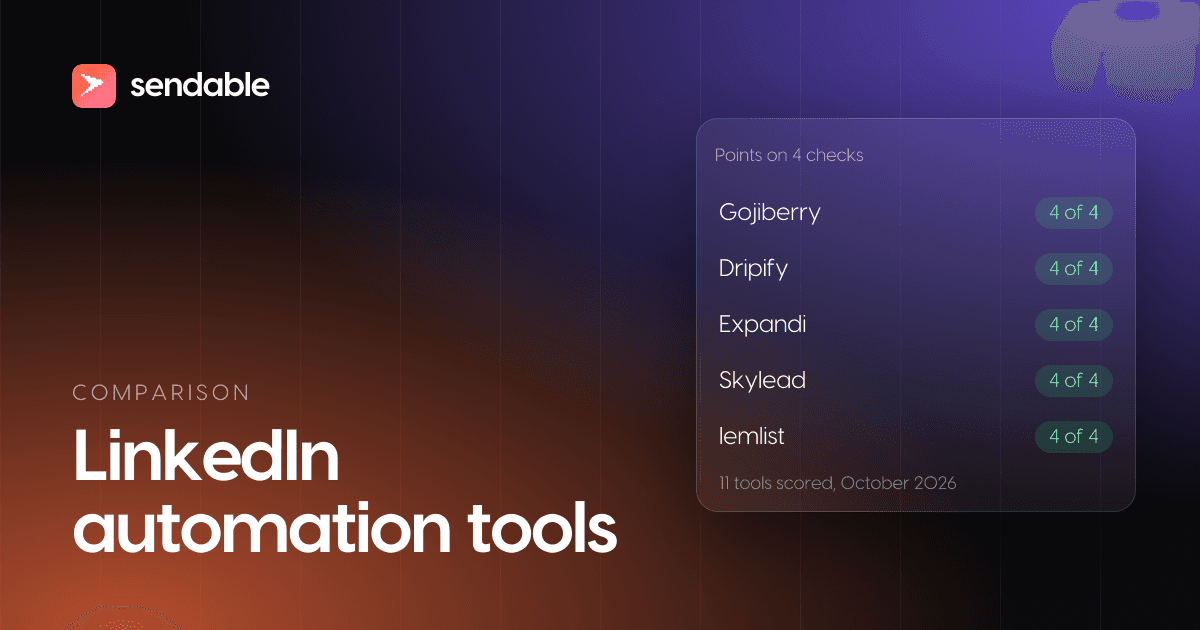
Two tools document all four moments: We-Connect and Reply.io. Four have three, and Sendable leads that group on price alone: Meet Alfred has the same score with email instead of a native CRM sync, for $3 more. If email matters more to you than the CRM, read those two the other way round.
1. We-Connect
We-Connect is a cloud outreach tool that added email to LinkedIn. Its plan table lists "Cloud-based (no browser extension needed)", "Auto-withdraw pending invitations" and a "Unified inbox (LinkedIn, Sales Navigator, Recruiter)" on every plan, and its FAQ counts "over 20 automated LinkedIn actions", from connection requests and InMail to post likes and event invitations. Professional adds "Multi-channel campaigns (LinkedIn + email)" and "Native CRM integrations (HubSpot, Salesforce, Pipedrive, Zoho)". Every plan also offers "AI auto-reply (co-pilot and autonomous modes)".
Price (checked November 4, 2026): per seat a month, Growth $69 and Professional $79, or $49 and $59 billed annually ($588 and $708 a year). "A seat is one LinkedIn account connected to We-Connect." A Scale plan at $99 is marked "Soon", and agencies with 10 or more accounts get a quote. 14-day free trial, no card.
Best for: one person or a small team that wants LinkedIn and email in one cloud sequence, replies in one inbox and leads in the CRM, for under $80 an account.
Limits: Growth is LinkedIn only, so the four points start at $79. The autonomous reply mode answers people without you: switch it on only once you have read what it writes.
2. Reply.io
Reply.io is a sales engagement platform where LinkedIn is one channel next to email, calls, SMS and WhatsApp, and unlike HubSpot or Apollo it sends LinkedIn steps by itself. Connection requests, messages, InMails, profile visits and post likes run automatically, "or keep selected steps semi-automated when you want more control". Its safeguards: "Reply checks connection status, detects weekly invitation limits, cleans up pending requests, and prevents redundant actions." Replies arrive in one place: "Bring LinkedIn conversations into Reply's Inbox and use AI categorization to surface positive replies and conversations that need attention." Its own integrations cover HubSpot, Salesforce and Pipedrive, and Jason AI SDR can run the outreach for you.
Price (checked November 4, 2026): Multichannel, "All-Inclusive outreach via Email, LinkedIn, SMS, and Phones at one fixed price", is $99 per user a month, or $89 billed annually. The Email Volume plan starts at $59 a month ($49 annually) for 1,000 active contacts, and LinkedIn is then an add-on at $69 per account a month. Jason starts at $500 a month, billed annually. 14-day free trial.
Best for: teams whose outreach runs on email and calls as much as on LinkedIn, and who want one sequence and one inbox for every channel.
Limits: the price is per user, and the pricing page does not say how many accounts one Multichannel user connects. On the email plans, LinkedIn costs $69 more per account.
3. Sendable
This is the product I am building. Read this entry with that in mind, and judge it with a trial rather than on my word.
Sendable is LinkedIn only and starts one step earlier than the other tools here: signals such as people who viewed your profile or people who just started a new job find the people, and AI checks each one against the ideal customer you describe before anyone is contacted. The outreach itself is a sequence you write: profile visits, an invitation with a note, post likes, text and voice messages, waits, an Invitation accepted condition with a Withdraw invitation step for those who never accept, and conditions on the lead's fields. It runs from Sendable's servers, one action at a time per account, within the days, hours and daily limits you set.
A reply stops that person's sequence in every campaign of the team that already contacted them, and Sendable checks again for a reply just before each message goes out. Replies from every connected account land in one inbox, with labels, snooze, a shared draft per conversation and AI that marks the interested ones. Leads sync to HubSpot or Attio.
Price (checked November 4, 2026): €59 per LinkedIn account a month (about $66), or €590 a year, with no tiers. Campaign actions cost no credits: each account includes 500 credits a month, one per person a signal finds who matches your ideal customer. The 7-day trial needs a card and charges nothing before it ends; it includes 20 credits, one LinkedIn account and 3 signals.
Best for: founders and small B2B teams who want each conversation to start from something the person just did on LinkedIn, and who write their own messages.
Limits: no email steps and no InMail. Withdraw invitation is a step of the sequence, so it does not clean up invitations you sent by hand outside Sendable. No AI writes your messages, and no tool, this one included, can promise replies.
4. Meet Alfred
Meet Alfred is a "Cloud-based solution ideal for automated outreach on LinkedIn" that also runs email and X. Every plan has autopilot LinkedIn outreach and a "Smart LinkedIn Inbox"; Multi-Channel adds email automation, InMail, Sales Navigator, and group and event campaigns. Its help center describes an Auto Withdrawal setting that "automatically withdraws invites from individuals not interested in connecting with you". Native Salesforce and HubSpot integrations start on Agency; Multi-Channel connects to other tools through Zapier and webhooks.
Price (checked November 4, 2026): per seat a month, LinkedIn Only $59, Multi-Channel $69 and Agency $79 from 3 seats ($237), or $39, $49 and $59 billed annually. Unlimited is quoted. Free trial, no card.
Best for: a solo seller who wants LinkedIn and email, with X as a bonus, in one cloud tool for under $70 a month.
Limits: the native CRM sync needs the Agency plan and three seats, and team inbox management starts there too.
5. SalesRobot
SalesRobot bills per account and runs "Multi-step LinkedIn + Email sequences" on every plan, with "Cloud-based performance (no browser needed)". From Advanced, replies land in a "Unified inbox (LinkedIn + Email)" and leads sync through a "Native HubSpot, Pipedrive & Salesforce sync". Its FAQ says "you can send up to 75 connection requests a day" and "up to 40 InMails a day to open profiles without using any InMail credits", while its plan table lists 50 InMails a day on Advanced. Its pages do not describe withdrawing pending invitations.
Price (checked November 4, 2026): per account a month, Basic $59, Advanced $79 and Professional $99, or $39, $59 and $79 billed annually. Basic runs one active campaign with "Limited daily quotas". 14-day free trial.
Best for: sellers who want to reach open profiles by InMail as well as by invitation, with email in the same sequence.
Limits: Basic has no inbox and no CRM sync, and team management starts on Professional at $99.
6. Overloop
Overloop is an email platform with LinkedIn steps and its own database of 450M+ contacts. Its workflows "combine social actions with email follow-ups. If a request is not accepted, the sequence can continue with an email step", and Overloop runs them "in the background, executing tasks and stopping automatically when a prospect replies". Replies land in "a built-in inbox to centralize all the conversations with your prospects without leaving Overloop", and its AI writes the icebreakers. HubSpot and Pipedrive integrations start on Growth, Salesforce on Enterprise. Its pages do not describe withdrawing pending invitations.
Price (checked November 4, 2026): Starter is $69 per user a month (250 credits, 1 email account, 3 campaigns) and Growth $99 (500 credits, 3 email accounts, 10 campaigns); Enterprise is quoted. The pricing page offers a 7-day free trial, while Overloop's own comparison of LinkedIn outreach tools says 14 days.
Best for: teams that sell mainly by email and want LinkedIn steps, with AI-written opening lines, in the same campaign.
Limits: "Prospect replies cannot sync from Overloop into HubSpot", Starter stops at three campaigns, and the site does not say how many accounts one user connects.
7. Aimfox
Aimfox is LinkedIn only, priced per seat. Each seat runs campaigns to new leads and to existing connections, sends voice notes, attachments and videos "from the campaigns and unibox", and sends free InMails to open profiles. Its Unibox lets you "Chat with every lead from every profile straight from the Unibox." It syncs both ways with HubSpot, Pipedrive, Salesforce and Close, and reaches email only through integrations with Instantly, Smartlead or EmailBison. Its pages do not describe withdrawing pending invitations.
Price (checked November 4, 2026): $49 per seat a month. Agency starts at $499 for 20 seats, plus $20 per extra seat. 14-day free trial, no card.
Best for: LinkedIn-only outreach at the lowest cloud price on this list, with replies from several profiles in one inbox.
Limits: no email of its own. Aimfox also sells "Outreach avatars" at $387 a month, "renting and customizing LinkedIn profiles": a rented profile is someone else's account, and LinkedIn's User Agreement forbids trying to "use another's account (such as sharing log-in credentials or copying cookies)".
8. Botdog
Botdog is LinkedIn only and cloud based. Its sequences "Chain invitations, messages, InMails, voice notes and profile visits with if/then branches", and its auto-withdraw removes pending invitations "after 30 days by default, or any window from 1 to 91 days you choose, including the ones you sent by hand". Replies land in an "AI-powered Unified Inbox" whose assistant writes "Summaries, smart replies, drafts, auto-tags and suggested next actions on every thread."
Price (checked November 4, 2026): Solo is $79 per account a month, or $55.33 a month billed yearly ($664). Agency is $299 a month ($209.33 billed yearly), and a managed service starts at $690 a month per seat. 7-day free trial, no card.
Best for: LinkedIn-only senders who want ignored invitations cleaned up, including old ones, and AI help on every reply.
Limits: no email steps and no native CRM. "No, Botdog doesn't have direct integrations with any CRM", says its integrations page, which sends you to Zapier, Make or n8n, while its FAQ says "Botdog integrates with popular CRMs like Salesforce, HubSpot, and Pipedrive".
9. Octopus CRM
Octopus CRM is a Chrome extension: it acts from your own browser rather than from a server. It sends invitations with a personalized note, "Send automated messages in bulk", views profiles and endorses skills, and keeps campaigns, funnels and stats in a personal CRM. HubSpot is reached through Zapier: "Push actions from LinkedIn to Zapier and then forward them to hundreds of apps including Hubspot CRM".
Price (checked November 4, 2026): per month, Starter $9.99, Pro $14.99, Advanced $21.99 and Unlimited $39.99, or $6.99 to $24.99 billed annually. 7-day free trial, no card.
Best for: trying automated invitations and messages for under $10 a month, on one account.
Limits: no inbox of its own, no email and no native CRM, and LinkedIn's ban on automation names "browser plug-ins, or browser extensions" explicitly.
What happens to the LinkedIn invitations nobody accepts?
They stay pending until someone withdraws them, and a pile of them is one of the reasons LinkedIn gives for restricting an account. Its page on invitation restrictions, read on November 4, 2026, lists "Many of your invitations have been ignored, left pending, or marked as spam by the recipients", and adds: "If you send an excessive number of invitations and we suspect the use of an automation tool, we may suspend or restrict your account."
Withdrawing has a cost of its own: "After you withdraw an invitation, you won't be able to resend an invite to the same recipient for up to three weeks." So withdraw on purpose, once the person has had a fair chance to accept, not after a day.
LinkedIn publishes no number for how many pending invitations are too many, and the tools disagree. Meet Alfred's help center tells users to keep "your pending list under 3,000 connections" (February 2026), and another of its articles says "it's recommended to stay below 500 pending invites" (April 2025). Each tool picks its own moment:
| Tool | When an ignored invitation is withdrawn |
|---|---|
| Botdog | After 30 days by default, any window from 1 to 91 days, hand-sent invitations included |
| Meet Alfred | After the number of days you set in Settings, Auto Withdrawal |
| We-Connect | Automatically, on every plan; the window is not on the pricing page |
| Reply.io | "Cleans up pending requests"; the rule is not on its LinkedIn page |
| Sendable | When the Invitation accepted condition runs out: 3 days by default, up to 30, then the No branch withdraws it |
In Sendable, the other mode of the condition, Wait until accepted, gives up after 14 days and has no No branch, so nothing is withdrawn there. A week is a fair window for most invitations: long enough for someone who checks LinkedIn on Mondays, short enough that pending invitations stay few. What to write in the note so fewer invitations end up pending is in my guide to the LinkedIn connection request message.
Where should LinkedIn replies land?
In one inbox inside the outreach tool, where the sequence already stopped for that person and you can answer within the day. LinkedIn's InMail data points the same way: most InMail answers come in the first 24 hours and nine in ten within a week, so a tool that leaves replies scattered across five accounts makes you answer late.
Eight of the nine tools here have an inbox for replies, and five add AI on top:
- Reply.io sorts conversations with "AI categorization" to surface positive replies.
- We-Connect has a sentiment analysis agent and an AI auto-reply in "co-pilot and autonomous modes".
- Botdog summarizes threads and drafts replies.
- SalesRobot lists "Smart Reply Suggestions" on every plan.
- Sendable marks the replies that show interest, and leaves the answer to you.
An AI that answers for you saves time and costs control: the reply is the one message in the conversation the other person asked for. Draft with AI if you like, then read before you send. Once replies turn into deals, the inbox needs notes, statuses and a pipeline, which is the subject of my guide to the LinkedIn CRM.
Is a LinkedIn outreach tool safe for your LinkedIn account?
No outreach tool is allowed by LinkedIn, so none can promise that your account will never be restricted, Sendable included. LinkedIn's help page on prohibited software and extensions rules out third-party software, from crawlers and bots to "browser plug-ins, or browser extensions", that can "scrape, modify the appearance of, or automate activity on LinkedIn's website". Members who use one, it adds, "risk having their accounts restricted or shut down."
The same rule covers every kind of tool on this page, cloud or extension. What changes the size of the risk is how you use it: low daily volumes on a new account, people who have a reason to accept, invitations withdrawn once they go stale, one tool per LinkedIn account, and a stop at the first reply. For invitation limits, LinkedIn says "Most restrictions will automatically be removed within one week", and it warns that "Repeated suspensions may result in permanent restriction of your LinkedIn account." The settings, step by step, are in my guide on whether LinkedIn automation is safe.
One LinkedIn conversation, step by step in Sendable
Here is what Sendable does at each moment of one conversation, from the invitation to the reply. The screenshots come from two demo workspaces: Tallyport, Harborline and every person in them are fictional. Both write to people who viewed the sender's LinkedIn profile, a signal worth acting on the same week; the window for each signal and what to say first are in how to identify buying signals.
Step 1: Write the invitation and plan for silence
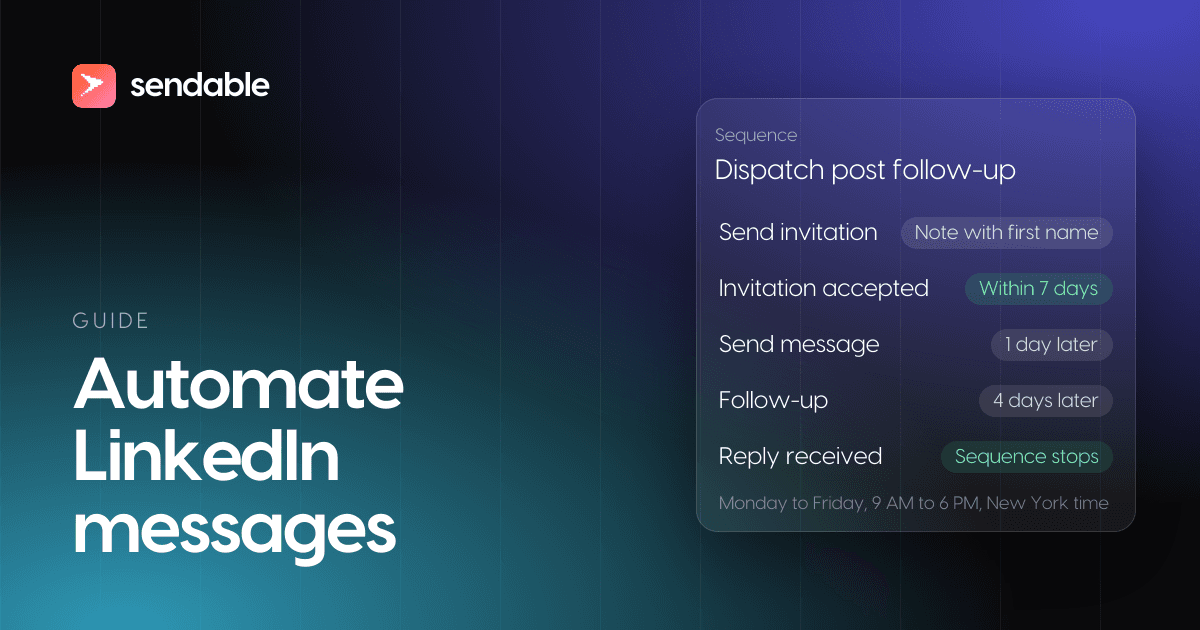
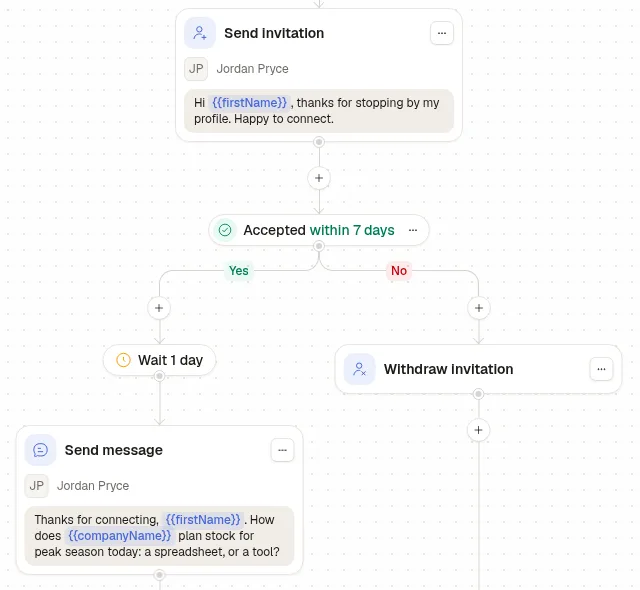
Tallyport sells inventory forecasting to US e-commerce brands. A profile view is something the person did on purpose, so the note can mention it: "Hi {{firstName}}, thanks for stopping by my profile. Happy to connect." Invitation accepted waits 7 days. Yes: one day later, one question about how the person's company plans stock for peak season. No: Withdraw invitation, so the invitation does not sit pending.
Step 2: Set when the account sends, and how much
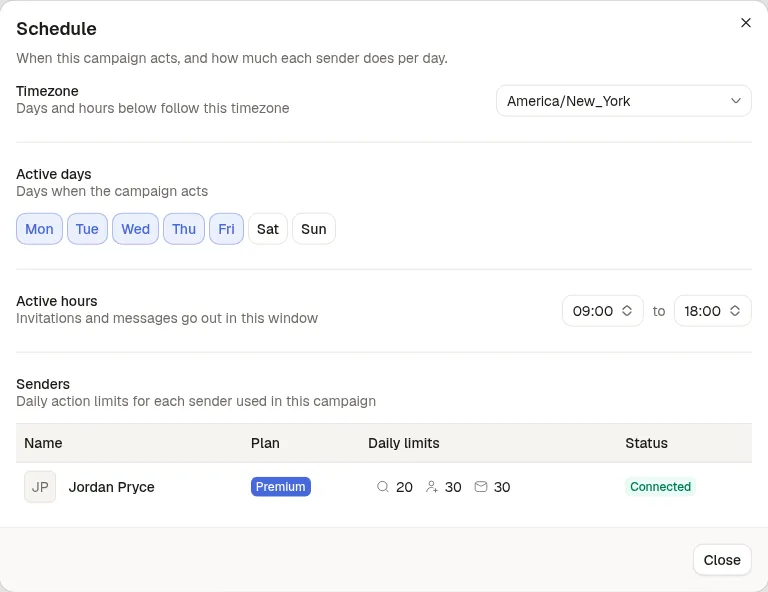
The campaign sends Monday to Friday, 9:00 to 18:00 New York time. Jordan Pryce's account is on LinkedIn Premium, so its daily limits are 20 profile visits, 30 invitations and 30 conversations; an account without Premium or Sales Navigator starts at 20 invitations and 20 conversations. Sendable takes one action at a time per account, spread over those hours.
Step 3: Let the reply stop the sequence
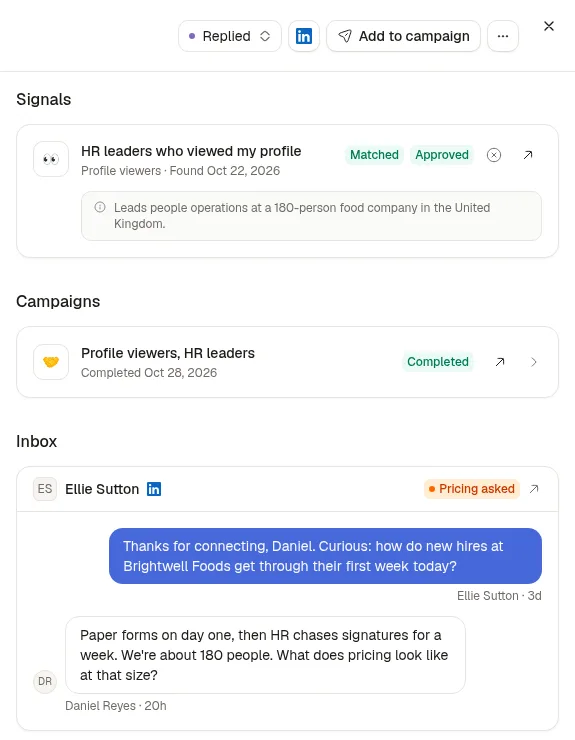
Harborline sells employee onboarding software to HR leaders in the UK. Daniel Reyes, who leads people operations at a 180-person food company, answered the first message with a question about pricing. His lead sheet shows the result: his status is Replied and his campaign reads Completed. In Sendable a reply ends that person's sequence, so no follow-up goes out after an answer, and the same reply stops him in any other Harborline campaign that already contacted him.
Step 4: Answer from one inbox
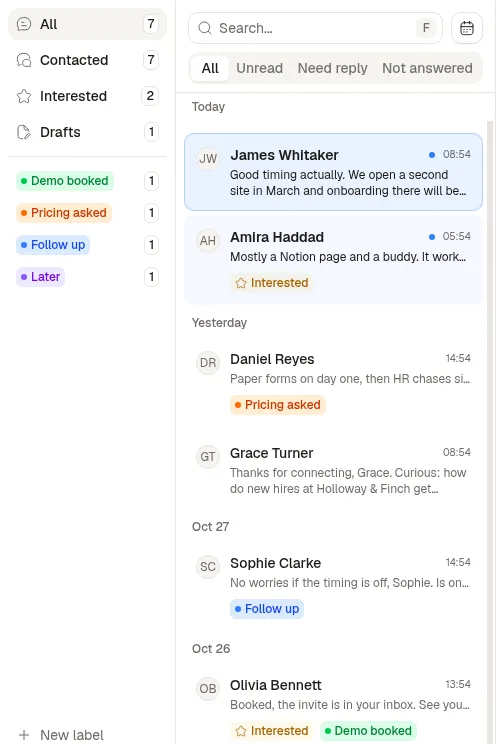
Every reply lands in the inbox, sorted into Unread, Need reply and Not answered, with the team's own labels (Demo booked, Pricing asked, Follow up, Later). Two conversations carry the Interested badge, which Sendable's AI adds when a reply shows interest and which you can also set by hand. With several LinkedIn accounts, a row of avatars at the top switches from one account's conversations to the next, each with its unread count. You write the answer yourself, or save a draft the team can see.