A LinkedIn connection request message gets accepted when it answers the two questions the person asks before clicking Accept: how do you know me, and why now? Say it in one or two sentences, under 200 characters, and ask for nothing else. LinkedIn's own help page on personalizing invitations lists the same ingredients: "How you found the person or what you have in common", "Why you'd like to connect now" and "A clear and polite tone".
I am Thomas Bonfils, cofounder of Sendable, the LinkedIn prospecting tool at getsendable.io (not the Swift protocol of the same name). Sendable finds people from buying signals and sends the invitations you write, so a lot of connection notes pass in front of me, good and bad. Every rule below is quoted from LinkedIn's Help Center as it read on November 3, 2026, and every Sendable behavior comes from the product's code.
My verdict: the reason you are writing is the message. A note is not a short pitch; it is the line that tells a stranger why your name is on their screen. If you cannot write that line, the problem is who you are inviting, not the wording.
What should a LinkedIn connection request message say?
Three things, in this order: how you found the person, what links you to them, and a light close that asks only for the connection. That fits in two sentences. Everything else (your offer, your calendar, your company's story) waits for the first message after they accept.
| Part | The question it answers | Example |
|---|---|---|
| The trigger | How did you find me? | "thanks for your comment on my post about pipeline reviews" |
| The link | Why me, and why you? | "it's the problem my team works on every day" |
| The close | What do you want from me? | "Glad to connect." |
Two classic studies in social psychology explain why the trigger and the link carry the note.
- A reason changes the answer. In a study published in 1978 in the Journal of Personality and Social Psychology, Ellen Langer and her colleagues asked people waiting at a copy machine to let them go first. With no reason, 60% said yes; with "because I'm in a rush", 94%. When the favor got bigger (20 pages instead of 5), only the real reason still raised the yes rate. An invitation from a stranger is a small favor, but it sits next to every other invitation in the list: give the real reason.
- Common ground works only when it is rare. In a 2004 study in Personality and Social Psychology Bulletin, Jerry Burger's team found that people who believed they shared a birthday, a first name or similar fingerprints with the person asking were more likely to agree to a request. The effect had a limit, in the authors' words:
"participants did not increase compliance when hearing about an incidental similarity with someone other than the requester or when they believed the feature they shared with the requester was common."
So "we both work in sales" does nothing. "We both started out at Kessler Logistics" is the kind of link that counts. If what you share is common, leave it out and lead with the trigger.
What is the character limit for a LinkedIn connection request note?
200 characters. LinkedIn's help page on personalizing invitations, which showed "Last updated: 6 months ago" when I read it on November 3, 2026, says "Each message can be up to 200 characters". The same page limits personalized notes on a free account: "You can add a personalized message to up to three connection requests per month", while "LinkedIn Premium members can send unlimited personalized invitations to all their connection requests (connection request limits may still apply)".
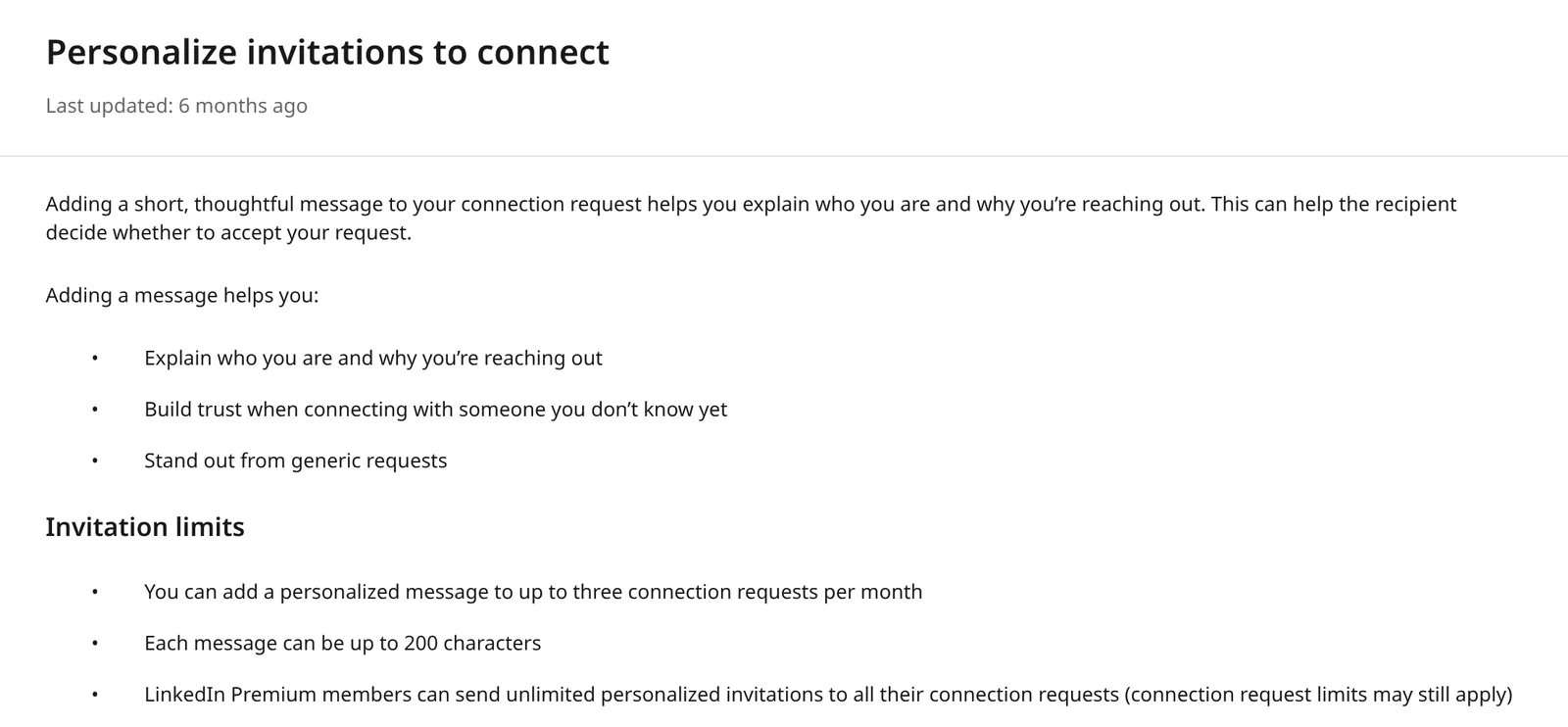
Everything the Help Center publishes about notes and invitations fits in one table, taken from its pages on personalizing invitations, the invitation limit and the types of restrictions:
| Question | What the Help Center says |
|---|---|
| Length of a note | "Each message can be up to 200 characters" |
| Notes on a free account | Three a month on the personalization page; five a month on the older "Invitation limit reached" page |
| Notes on Premium | "unlimited personalized invitations", invitation limits still apply |
| Notes and invitation limits | "Restrictions and limits on standard invitations are separate from the limits placed on personalized invitations to connect" |
| Invitations from the mobile app | "Invitations sent from People You May Know on the LinkedIn mobile app can't be personalized" |
| Replying to a note | "If the recipient responds to your message, they can reply without accepting your invitation" |
| Inviting again after a withdrawal | Not possible "for up to three weeks" |
| Invitations per day or per week | Not published |
Two things to know about these numbers.
- The help pages disagree with each other. The newer page says three notes a month on a free account; the "Invitation limit reached" page, last updated a year before, still says "Basic and free LinkedIn members can include a personalized message to five connection requests per month". Plan for three.
- Many guides still say 300. On November 3, 2026, Google's AI Overview for "linkedin connection request message" said a good note "stays under the 300-character limit", and cited the help page that says 200. Several of the guides ranking next to it say 300 too. No separate length is published for Premium. Some tools, Sendable included, let you type up to 300 characters, and a note that is too long is refused. Write under 200 and the question never comes up: every template in this guide does.
Every character counts: spaces, punctuation and the first name once it is filled in. A note that fits with "Tom" may not fit with "Maximiliana".
Should you send a LinkedIn connection request with or without a note?
With a note when you have a specific reason to give. Without one when the only line you could write is generic, or when a free account has used its notes for the month. A blank invitation beats "I'd like to add you to my professional network", which only tells the person you had nothing to say.
No independent study measures how much a note changes acceptance. The published tests come from vendors of outreach tools, and they disagree, from no difference at all to large gains. LinkedIn itself only says that a message "can help the recipient decide whether to accept your request". What a note does for sure is open a door: the person can answer it without accepting, and that conversation lands in your messages.
Your invitation may not even be seen. LinkedIn's page on invitations, updated about three months before November 3, 2026, sorts received invitations into two views: Focused, "from members our systems have higher confidence in", and Other, "from members our systems have lower confidence in". The sorting uses "a combination of signals, including authenticity signals that help reduce spam and unwanted requests", and "LinkedIn may not send notifications for invitations that appear in the Other view". The page does not list those signals, nor say whether the note is one of them. So a perfect note can still land where nobody looks, and the account you send from may matter as much as the words.
12 LinkedIn connection request message templates, by situation
Each template is written for one reason to connect, because a note only works when its reason is true. I counted each one as written: they run from 140 to 167 characters, under LinkedIn's 200 with room for a longer name. The names and companies are fictional. Swap the trigger and the link for yours, and keep the close short.
| # | Situation | Opens with | Characters |
|---|---|---|---|
| 1 | They viewed your profile | "thanks for stopping by my profile" | 163 |
| 2 | They commented on your post | "thanks for your comment on my post about..." | 154 |
| 3 | They commented on a post about your topic | "I read your comment on Lena Ortiz's post..." | 160 |
| 4 | They posted about a problem you solve | "your post about chasing late invoices..." | 160 |
| 5 | They just started a new job | "congrats on the new role at..." | 142 |
| 6 | Their company is hiring | "I saw Halcyon is hiring two SDRs" | 147 |
| 7 | You are going to the same event | "I saw you're attending RevOps Summit..." | 153 |
| 8 | You met in person | "good talking with you after Thursday's panel" | 144 |
| 9 | A mutual connection introduced you | "Jordan Pryce suggested I reach out" | 154 |
| 10 | They voted in your poll | "you voted "a spreadsheet" in my poll..." | 149 |
| 11 | You share something rare | "we both started out at Kessler Logistics" | 140 |
| 12 | No trigger at all | "I'm Thomas. I work with sales leaders..." | 167 |
1. They viewed your profile
Hi Dana, thanks for stopping by my profile. I write about CRM cleanup for RevOps teams, so I'd guess we work on similar problems. Glad to connect if that's useful.
They came to you first, so thank them and say what you do in one clause. Never ask why they looked: it puts them on the spot.
2. They commented on your post
Hi Marcus, thanks for your comment on my post about pipeline reviews. Your point on deals that sit in one stage for months stuck with me. Glad to connect.
Quote back the idea, not the whole comment. It proves you read it, which a thank-you alone does not.
3. They commented on a post about your topic
Hi Priya, I read your comment on Lena Ortiz's post about onboarding churn. It's the problem my team works on every day. Would be glad to have you in my network.
A public comment is fair to mention. Name the topic and the post's author, then the link to your work; leave out when they commented.
4. They posted about a problem you solve
Hi Sam, your post about chasing late invoices by email hit home: most finance teams we talk to say the same. Would be glad to connect and follow what you share.
Agree with the problem, do not answer it. The fix belongs to a later message, if they ask for it.
5. They just started a new job
Hi Marta, congrats on the new role at Quayside. I work with finance leaders on month-end close, so I'd be glad to connect while you settle in.
A new title is news the person shared on purpose, which makes it the easiest trigger to name. Congratulate, say what you do, and stop. To find these people without checking LinkedIn every day, see LinkedIn job change alerts.
6. Their company is hiring
Hi Ana, I saw Halcyon is hiring two SDRs. I help sales teams get new reps to their first meetings faster. Glad to connect while you build the team.
Write to the person who will manage the hires, not to the recruiter, and connect the role to your work in one sentence. How to spot those job posts is in the guide to a LinkedIn job post tracker.
7. You are going to the same event
Hi Grace, I saw you're attending RevOps Summit in Austin next week. I'll be at the forecasting sessions on day two. Would be glad to connect before then.
Before the event, the shared date is the reason. Say where you will be, so meeting in person stays possible without asking for it.
8. You met in person
Hi Elena, good talking with you after Thursday's panel on partner programs. I'm the one who asked about pricing tiers. Let's keep in touch here.
People forget names, not moments. Give them the detail that places you.
9. A mutual connection introduced you
Hi Nora, Jordan Pryce suggested I reach out. He said you rebuilt the partner program at Lumen, and I'm about to do the same at Tallyport. Glad to connect.
Use it only when the person really suggested it: Nora can ask Jordan.
10. They voted in your poll
Hi Owen, you voted "a spreadsheet" in my poll on how sales teams forecast. So did most people. Curious how it holds up on your side, glad to connect.
A vote is an opinion they gave you in public. Repeating it back is personal without being intrusive.
11. You share something rare
Hi Laura, I noticed we both started out at Kessler Logistics. Small world. I run sales at Tallyport now and would be glad to reconnect here.
This is the Burger effect at work: a former employer, a small school, a hometown. A shared industry or job title is too common to count.
12. No trigger at all
Hi Raj, I'm Thomas. I work with sales leaders at B2B software companies on their LinkedIn outreach, and I'd like to learn how teams like yours run it. Glad to connect.
When nothing links you, say who you are and why them, and keep it honest. If you would send the same words to a thousand people, send no note instead.
Which mistakes get a LinkedIn connection request ignored or reported?
A pitch, a generic line, a fake or creepy reason, and sloppiness. Each one tells the person you sent the same note to many people, and LinkedIn counts what happens next: its page on types of restrictions names "Many of your invitations have been ignored, left pending, or marked as spam by the recipients" as a reason to restrict an account from sending invitations.
The rule on pitching is written down. LinkedIn's Professional Community Policies say: "Do not use our invitation feature to send promotional messages to people you don't know or to otherwise spam people." A connection request is not a sales channel by LinkedIn's own rules.
| Mistake | What it looks like | Do this instead |
|---|---|---|
| A pitch | "We help companies like yours cut churn by 30%. Open to a quick call?" | Keep the offer for after they accept, and only if the conversation calls for it |
| A meeting request or a link | "Here's my calendar so you can grab 15 minutes." | Ask for the connection only |
| The generic line | "I'd like to add you to my professional network." | Name the trigger, or send no note |
| Fake familiarity | "Great meeting you last week!" to someone you never met | Claim only what is true: the person knows |
| Tracking detail | "I saw you liked Lena's post at 9:14 this morning." | Name the topic, not what you watched them do |
| Comments on looks | "What a great smile!" | Never: the Professional Community Policies forbid commentary on someone's appearance |
| Empty flattery | "I'm impressed by your profile." | Name the specific post, role or move |
| Common ground that is common | "We're both in sales!" | Use a rare link or none |
| A broken variable | "Hi {firstName}," or "Hi ," | Read every lead's note before it goes out |
| Too long | 280 characters that stop mid-sentence | Stay under 200 |
| Inviting again too soon | A new invitation right after a withdrawal | Blocked for up to three weeks: wait, or let it go |
Volume makes every one of these worse: "many invitations within a short amount of time" is the first cause the restrictions page names. The safe pace is covered in is LinkedIn automation safe.
What should you do after a connection request is accepted?
Send a first message a day or so later that continues the reason, with one question the person can answer in a line. Not a pitch, not a deck: the note opened a conversation, the first message keeps it going. After the poll note, for example: "Thanks for connecting, Ben. When a renewal slips at Fieldline, who notices first: the CSM, finance or the customer?"
If they never accept, withdraw the invitation after a week or two instead of leaving it pending, since pending and ignored invitations are what accounts get restricted for. Withdraw once: you cannot invite the same person again for up to three weeks.
Who you invite matters more than any wording. When Sendable ran a two-week campaign for itself, from May 31 to June 13, 2026, on people who had just posted about the exact problem the product solves, 92 of 156 invitations were accepted, a 59% acceptance rate. And 52 of the 87 people messaged after that replied. The full campaign is in the guide to identify buying signals.
How does Sendable personalize the connection request from the signal?
Through the campaign, not through AI. In Sendable, a signal feeds one campaign, so everyone who reaches the invitation step surfaced for the same reason: they viewed your profile, they started a new job, they voted in your poll. You write the note once for that reason. Variables fill in each lead's name, company and title, and for five signals a field the signal itself collected. Before launch, you can read each lead's note as it will be sent and rewrite it for that person alone.
I build Sendable, so weigh what follows accordingly. Each line comes from the product's code:
| What | How it works in Sendable |
|---|---|
| One reason per campaign | A signal feeds at most one campaign, so one note can name the reason for everyone in it |
| Lead variables | First Name, Last Name, Company and Job Title, plus email, phone, LinkedIn URL and Sales Navigator URL, inserted with the variable button and written {{firstName}} |
| Fields from the signal | Poll voters adds a field named after your poll question, holding each voter's answer. Job postings adds "Job post URL"; Post interactions, Influencer engagement and Company engagement add "posts URL". Every custom field is a variable |
| Length | The note editor counts the note as typed, variable names included, up to 300. The edit window for one lead counts the note as it will be sent and will not save it above 300 |
| Empty values | The review list shows how many leads have missing variables and filters them. A variable with no value is left blank in the note that goes out |
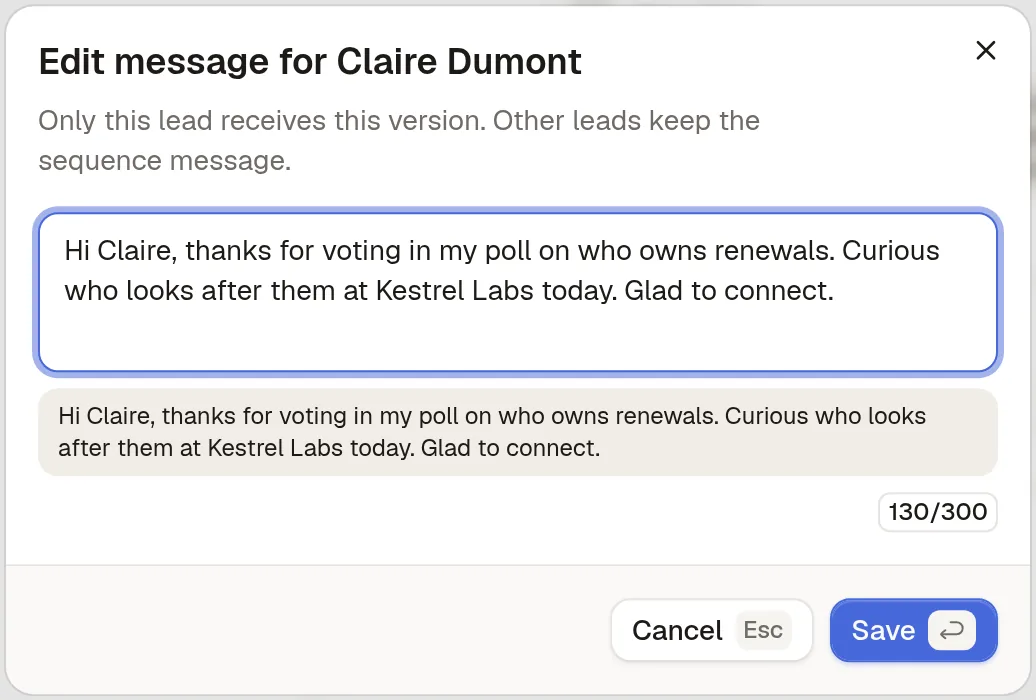
| A note for one person | "Only this lead receives this version. Other leads keep the sequence message." |
| A note refused as too long | The campaign pauses: "Message exceeds the character limit", with "Shorten the message, then resume the campaign." |
| After the invitation | Invitation accepted: within 1 to 30 days (3 by default), or Wait until accepted, which gives up after 14 days. Withdraw invitation, with LinkedIn's three-week block shown on the step |
| Reading the result | The campaign's analytics show "Accepted", your acceptance rate: the share of invitations sent that were accepted |
What Sendable does not do: no AI writes your note (AI only checks each person against your ideal customer and writes down why), notes cannot be A/B tested (variants are for messages), and nothing tracks a free account's monthly note allowance or stops you at 200 characters. Of the signal fields, only the poll answer reads well inside a sentence: a job or post URL alone takes 45 to 73 of the 200 characters.
Write a connection request note from a signal, step by step in Sendable
The screenshots come from a demo workspace: Renewly and every person in it are fictional, and nothing was sent. Renewly sells renewal tracking to customer success leaders, and Maya Chen, its founder, asked on LinkedIn "Who owns renewals at your company?". Its campaign invites the people who voted.
Step 1: Write one note for the signal
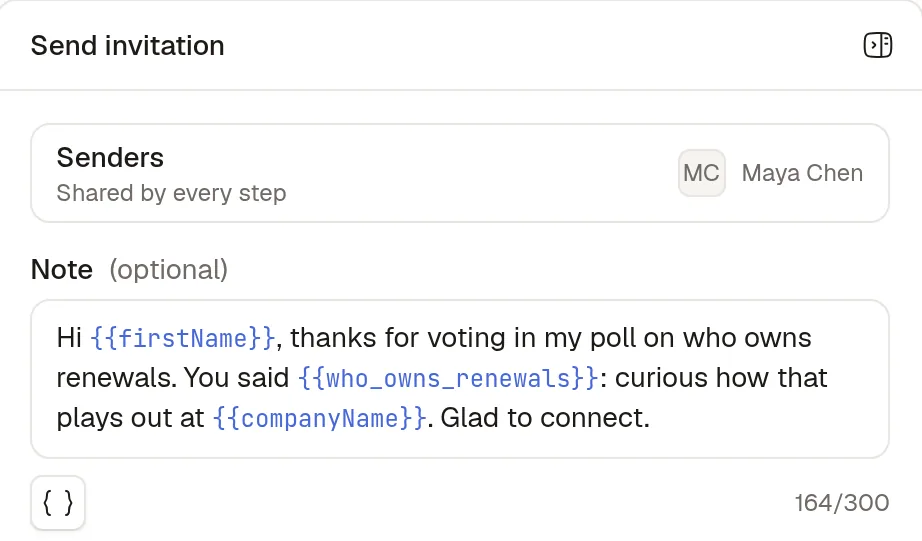
Open the campaign builder and click Send invitation. Write the note for the reason everyone in this campaign shares, then insert variables with the { } button: the first name, the company and, from the Poll voters signal, the person's answer. The counter shows 164/300 here because it counts the variable names as typed; the real length depends on each lead.
Step 2: Read the note as each lead will get it
On the Review step, pick a lead to see the sequence with every variable filled in. For Ben Okafor at Fieldline, the note reads: "Hi Ben, thanks for voting in my poll on who owns renewals. You said Customer success: curious how that plays out at Fieldline. Glad to connect." That is 143 characters once filled in.
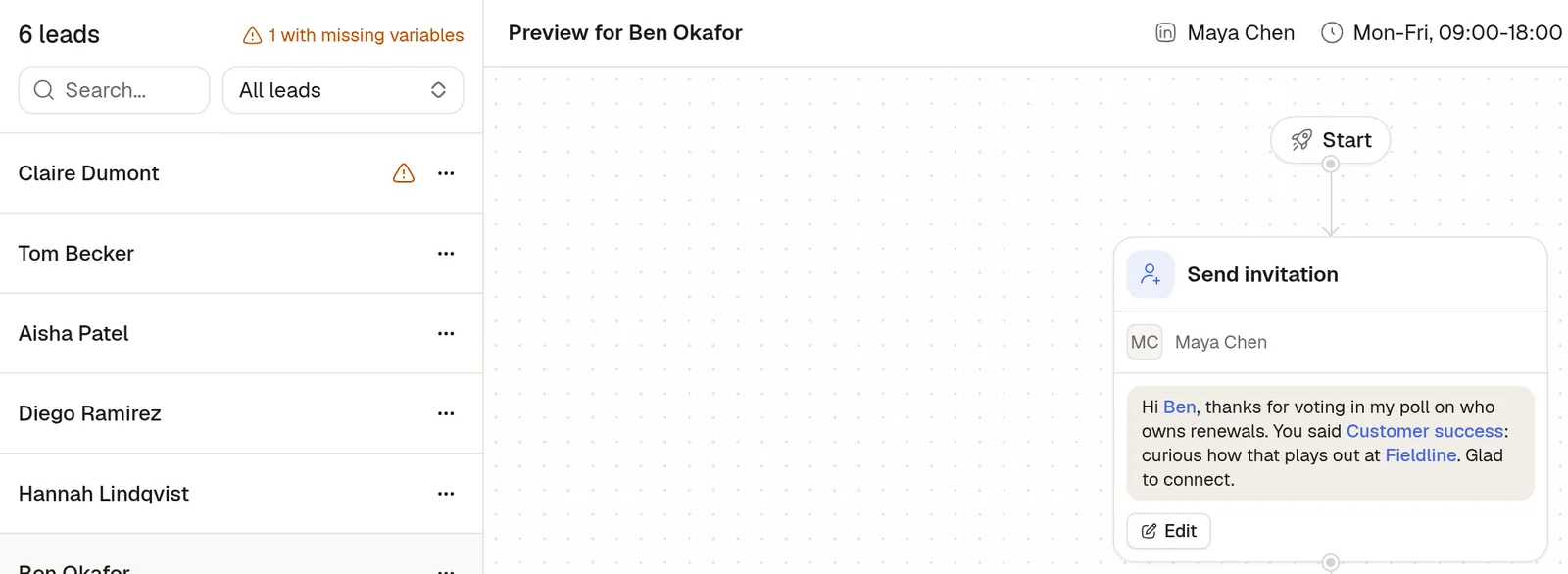
Step 3: Fix the leads with a missing variable
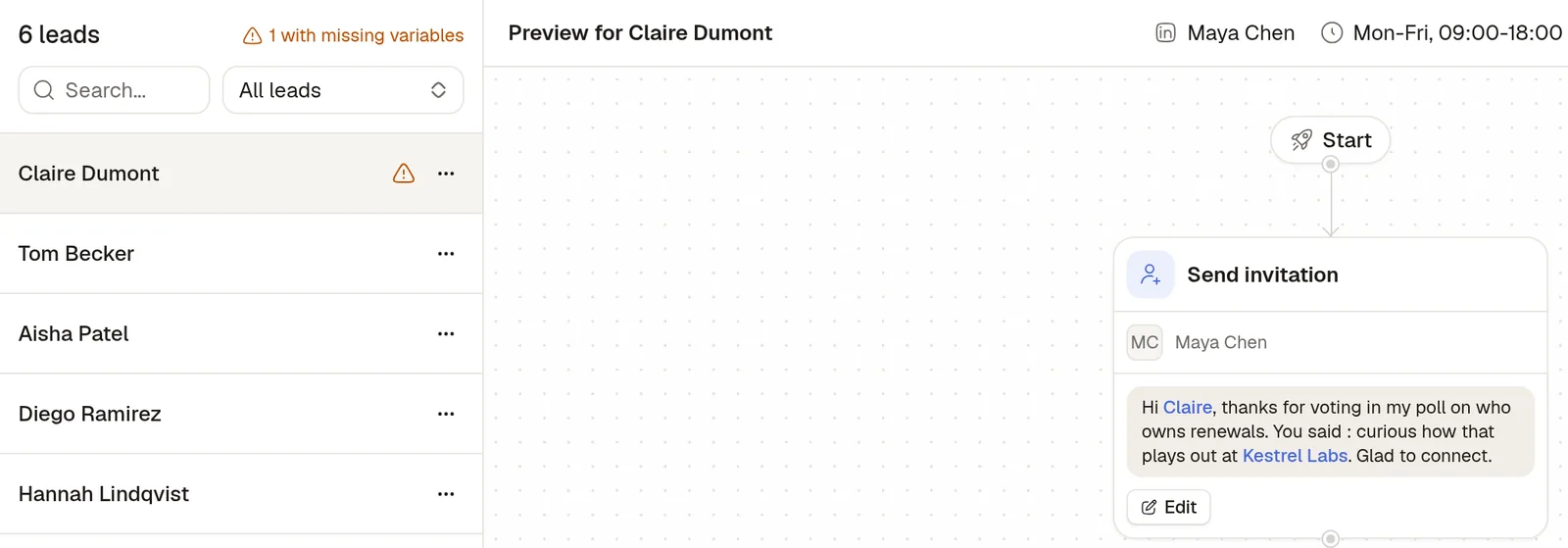
The list header says "1 with missing variables", and a warning sits next to Claire Dumont: she is in the campaign without a poll answer, so her note would read "You said : curious how that plays out". Sendable would send it that way, with the blank, so this is the check to make before launch.