Trigify is gone: its team joined HubSpot, and the standalone platform closed for most customers on October 22, 2026. The best Trigify alternatives depend on the job you used it for. For the LinkedIn engagement feed alone, Signado, SignalRaven, Teamfluence and OutX are the closest. For listening on X, Reddit and YouTube too, Octolens. To find the people and send the LinkedIn outreach from one tool, Sendable, Gojiberry or ReactIn. To keep building your own tables, Clay, fed by one of the above.
Full disclosure: I build Sendable, one of the nine tools below. It sits where the stated criteria put it, not first. Every price comes from the vendor's own site, checked on October 28, 2026.
My verdict: Trigify found people and handed them to another tool; it never sent the LinkedIn invitation or message. So the real choice is not which clone to buy, but whether you want a new feed for the sequencer you already pay for, or one tool that does both.
What happened to Trigify?
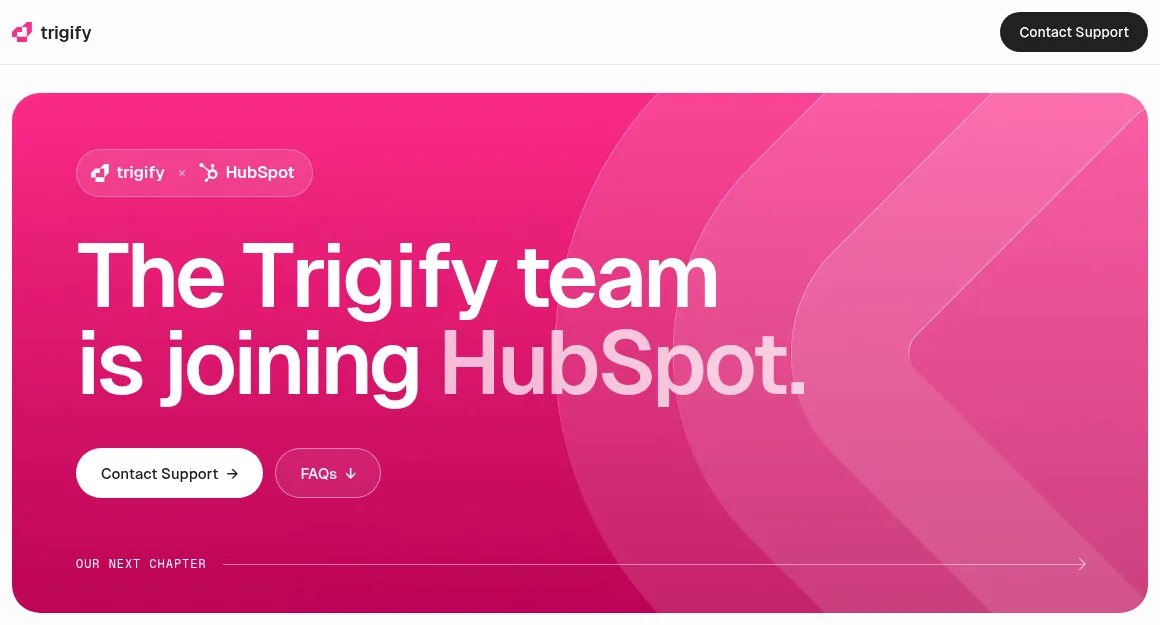
Trigify announced on September 23, 2026 that its team is joining HubSpot and that it is "winding down the standalone Trigify platform". Access ended at 11:59pm BST on October 22, 2026 for customers on the standard notice period; other contracts got their own dates.
There is no HubSpot version to wait for. The FAQ on Trigify's site, word for word:
- "The Trigify platform, customer accounts and service are being retired and will not continue within HubSpot."
- "Your Trigify account will not be migrated to HubSpot."
- "Trigify integrations and API access will stop when account access ends at 11:59pm BST on 22 October 2026. Monitoring and signal collection will also stop."
The team moved to HubSpot, not the product. If your contract runs past October 22, export now (what to save); if not, you rebuild from memory and from where your data landed.
What Trigify did, and what it cost
Trigify sold itself as "The Signal Layer for AI Agents", covering "every buying signal across 11+ social platforms" (homepage archived on July 19, 2026). It did four jobs:
- Social Signals: the people engaging with posts from profiles you picked.
- Listening searches: Boolean keyword searches on LinkedIn, X, Reddit, YouTube and other networks.
- Account signals: on a target list, role and company changes, hiring, competitor engagement, likes on competitor content, posts about a tracked topic.
- Workflows: Jarvis, its AI co-pilot, built the searches; workflows enriched each person (email, phone) and pushed them to Instantly, Attio, Slack, Notion, Sheets and other tools. The only actions it listed were on X.
Plans from Trigify's pricing page, archived on August 4, 2026:
| Plan | Price | Social Signals profiles | Listening searches | Credits a month | Search history |
|---|---|---|---|---|---|
| Starter | $40 a month | 50 | 25 | 4,000 | 7 days |
| Max | $199 a month | 5,000 | Unlimited | 40,000 | 12 months |
| Enterprise | Custom | Custom | Unlimited | Unlimited | All time |
Extra credits cost $0.012 each, after a 14-day trial. Most customers paid $40 or $199 for the signals, then paid again for the tool that sent the messages.
The 9 Trigify alternatives at a glance
Prices checked on October 28, 2026, on monthly billing. Sendable bills in euros: at the European Central Bank rate of October 27, 2026 (1 EUR = 1.1150 USD), €59 is about $66.
| Tool | Replaces in Trigify | Sends on LinkedIn | Entry price | Best for |
|---|---|---|---|---|
| Signado | LinkedIn keywords, creators, competitors, company pages, hiring | No: email, or a push to HeyReach or Instantly | $29 a month | The lowest entry price |
| SignalRaven | Engagers on competitor pages, keyword posts and creators | No, read-only | $99 a month | A scored feed into Slack, Sheets or Clay |
| Teamfluence | Engagement on your team, competitors, creators and keywords | Connection requests | $299 a month, unlimited seats | A team that wants the migration done for it |
| OutX | Keyword, profile and company monitoring on LinkedIn and Reddit | Not documented | Free plan, then $99 a month | Keyword and job change alerts on a budget |
| Octolens | Keyword listening on Reddit, X, LinkedIn, YouTube and more | No | $199 a month | Trigify's listening beyond LinkedIn |
| Sendable | Engagement, keyword and job signals, plus the sequencer you fed | Yes, your own sequence | €59 (about $66) per LinkedIn account | Signals and LinkedIn outreach in one tool |
| Gojiberry | Competitor engagement, profile visits, job changes, hiring | Yes, written by an AI agent, plus email | $99 a month for 2 senders | An agent that finds, writes and sends |
| ReactIn | Post likes, competitor audiences, profile visits | Yes, from the Growth plan | $69 per sender | A low price per sender, signals included |
| Clay | The Clay tables Trigify fed, plus job change signals | No, email only | Free plan, then $185 a month | Teams with someone who builds tables |
Which Trigify job each alternative covers
"Yes" means the vendor's own site documents the job, read on October 28, 2026; a dash means the site does not say, not that the tool cannot.
| Tool | Profiles you pick | Competitor pages | Keyword posts | Beyond LinkedIn | Job changes, hiring |
|---|---|---|---|---|---|
| Signado | Yes | Yes | Yes | No | Hiring |
| SignalRaven | Yes | Yes | Yes | No | - |
| Teamfluence | Yes | Yes | Yes | - | - |
| OutX | - | - | Yes | Yes | |
| Octolens | - | - | Yes, as mentions | Yes | - |
| Sendable | Yes | Yes | Yes | No | Yes |
| Gojiberry | - | Yes | Topics | - | Yes |
| ReactIn | - | Yes | - | - | - |
| Clay | - | - | - | - | Yes |
Only Octolens replaces Trigify's listening on X and YouTube, and OutX adds Reddit. Only three of the nine run a full LinkedIn sequence.
How I picked these tools
Three criteria: it replaces at least one Trigify job at the person level (a named person engaging, posting or changing jobs), its price is public on its own site, and it is still selling on October 28, 2026. Account level intent data vendors (Bombora, 6sense) and website visitor tools solve a different problem; my roundup of buying signals tools covers Common Room, UserGems and RB2B. Other lists also name traxy, Buska, CommunityTracker and PhantomBuster; I did not compare them.
The order follows what Trigify was: a signal feed for the tools you already use. Feeds come first, then the tools that also send on LinkedIn (a bigger switch, since they replace your sequencer too), then Clay, which needs a feed. Inside each group, a tool ranks by how many of Trigify's three LinkedIn engagement jobs its site documents, then by its other jobs, then by entry price.
1. Signado
Signado watches LinkedIn keywords (post authors or the people engaging with them), creators, competitors, company pages, posts you pick and hiring sources. A "Deep Dive" adds company events: hiring, funding, news, product launches, leadership changes and partnerships. It sends by email (Gmail, Google Workspace or your SMTP server) and pushes leads to Instantly or HeyReach, with CSV export, webhooks and MCP on every plan.
Price (checked October 2026): per workspace, no per-user fees. Lite at $29 a month (1,000 credits, 5 active monitors, up to 200 warm leads), Starter $59, Growth $99, Scale $349 (20,000 credits, 100 monitors). 7-day trial with a card.
Best for: the cheapest replacement for Trigify's LinkedIn engagement feed, sent to HeyReach or Instantly.
Limits: LinkedIn only, and LinkedIn invitations go through a second tool.
2. SignalRaven
SignalRaven is a feed and nothing else, on purpose: "Posting, DMs and connection requests are out of scope by design." It monitors competitor company pages, keyword posts, thought leaders and brand mentions on LinkedIn, screens each engager through "14 qualification gates", and delivers to Slack, Clay, Google Sheets, Notion, a webhook, n8n or MCP. It reads public activity from its own infrastructure: "Your reps stay logged out of it entirely".
Price (checked October 2026): Solo at $99 a month (2,500 credits, 20 sources, 1 seat), Pro at $399 (11,500 credits, 80 sources, 5 seats), Scale at $799 (25,000 credits, unlimited sources and seats). Credits are spent per post surfaced, comment or reaction captured, engager evaluated and signal delivered. The trial gives 2,500 credits, with no card and no time limit.
Best for: teams whose Trigify signals fed Clay or Slack, who keep their sender and want no LinkedIn login on the signal side.
Limits: LinkedIn only, no sending, and a cost that grows with the engagement you watch.
3. Teamfluence
Teamfluence covers Trigify's LinkedIn side for a whole team, and courts Trigify customers hardest: price matching and a free migration of your setup. It tracks "profile visits, connections, posts, likes, comments, shares" on your team's profiles and company page, plus "tracked competitor posts, influencer activity, and any keyword you want watched". It can send connection requests across your team's accounts, and connects natively to HubSpot and Salesforce, with Slack alerts, webhooks to Clay and a REST API.
Price (checked October 2026): two plans with unlimited seats, billed monthly: Small Unlimited at $299 a month (500 qualified leads, 10,000 credits) and Regular Unlimited at $499 (1,000 qualified leads, 20,000 credits), or €259 and €449 in euros. No free trial and no self-serve signup: every customer starts with a call.
Best for: a team where several people post on LinkedIn and want every audience tracked, with the migration done for them.
Limits: the highest entry price for a feed, and no way to test it before a call.
4. OutX
OutX monitors LinkedIn and Reddit three ways: keywords ("Watch any phrase, anywhere on LinkedIn or Reddit"), profiles (posts, job changes and birthdays, up to 500,000 profiles) and companies (employee posts, hiring signals, product mentions), with alerts in Slack. You connect your LinkedIn account; its homepage says it "sends from your real LinkedIn session at human pacing".
Price (checked October 2026): a free plan (500 leads a week, 2 private watchlists), then Growth at $99 a month (2,000 leads a week, 1,000 tracked profiles), Expert at $249 and Ultimate at $999 (10,000 leads a week, 20,000 profiles, refreshed every 6 hours). Yearly billing saves 20%. 7-day trial with a card.
Best for: keyword and job change alerts on a small budget, Reddit included.
Limits: no CRM integration named on its pages, and a connected LinkedIn session.
5. Octolens
Octolens is the only tool here that replaces Trigify's listening beyond LinkedIn: keyword mentions on Reddit, X, LinkedIn, TikTok, YouTube, Bluesky, DEV, Hacker News, GitHub, Stack Overflow and review sites, plus podcasts, newsletters, news and the web on Scale. AI labels such as buy intent tag each mention; alerts go to Slack or email, with webhooks, an API and MCP on every plan.
Price (checked October 2026): Pro at $199 a month, or $159 billed yearly (10 keywords, 15,000 mentions, unlimited seats, hourly refresh), and Scale at $599, or $499 yearly (40 keywords, 50,000 mentions, real time). 7-day trial with up to 5,000 mentions, no card.
Best for: teams that used Trigify's listening on X, Reddit or YouTube, for marketing as much as sales.
Limits: it reports mentions, not lists of the people engaging with a post, and describes no lead enrichment.
6. Sendable
From here on, the tools find the people and also send the LinkedIn outreach. This one is the product I am building: judge it with a trial rather than on my word.
Sendable, signal-based LinkedIn outreach covers Trigify's LinkedIn jobs and the step Trigify left to another tool. It watches buying signals, checks every person against the ideal customer you describe with AI, and adds the ones that fit to a LinkedIn sequence you write. Of its sixteen signals, Influencer engagement (up to 10 profiles), Company engagement (up to 10 company pages), Keyword tracker, Changed jobs, Job postings and CSV import replace Trigify's monitors one for one (mapping below). The LinkedIn keyword tracker and hiring signals guides show two of them in detail. Leads go to Attio (HubSpot is in beta), a CSV export, or a Slack message when a signal finds new people.
Price (checked October 2026): €59 a month per connected LinkedIn account (about $66), or €590 a year, with no tiers and no fee per teammate. Each account includes 500 credits a month, one per lead that matches your ideal customer; a team runs up to 5 signals at once. The 7-day trial needs a card and charges nothing before it ends; it includes 20 credits, one LinkedIn account and 3 signals.
Best for: founders and small teams who used Trigify to feed a LinkedIn sequencer and would rather run both in one place.
Limits: LinkedIn only. No listening on X, Reddit or YouTube, no brand mentions, no email channel, no watch over every employee of a target account list. And no tool, this one included, can promise replies.
7. Gojiberry
Gojiberry sells an AI sales agent. Its FAQ lists "people engaging with your company or content", "profile visits", "company followers", "engagement around competitors", "activity around relevant topics", "job changes" and "hiring activity", plus lookalikes of your best customers. The agent writes and sends on LinkedIn and by email, "full auto or approve before it sends". More detail on the Gojiberry AI alternatives page.
Price (checked October 2026): Pro at $99 a month with 2 AI agents, 2 LinkedIn seats, up to 1,800 prospects contacted a month and 200 credits. Its help center lists $59 a month per extra agent, $29 per extra lead source and $99 per member with their own login. Free trial, length not stated.
Best for: one or two people who want an agent to write and send for them.
Limits: you do not build the sequence, and each teammate with their own login costs $99 a month.
8. ReactIn
ReactIn pitches itself against the stack many Trigify customers ran: "You're running Trigify to find signals, Clay to enrich, HeyReach to send." It finds leads "from post likes, competitors' audiences and 20+ signals" (profile visits, post engagement, webinar sign-ups, lead magnet downloads), segments them with AI and sends LinkedIn sequences with sender rotation.
Price (checked October 2026): Basic at $29 per sender a month (signals and enrichment, no outreach), Growth at $69 per sender with follow-ups and lead management, Agency at $999 a month for up to 50 senders. 7-day trial, no card.
Best for: a low price per sender across several accounts.
Limits: Basic sends nothing, and its site documents neither keyword posts nor job changes.
9. Clay
Clay is where many Trigify signals ended up. Its guide to the Trigify integration still describes the action "Find prospects engaging with social content with Trigify", with no shutdown notice on October 28, 2026; since Trigify's integrations stopped, a table built on it needs a new source. Clay has its own social signals from Launch ("Get signals on job change, promotions, new hires, company news, and social"), sends email through its sequencer or an integration, and adds CRM sync, any HTTP API and webhook signals on Growth.
Price (checked October 2026): a free plan, then Launch from $185 a month and Growth from $495 on monthly billing ($167 and $446 billed yearly), each the sum of an actions tier and a data credits tier. 14-day trial.
Best for: teams with someone who builds tables, paired with a feed above (SignalRaven and Teamfluence deliver to Clay).
Limits: you build and maintain the workflow, and Clay does not send on LinkedIn.
How to move a Trigify setup, step by step
Four steps whatever tool you pick: list what Trigify watched, map each monitor, bring back your export, then run two candidates side by side for a week.
What to save, or rebuild, from Trigify
If your notice period still runs, Trigify's FAQ says to "use the existing export options available in Trigify". Export the people and companies with the source post and date of each signal: they show which sources were worth it. If access already ended, rebuild from memory and from where the data landed: the profiles, competitor pages and keywords you tracked, your filters (titles, company sizes, countries), and every destination (Clay tables, CRM fields, Slack channels, sequencer campaigns).
Then map each monitor. For the other tools, the job table above shows which cover what; in Sendable:
| In Trigify | In Sendable |
|---|---|
| Social Signals on profiles you picked | Influencer engagement |
| Competitor engagement, likes on competitor content | Company engagement |
| Listening search on LinkedIn | Keyword tracker |
| Listening on X, Reddit, YouTube | Not covered: Octolens, or OutX for Reddit |
| Changed role, changed company | Changed jobs |
| Started hiring | Job postings |
| Your exported people | CSV import |
The worked example
The screenshots come from a demo workspace: Tendwell and every person in it are fictional. Tendwell sells staff scheduling software to groups of clinics in the United States. In Trigify, it watched two competitors' company pages and sent the operations leaders who engaged to a sequencer.
Step 1: Track the competitor pages
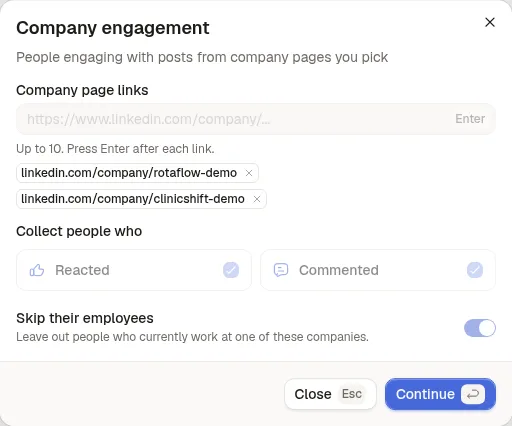
Create a signal, pick Company engagement and paste the competitors' company page links (up to 10). Keep Skip their employees on: a competitor's own staff engage with its posts more than anyone.
Step 2: Bring back your Trigify export
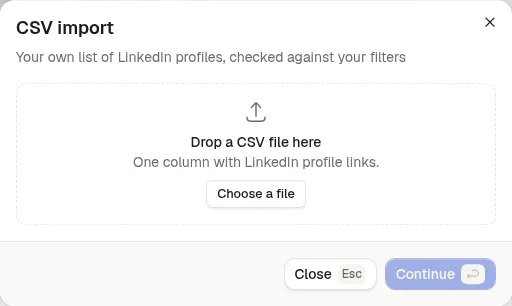
Your exported people go in a second signal, CSV import: one column of LinkedIn profile links. With an ideal customer set, each row gets the same check as a signal and a kept row costs one credit; without criteria, the file goes in as is, at no cost.
Step 3: Describe the ideal customer
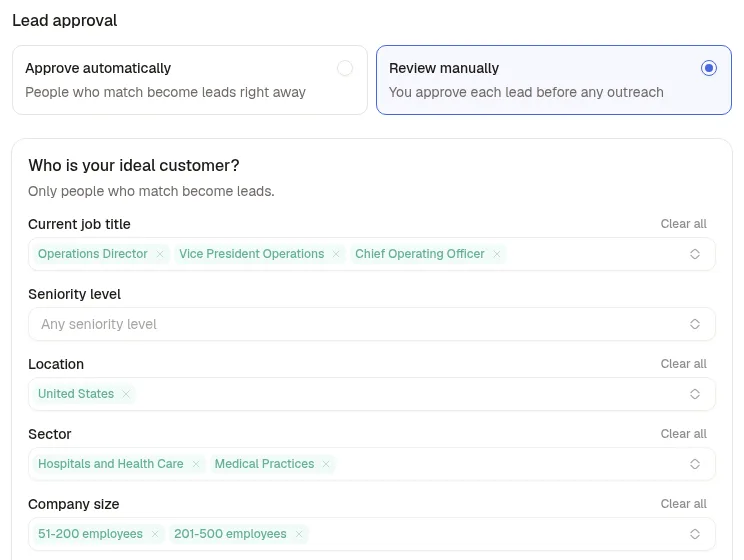
This is the step Trigify's raw feed left to you. Pick the titles, locations, sectors and company sizes you sell to; only people who match become leads. Tendwell keeps operations leaders at clinic groups of 51 to 500 people in the United States. For the first week, choose Review manually to approve each lead before any outreach and see whether the filter agrees with you.
Step 4: Write the sequence
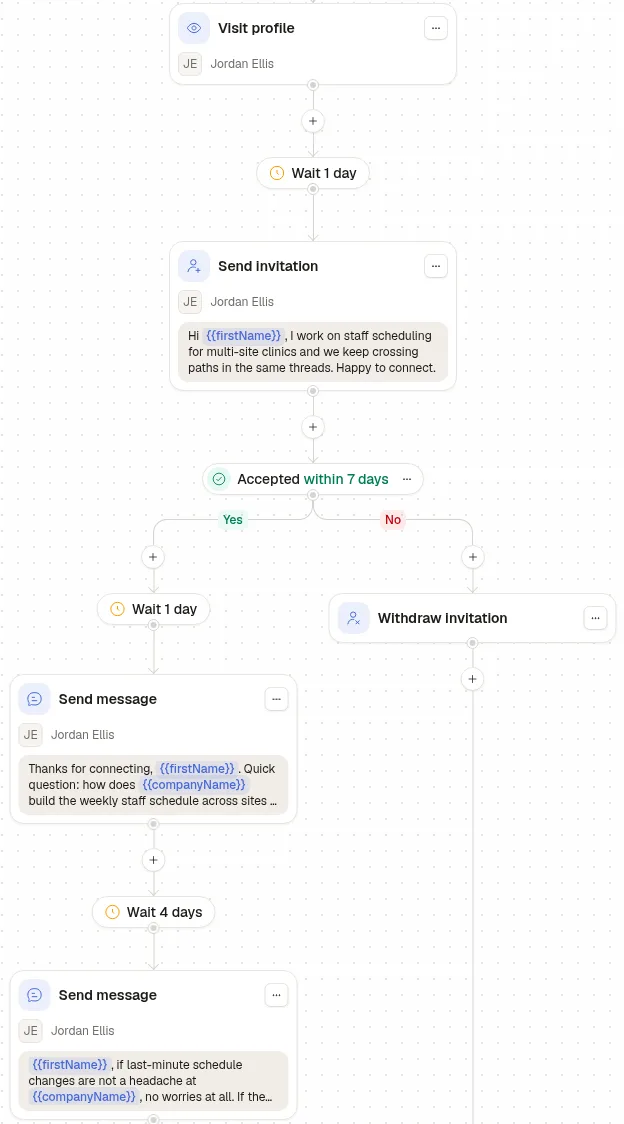
A like on a competitor's post is a quiet action, so the invitation names the topic, not the like. The sequence visits the profile, waits a day and sends the invitation; if it is accepted within 7 days, it sends one question, then a follow up four days later, and otherwise withdraws the invitation.
Step 5: Read the verdicts
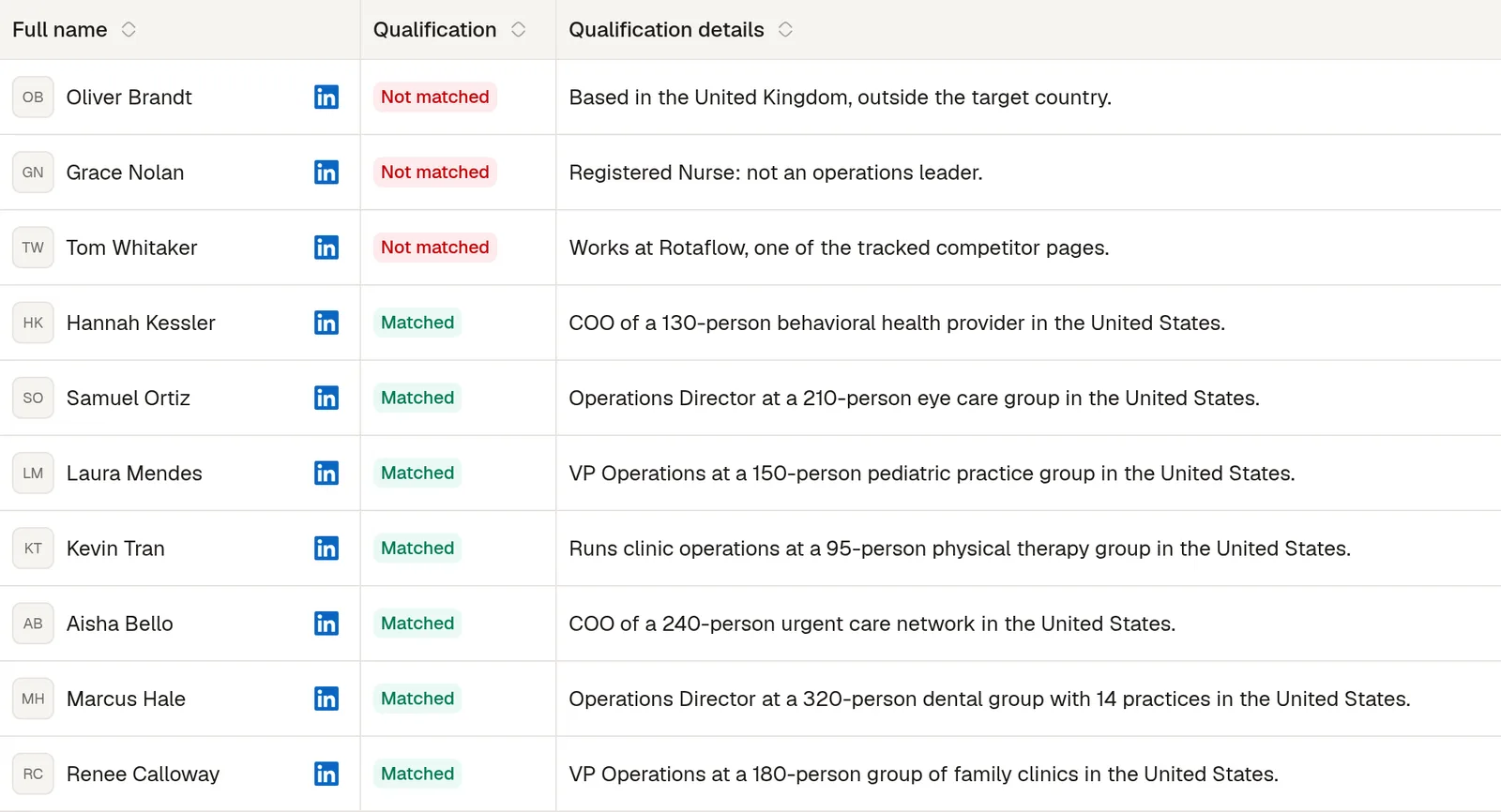
Each person comes back with a verdict and its reason. Here, 7 of the 10 people collected match; the three rejected are a competitor's employee, a nurse and an operations director in the United Kingdom, the people Trigify would have pushed into your sequencer for you to sort.