A LinkedIn multi account inbox is one place where a team reads and answers the conversations of several people's LinkedIn profiles, while each conversation stays tied to the profile it came to. To manage one, keep one profile per person (LinkedIn's User Agreement allows each member a single account and forbids sharing it), connect them all to the same tool, decide who answers which kind of reply, sort replies by what you owe each day, and set who sees what.
I'm Thomas Bonfils, cofounder of Sendable. We build a LinkedIn prospecting tool with a shared inbox, so weigh what follows accordingly: every fact about Sendable below was checked in its code on November 9, 2026, and every LinkedIn rule is quoted from LinkedIn's own pages.
My verdict: the rule matters more than the tool. A team that knows who answers each reply, and from whose profile, can work from any shared inbox; a team that doesn't will double-reply or miss replies in the best one.
What is a LinkedIn multi account inbox?
It is a tool that pulls the conversations of several LinkedIn profiles into one screen, so a team can read, sort and answer them without signing in and out of each profile. You will also see it sold as a LinkedIn unified inbox, a shared inbox or a team inbox. It comes in two designs, and the difference decides how your team works:
| Option |
What you see |
Who it suits |
What to watch |
| Merged inbox (often "unified") |
Every profile's conversations in one list, newest first |
A few people answering for many profiles, such as an agency team |
Each thread must show its profile, or someone answers as the wrong person |
| Per-account inbox |
One profile's conversations at a time, a click to switch |
Teams where each conversation belongs to the person named on it |
Unread counts per profile, so nobody forgets the ones not on screen |
| LinkedIn's own messaging |
The profile you are signed in to |
One person with one account |
No shared labels or drafts, and no second profile without signing out |
| A Company Page inbox |
The Page's messages, for its admins |
Answering people who wrote to your Page |
A Page cannot start a conversation |
Sendable's shared LinkedIn inbox is a per-account design: a row of avatars switches between the team's profiles. If what you need is deals, stages and a pipeline rather than replies, you are looking for a LinkedIn CRM instead.
Why can't a team share one LinkedIn login?
Because LinkedIn's rules tie every account to one real person. Its User Agreement, effective November 3, 2025, says it in three places:
- Section 2.1: "you will only have one LinkedIn account, which must be in your real name".
- Section 2.2: "You will keep your password a secret" and "You will not share your account with anyone else and will follow our policies and the law."
- Section 8.2, among the things members agree not to do: "use or attempt to use another's account (such as sharing log-in credentials or copying cookies)".
So a multi-account inbox replaces a shared password; it does not make one easier. Each salesperson, founder or client keeps their own account and connects it themselves, and the team works the conversations in the tool. The exception is a Company Page, which has admins rather than an owner: "You must be a super or content admin to view and reply to messages for your Page", says LinkedIn Help, but "Admins can only send a message to a member if they message the Page first." A Page answers; it does not prospect.
What does LinkedIn's own inbox do with several accounts?
Nothing across profiles: LinkedIn messaging shows the one you are signed in to. Inside it, LinkedIn Help lists five filters on a computer (Jobs, Unread, My Connections, Starred and InMail), a search "by keyword or recipient", and Focused and Other tabs. It introduced that Focused Inbox in a December 1, 2022 update, "with conversations up nearly 20 percent since last year": a 2022 figure, but a sign that LinkedIn itself saw inboxes filling up.
What a team misses is everything shared: no label a colleague can see, no draft someone else can finish, and no way to read a second profile without signing out of the first or keeping a browser per profile. That is the gap a LinkedIn inbox for multiple accounts fills.
Who should answer each reply?
Decide it before you connect anything. A shared view without an owner per reply only moves the confusion to a new screen: two people answer the same prospect, or each assumes the other did. Pick one of three ownership models and write it down.
| Ownership model |
Who answers |
It works when |
The risk |
| Account owner |
The person whose account received the reply |
Each salesperson or founder prospects from their own profile |
Replies wait while the owner is away |
| Triage, then hand-off |
One person sorts every profile's replies, answers routine ones, hands off the rest |
A founder with an assistant, or an SDR supporting several sellers |
The prospect reads the owner's name, so the triage person writes in their voice or only drafts |
| Team per client |
A small team answers only one client's profiles |
An agency running outreach for several clients |
A reply sent from the wrong client's account: separate clients in the tool, not only in people's heads |
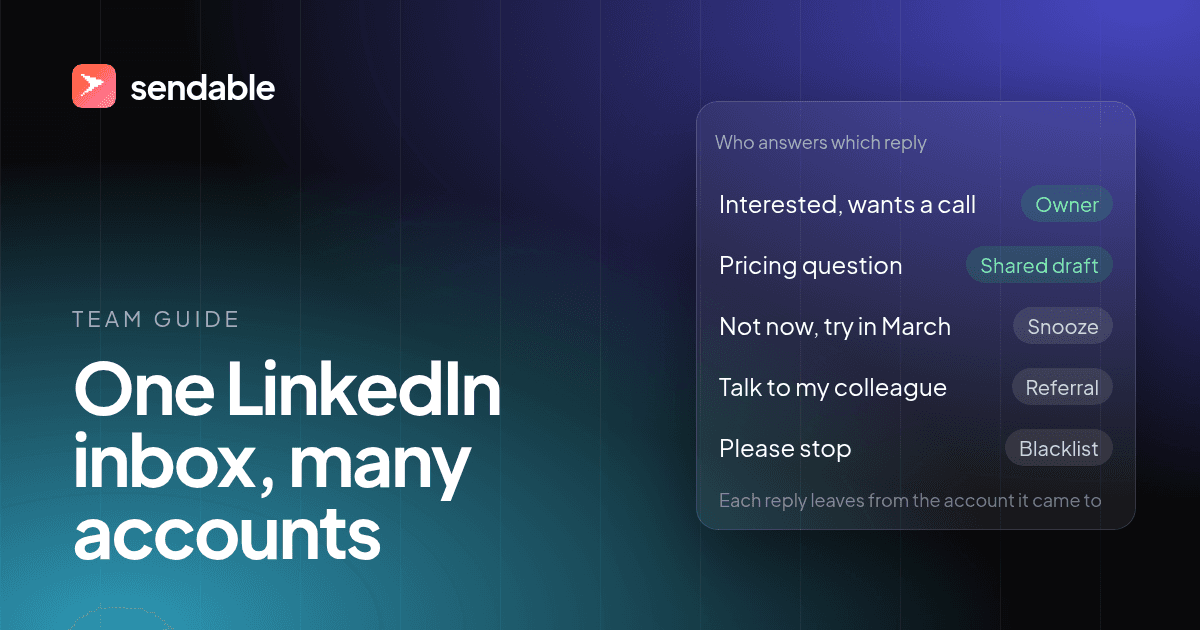
Then route each kind of reply. This is the table to agree on in your first meeting:
| The prospect says |
Who handles it |
What to do in the inbox |
| "Interested, can we talk?" |
The owner |
Propose a time and label the conversation (Meeting booked) |
| A pricing or technical question |
The owner, with a specialist's draft if needed |
Save the draft on the conversation; the owner reviews and sends it |
| "Not now, try in March" |
Whoever triages |
Snooze to the date they gave and label it (Follow up) |
| "Talk to my colleague" |
The owner |
Thank them, then reach the colleague from the same profile |
| "Not interested" or "Please stop" |
Whoever triages |
Archive it, and add the person to the blacklist so no campaign writes again |
Sendable has no assignment field: a conversation belongs to the LinkedIn account it came to, so whoever owns that account owns its replies by default. A team that needs a named assignee on every thread should test that feature on a trial of each tool it considers.
How do you sort replies across several accounts every day?
By what you owe, not by account. Once or twice a day, in this order:
- Unread, profile by profile. Start with those that have unread replies, so nobody's prospects wait because their profile was not on screen.
- Read but not answered. Replies someone opened and left: this is where silences and double replies come from.
- You wrote last. Conversations waiting on the prospect: candidates for one follow-up, or for the archive.
- Snoozed conversations due today. Bring them back and answer.
The volume adds up quickly. In a Sendable campaign from May 31 to June 13, 2026, described in our guide to identifying buying signals, one account sent 156 connection requests and got 52 replies in two weeks, close to four a day. Three profiles at that pace would mean about eleven replies a day to sort, each under a different person's name.
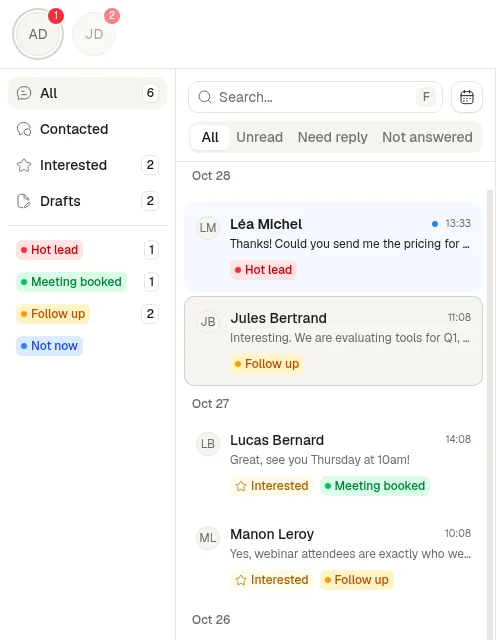
In Sendable, that order maps to the screen. With two accounts or more, a row of avatars above the list shows each one's unread count, keys 1 to 9 jump to one, and the sidebar badge adds them all up. Three tabs split the conversations of the profile you are on: Unread, Need reply (read and not answered; a reaction you left counts as an answer) and Not answered (you wrote last). Auto Interested, on by default, has an AI model read each new reply from someone a campaign reached, and marks the lead Interested when they show interest.
How do teammates hand off a conversation without a double reply?
By keeping the state of each conversation in the tool, where everyone sees it, rather than in someone's head. Four things carry a hand-off:
- A label as the stage. In Sendable, labels belong to the team and a conversation carries one, so "Pricing asked" or "Meeting booked" tells the next person where things stand.
- A draft saved on the conversation. Sendable keeps one draft per conversation for the whole team until someone sends it, so a colleague can write the answer and the owner can send it.
- Notes on the lead, not in the thread. A click on the name opens the lead sheet: the signal that found the person, their campaigns and the team's notes.
- Snooze with a date. "2 days" or "next friday": the conversation shows the date and waits in Snoozed until then. Sendable sends nothing when the date comes, so someone still has to answer.
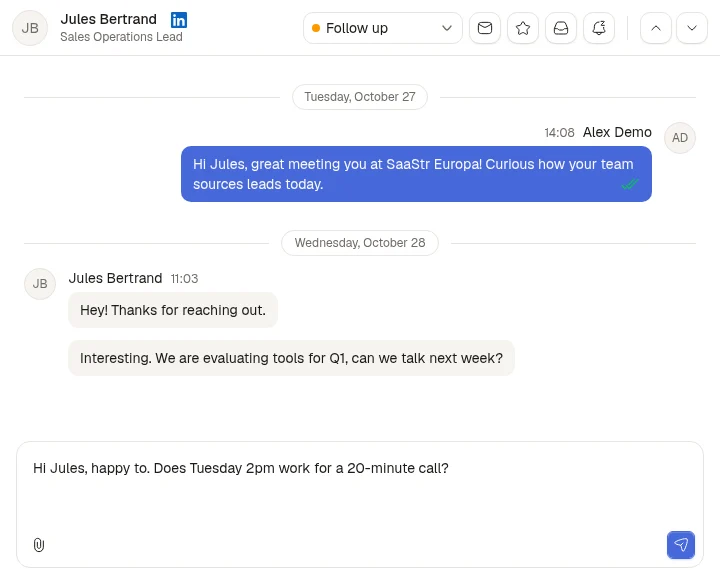
Two safeguards stop the doubles a team inbox can create. A reply stops the lead's campaign sequence, so nobody gets an automated follow-up after answering. And a message written in Sendable leaves when someone presses send, with a retry that never sends it twice.
The sync runs both ways too: a message sent from LinkedIn's phone app shows up in Sendable, so the team sees an answer the owner typed on the go. Connect a CRM and the conversation follows the person further: Attio and HubSpot are open to every workspace, Pipedrive is in beta, and each message lands on the person's timeline.
Who on your team should see which accounts?
Everyone who answers needs the conversations they answer, and nothing forces wider access. Set it per person:
- A sales team: every member reads every profile's conversations by default, which is what makes the inbox shared.
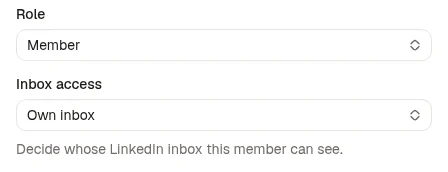
- A salesperson who wants privacy: an owner sets them to Own inbox in Settings, Members, Edit member. They then see only the conversations of the accounts they connected, in the inbox, on the dashboard, on the lead sheet and in Slack. Owners always see everything.
- An agency: one team per client in the workspace, each with its own accounts, campaigns, leads and inbox, and each client invited to their own team only. Our guide to LinkedIn automation for agencies walks through that setup and where it falls short. Our Done for you team runs LinkedIn outreach for clients too: here are the results four B2B clients got.
One caveat: a CRM sync sends every account's conversations, whatever each member's access in Sendable, so check who can read the CRM as well.
What should you check before choosing a multi-account inbox?
Six things, tested on a trial with two or three real accounts rather than read on a pricing page.
| Check |
The question to ask |
Sendable's answer |
| Account identity |
Does every thread show which profile it belongs to, and which one a reply leaves from? |
One profile at a time, one click apart, each with its unread count |
| Message coverage |
Which conversations come in: existing threads, new ones, groups, Page messages? |
Existing conversations imported on connection, then every new message; groups included; no Page messages, no email |
| Two-way sync |
Does a reply typed on LinkedIn appear, and does read or unread go back to LinkedIn? |
Yes for both; labels, drafts, snooze and archive stay in Sendable |
| Ownership and hand-offs |
Is there assignment, a shared draft, labels, notes? |
No assignment; team labels, one shared draft per conversation, notes on the lead |
| Access |
Can you limit what each member sees? |
All inboxes by default, Own inbox per member, one team per client |
| Price |
Per account, per user, or both? |
Per LinkedIn account, teammates at no cost, no inbox-only plan |
Also weigh what Sendable's inbox does not do: no merged list (only the unread badge adds them all up), no search inside messages (the search finds a contact by name), no comments on a thread and no snippets.
Should a multi-account inbox also send messages automatically?
Treat it as a separate decision. Reading and answering replies by hand is one job; sending invitations and follow-ups automatically is another, with its own risk. LinkedIn's User Agreement, in section 8.2, forbids using "bots or other unauthorized automated methods to access the Services", and its page on prohibited software and extensions warns that members who use such software "risk having their accounts restricted or shut down". No tool can promise zero risk, Sendable included: it reads and sends through each profile you connect.
In Sendable, the two stay apart. In the inbox, a message leaves when someone presses send. Campaigns send the sequence you write within daily limits that you can see and change: 30 invitations and 30 new conversations a day to start for Premium or Sales Navigator accounts, 20 for free accounts. Our guide to automating LinkedIn messages covers what to automate and what to keep by hand.
How much does a multi-account inbox cost in Sendable?
$69 per LinkedIn account a month, or $690 a year, before VAT: a launch price, $99 normally. Three accounts cost $207 a month, and teammates who read and answer cost nothing. There is no inbox-only plan: the price also covers buying signals, AI qualification with 500 credits per account every month, and campaigns.
The 7-day free trial needs a card, charges nothing before it ends, and includes one LinkedIn account: enough to try labels, drafts and the lead sheet. Connecting a second one, to switch between them, takes Pro. Every plan is listed with its price per LinkedIn account.
Give every reply an owner first
A LinkedIn multi account inbox works when every reply has an owner and every profile stays its owner's. Keep one profile per person, connect them all to one tool, write down who answers which kind of reply, sort replies by what you owe each day, and give each member the access they need. Then test the tool on two or three real accounts before you commit. If your team prospects from several people's profiles and wants each reply next to the signal and campaign that started it, see how Sendable's shared inbox works.
Sources
- LinkedIn, User Agreement, effective November 3, 2025: one account per member, no shared account or log-in, no bots (sections 2.1, 2.2 and 8.2).
- LinkedIn Help, Prohibited software and extensions: the restriction risk of automation software.
- LinkedIn Help on filtering messages: the five filters, the search and the Focused and Other tabs of LinkedIn's own inbox.
- LinkedIn Help on messages for LinkedIn Pages: who answers a Page's messages, and when a Page can write.
- LinkedIn News, New and improved messaging experience, December 1, 2022: the Focused Inbox and the growth in conversations.
- Sendable, How to identify buying signals: the campaign of May 31 to June 13, 2026.
FAQ
What is a LinkedIn multi account inbox?
A tool that brings the conversations of several people's LinkedIn profiles into one place, so a team can read, sort and answer them without signing in to each one. Each conversation stays tied to the profile it came to, and the reply leaves from that profile.
Can you have two LinkedIn accounts?
Not as one person: LinkedIn's User Agreement says "you will only have one LinkedIn account, which must be in your real name". A team manages several accounts by having each person keep their own and connect it to a shared inbox.
Can teammates assign LinkedIn conversations to each other?
It depends on the tool. Sendable has no assignment field: a conversation belongs to the account it came to, and the team hands it off with shared labels, one shared draft per conversation and notes on the lead. If your team needs a named assignee per thread, test that feature on a trial.
Does a multi-account inbox send LinkedIn messages automatically?
Not necessarily: answering replies and automated sending are separate jobs. In Sendable, a message written in the inbox leaves when someone presses send, and campaigns send sequences within daily limits you set. LinkedIn's rules on automation apply to any tool that sends for you.
Do messages sent from the LinkedIn app show up in a shared inbox?
In Sendable, yes: it imports the existing conversations when an account connects, then receives every new message in both directions, so a reply typed in LinkedIn's phone app appears in the team's inbox. Check the same on a trial of any tool you compare.
How much does a LinkedIn multi account inbox cost?
In Sendable, $69 per LinkedIn account a month, or $690 a year, before VAT, with teammates at no cost. The inbox comes with signals, AI qualification and campaigns; there is no inbox-only plan.