Turning LinkedIn post engagement into leads takes four moves: pick posts whose audience looks like your buyers, keep only the people who fit, write to them within days, and open with the topic they engaged with rather than with the like itself. LinkedIn names most of these people for you: the reactions, the comments and a list of who reposted. What it never names are the people who only scrolled past.
Full disclosure: I build Sendable, a tool that runs this method every day. The method comes first, by hand and for free, with the platform's rules quoted from its own help pages, read on November 3, 2026. Then the same method in Sendable, every setting checked against the product's code.
My rule: a reaction gives you a name, a comment gives you a reason. Write to the commenters first, to the reactors only when they match your buyer exactly, and never to everyone who clicked.
Which LinkedIn post engagement is worth a message?
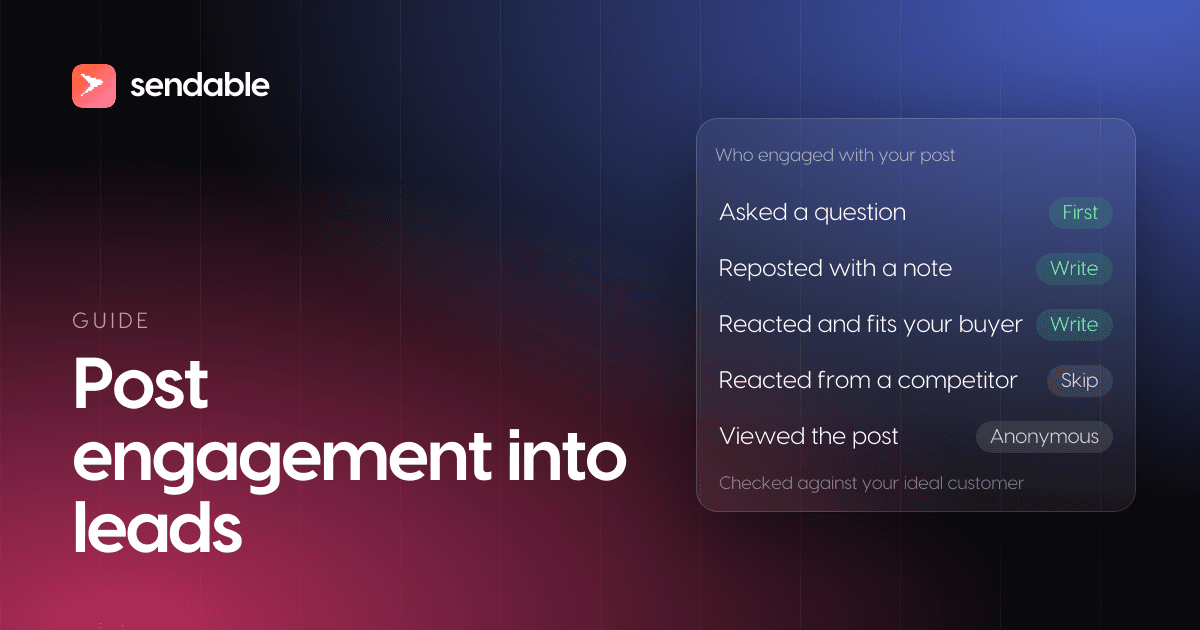
Comments first, then reposts with their own text, then reactions from people who fit your buyer exactly. A comment shows effort and often a problem in the person's own words; a reaction is one click. Views are not leads at all, because LinkedIn never tells you who viewed a post.
What you see for each kind of engagement, from the help pages on post analytics, reposts and polls, read on November 3, 2026:
| Engagement | What LinkedIn shows you | What it tells you | Worth a message? |
|---|---|---|---|
| Comment that asks a question or names a problem | Name, headline and the comment itself | A live problem, in their words | Yes, first |
| Comment that agrees or adds a point | The same | Interest, and a minute of effort | Yes |
| Repost with their own text | Name in the reposts list, and their text | They put their name behind the idea | Yes |
| Repost without text | Name in the reposts list | Agreement, little else | If they fit |
| Reaction (Like, Insightful, Support...) | Name, headline and the reaction chosen | A second of interest | Only if they fit exactly |
| Vote on your poll | Their answer, shown to the poll's author | Their situation, in your own categories | Yes, by answer |
| Private send to a contact | Nothing: "This list will not display posts that are shared privately" | Unknown | No way to know |
| View or impression | Counts and demographics, never names | Reach | No |
Only the people you can name can become leads, and the platform names everyone in that table except viewers and private sends. Its analytics page lists discovery, social engagement and "Post viewer demographics", and adds: "Only you can view your post analytics." For polls, "How you vote is visible to the author of the poll (i.e. the person or organization who posts the poll)", and on a company page poll, to its admins.
Two details change how much a reaction is worth. The reactions page defines Insightful as "you thought the post made a great point, offered a new idea, or shared helpful insights or advice", and Celebrate as congratulating "a personal or professional milestone". An Insightful on a how-to post says more than a Celebrate on a job announcement, which mostly comes from colleagues and friends. And the topic matters more than the reaction: a Like on your buyer's problem beats a Love on your company's anniversary.
Comments also carry further than they used to. In its fourth quarter results, published on July 29, 2026, LinkedIn reported:
"Time spent on content grew 10% year over year, knowledge-oriented posts increased 24%, and time spent reading comments rose 18%, reflecting growing engagement with professional knowledge and conversation."
A comment is read by the author's whole audience, so the person who wrote it knows it is public. That is why answering it, publicly or in a message, feels natural, while quoting someone's Like back to them does not.
Whose posts should you watch for leads?
Your own posts, what the creators your buyers follow publish, your competitors' company pages, and anything written in your buyers' words. Each one brings a different audience, which changes who you keep and what you say first.
| Source | Who engages | What they know about you | Volume | Open with |
|---|---|---|---|---|
| Your own posts | Your network, and theirs | You, a little | Small, warm | Their comment, or the topic |
| Posts by creators your buyers follow | People who care about the topic | Nothing | Medium | The topic, not the creator |
| A competitor's company page | Its customers, prospects, staff and job seekers | Your competitor | Medium, mixed | The problem it raised |
| Anything written in your buyers' words | Strangers working on the topic | Nothing | Large, noisy | The topic |
| Your polls | People who answered your question | You | Small | Their answer |
| A lead magnet post ("comment and I'll send it") | People asking for a resource | You owe them something | Spikes | The resource, then one question |
- Your own posts are the warmest source and the smallest. Someone who commented there spoke to you, in public: mentioning the comment is a reply, not surveillance. If your profile has no audience yet, the other sources come first.
- Creators your buyers follow lend you their audience. Pick people who write about the problem you solve for practitioners, not generalists with a huge following: a broad audience brings everyone, and your filter throws most of it away.
- A competitor's company page is the visible part of its audience. Only a page's admins see its followers by name (my guide to LinkedIn company followers quotes LinkedIn's rule), but anyone can see who reacts to and comments on its posts. Expect its own employees among them, and drop them.
- Posts that use your buyers' words reach people you would never find through a creator, at the cost of noise: practitioners, students and vendors write about every topic. How to write a search that surfaces buyers is in my guide to the LinkedIn keyword tracker.
- Your polls sort people for you. A vote is an answer to your question, so the first message can follow up on it.
- A lead magnet post asks for a comment in exchange for a guide or a template. The commenters expect a message, so the resource is the opener. Sending it to every commenter who fits your buyer, automatically, is what LinkedIn lead magnet automation does.
How do you collect the people who engaged with a post?
By hand, the platform's own screens are enough for one or two posts a week: open each one, click the reaction count for the list of people and their reaction, read the comments, and click the reposts count for the reposts list. For your own poll, the results show who voted for what. Then copy each person into a sheet.
Step by step, for one post:
- Reactions. Click the reaction count: you get each person with their headline and the reaction they chose.
- Comments. Expand the comments and their replies. A commenter who asks a question or describes their own situation goes to the top of your list.
- Reposts. On your own post, "You can view the list of people who've reposted your post in the [number] reposts pop-up window", says the help page on reposts. "You can also click [number] comments to view the comments that have been added to the reposts."
- Polls. On your own poll, the results show each voter's answer.
- The sheet. One row per person: name, profile link, headline, what they did (commented, reposted, reacted), the date, and the link. Someone who engaged twice this month goes first.
There is no export button for any of this. For a public post, my free LinkedIn comment exporter puts the commenters and the people who reacted into one CSV file, one row per person, with no login and no extension. What no export does is decide who is worth a message: that part is the next step, and it is where most of the time goes.
Software that collects this from your own session is a different matter. The help page on prohibited software and extensions is explicit:
"In order to protect our members' data and our website, we don't permit the use of any third party software, including "crawlers", bots, browser plug-ins, or browser extensions that scrape, modify the appearance of, or automate activity on LinkedIn's website."
It adds that members who use such tools "risk having their accounts restricted or shut down". Section 8.2 of the User Agreement, effective November 3, 2025, forbids tools that "scrape or copy the Services, including profiles and other data from the Services". A tool that collects engagers through your logged-in account puts that account at risk; a tool that does not use your account does not, for the collection step. Outreach is another story, covered below.
How do you decide which engagers to contact?
Check each person against your ideal customer profile (ICP), on their current position: job title and seniority, company size, sector, location. Then remove the people you should not write to, even when they fit. What is left is your lead list; on a broad topic it can be a small part of everyone who engaged.
The people to remove, in order:
- The author's colleagues and the competitor's staff. They engage with their own company's content by habit.
- Your customers and open deals. Your account owner talks to them, not a sequence.
- People already talking with you, in your LinkedIn inbox or your CRM.
- Peers and vendors. In a thread about sales tooling, half the comments can come from people who sell sales tooling.
- Students, job seekers and recruiters, unless they are who you sell to.
Then sort what is left: commenters before reactors, repeat engagers before one-time ones, your own posts before other people's. Engagement is interest in a topic, not a plan to buy. The first message has to find out whether that interest comes with a problem, as with every buying signal on LinkedIn.
What should you write to someone who engaged with a post?
One short reason, one question, nothing to sell. On your own post you can mention their comment, because they addressed you. Anywhere else, name the topic, never the action: "I saw you liked that" tells them you were watching. The help page on personalizing invitations asks for "How you found the person or what you have in common" and "Why you'd like to connect now".
On a free account, the note itself is rare. The same page says "You can add a personalized message to up to three connection requests per month" and "Each message can be up to 200 characters"; Premium members can personalize every invitation. So on a free account most invitations go out without a note, and the reason has to travel in the first message after the acceptance.
LinkedIn's data on InMail, published by its Talent Blog on November 7, 2023, gives three rules that carry over, even though recruiters sent those messages, not sellers:
- Short. "InMails under 400 characters tend to be met with 22% higher response rates than the average response rate for all InMails."
- Personal. "Personalized InMails can increase acceptance rates by 40%."
- One follow-up. "65% arrive within 24 hours and 90% arrive within one week": a second message a few days later covers most of the replies you will get.
Five openers, one per source, for a company selling expense software to finance teams. The character counts are for the text as sent, with "Maria" and "Brightpath" filled in:
| Source | Invitation note (if you have one) | First message after the acceptance |
|---|---|---|
| She commented on your post | "Hi {{firstName}}, thanks for your comment on my month-end close post. Chasing receipts is the step I hear about most. Happy to connect." (127) | "Thanks for connecting, {{firstName}}. You mentioned chasing receipts: is that still done by hand at {{companyName}}, or did you find a fix?" (126) |
| She reacted to a creator writing on month-end close | "Hi {{firstName}}, I write about month-end close for finance teams at companies like {{companyName}}. Would be glad to connect." (113) | "Thanks for connecting, {{firstName}}. Quick question: how many days does month-end close take at {{companyName}} today?" (106) |
| She commented on a competitor's page | No note: the competitor is not yours to mention | "Thanks for connecting, {{firstName}}. Curious: how do expense approvals work at {{companyName}} today, one tool or a mix of email and spreadsheets?" (134) |
| She voted in your poll | "Hi {{firstName}}, thanks for voting in my poll on month-end close. You picked "5 days or more": curious what slows it down at {{companyName}}." (129) | "Thanks for connecting, {{firstName}}. Is the slow part the receipts, the approvals or the bank reconciliation?" (102) |
| She asked for your checklist in the comments | "Hi {{firstName}}, you asked for the month-end close checklist under my post. Accept and I'll send it over right away." (109) | "Here it is, {{firstName}}: [link]. One question while you read it: which step takes longest at {{companyName}}?" (98) |
Every opener names the topic and asks something they can answer in ten seconds. No calendar link and no pitch in the first message. Twelve more notes, sorted by the signal that surfaced the person, are in my guide to the LinkedIn connection request message.
How soon should you reach out after someone engages?
Within the week, while it is still fresh in their mind. A comment from this morning is a conversation you can join; a reaction from last month is a cold contact with a name attached. If they accept your invitation, send the first message within a day, then one follow-up a few days later.
Speed has a limit, though. Writing within minutes of a like, before you have checked who the person is, is how lists of strangers get the same message. Check first, then write the same week. And go easy on the volume: the help page on account restrictions names "You've sent many invitations within a short amount of time" among its causes, and so is "Many of your invitations have been ignored, left pending, or marked as spam by the recipients". A viral post with 2,000 reactions is a month of invitations, not a day. The full checklist is in is LinkedIn automation safe.
How does Sendable turn post engagement into leads?
Sendable runs the method above every day. A signal collects the people who react to or comment on the posts, profiles or company pages you pick, Sendable's AI checks each person against the ideal customer you describe and writes down why, and the matches go into a LinkedIn sequence that you write. Five signals cover it, each with limits read in the product's code:
| Signal | What it watches | Limits | Uses your account? |
|---|---|---|---|
| Post interactions | Reactions and comments on posts you pick, yours or anyone's | Up to 10 posts; new reactions and comments checked daily for 3 days after the first collection | No |
| Influencer engagement | What the profiles you pick publish | Up to 10 profiles; their 5 latest posts from the last 3 to 30 days, then each new one once it is 3 days old | No |
| Company engagement | What the company pages you pick publish | Up to 10 pages, same window, with Skip their employees | No |
| Keyword tracker | Posts that use your keywords: authors, reactions, comments | New posts daily; reactions and comments only above your minimums, 10 reactions and 5 comments by default | No |
| Poll voters | Your polls, by answer | One poll from your account; checked daily, then once more when it closes | Yes, yours |
Signals run every day between 06:00 and 20:00 in your timezone. Only Poll voters reads from your own account; the other four collect without it, so your account only acts when the campaign sends something.
Step 1: Pick the signal and paste the posts
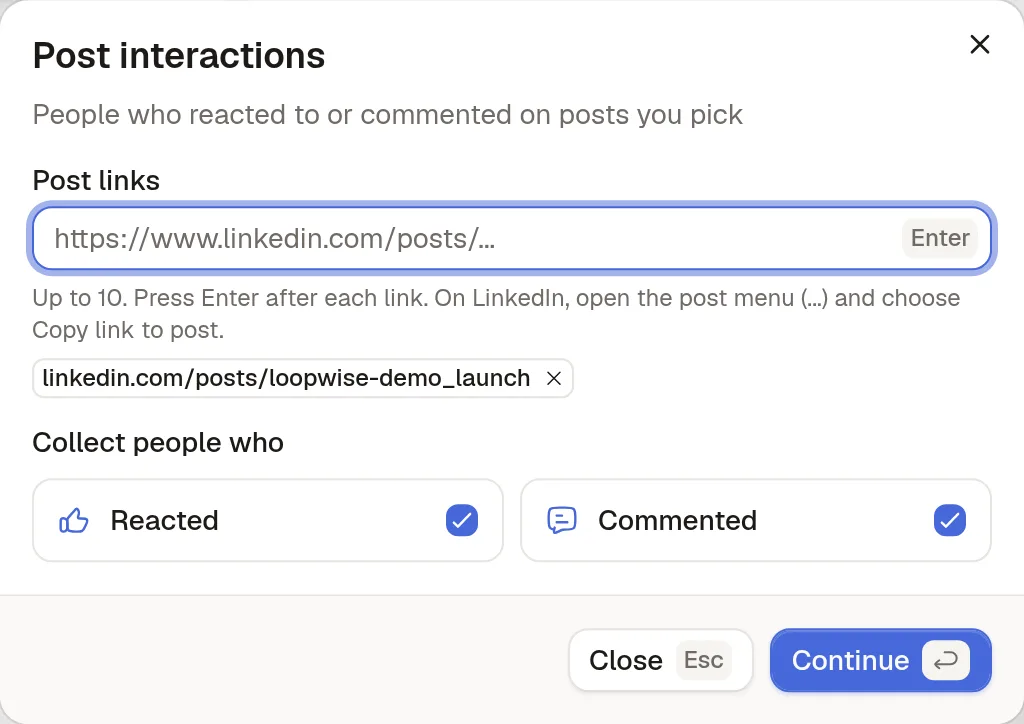
Open Signals, click Create and look in the Engagement group. Post interactions asks for Post links: "Up to 10. Press Enter after each link. On LinkedIn, open the post menu (...) and choose Copy link to post." Under Collect people who, keep Reacted and Commented, or untick Reacted to keep only the people who took the time to write. Influencer engagement and Company engagement work the same way with profile or company page links.
Step 2: Describe who you want to keep
The Ideal customer step holds the filters: job title, location, company size, sector and more. Every person collected is marked Matched or Not matched, with the reason. Lead approval is Approve automatically ("People who match become leads right away") or Review manually ("You approve each lead before any outreach"); review manually for the first week, while you learn what your sources bring in.
The Exclude card removes the people from the list in the previous section: In another active signal and Already contacted are on for a new signal, Already in your inbox and Already connected are one click away, and with a connected CRM, people already in it. On Company engagement, Skip their employees leaves out the people who work at the companies you watch.
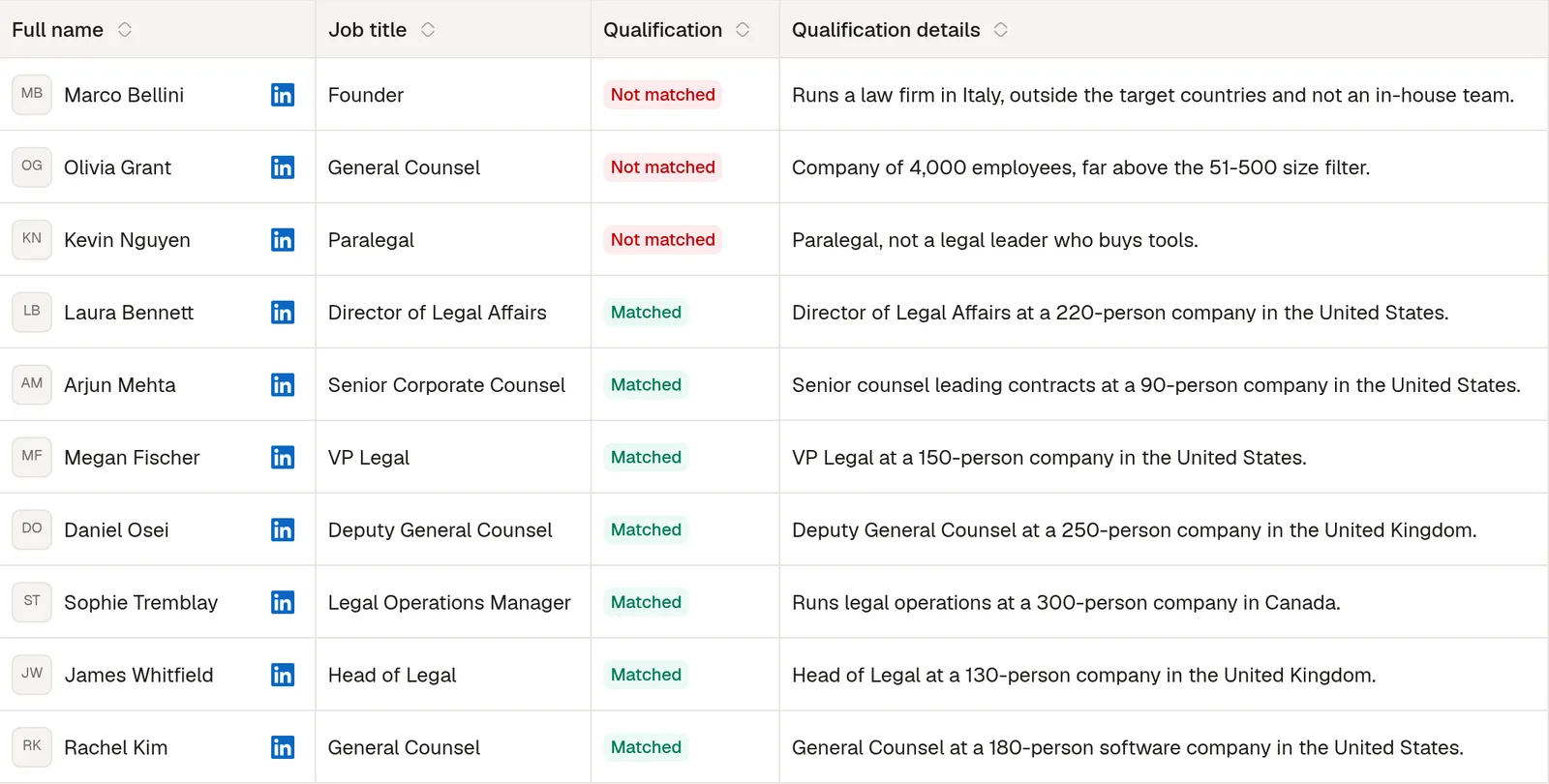
Only matches cost credits: one matched person, one credit. People who do not match, and the ones your exclusions remove, are free.