LinkedIn prospecting means reaching the right people at the right time with a message that sounds human, following up without pushing, and measuring what works. It comes down to seven decisions: your mindset, your profile, your ideal customer, where your leads come from, your first message, your follow-ups and the numbers you track. Well targeted, a decent campaign turns 100 invitations into 30 connections and 6 conversations.
This guide is what we have applied at Sendable for 3 years: tables to copy, message templates, a follow-up schedule and benchmarks that show where your prospecting gets stuck.
Should you be afraid of bothering people?
No: prospecting means taking the initiative for your business, and that is respectable. If your targeting is right and your message is kind, you bring a solution to someone who has the problem. The few people who brush you off will have forgotten you 30 seconds later. Hundreds of thousands of companies sign their customers through prospecting: not doing it out of fear is money left on the table.
Three rules prevent almost every bad reaction:
- Only contact people who have the problem you solve. That is the job of the ideal customer, below.
- Give a reason to write now: a post, a job opening, a new role. A message that says why you are writing does not look like spam.
- Take the first no. Stop the sequence at the first negative reply and never contact that person again.
How do you answer a "no"?
An objection is not the end: the prospect is still talking to you. Treat it as a question to understand, not an argument to win. One short message; if the objection comes back, you stop.
| They say |
What it often means |
Your answer |
| "Not interested" |
No reason to care yet |
"No worries, thanks for telling me. Out of curiosity: is it not a topic at all, or just not now?" |
| "Not the right time" |
Not a priority today |
"Got it. Should I check back in March?"
Write the date down and follow up then. |
| "Send me some info" |
A polite exit, or real interest |
"Happy to. So I send the right thing: is it more X or Y for you?"
Then send one page, no more. |
| "We already use [tool]" |
Happy with it, or not ready to switch |
"Great, you've got the basics covered. What would you improve if you could?"
Never knock the tool. |
| "No budget" |
Not a priority, or a real freeze |
"Understood. Is it a timing question, or just not a priority?" |
| "That's not my area" |
Wrong person |
"Thanks! Who would be the right person?" |
| "How did you get my profile?" |
Discomfort |
Say where it came from (the post, the event, the search) and offer not to write again. |
| "Is this a bot?" |
Doubt about who is writing |
Answer honestly: you write and read the conversation, even if sending is scheduled. |
What never to do: argue, list ten features to prove the prospect wrong, treat a "no" as a "not now", or answer an annoyed person with a pitch.
What LinkedIn profile makes people reply?
A profile that says in 5 seconds who you help, what result you bring and why they should trust you. Without it, your messages don't matter: before accepting an invitation or replying, the prospect clicks on your profile. They should see a peer who knows their job, not a salesperson.
The elements to get right, one by one
| Element |
What you want |
What to avoid |
| Photo |
A sharp, smiling face, framed at the shoulders, on a light or plain background |
A logo, a group photo, sunglasses |
| Banner (1584 × 396 px) |
Your promise in one sentence and social proof: client logos, a rating, a key number |
The default banner, a landscape, a vague slogan |
| Headline (220 characters) |
Your offer and social proof, possibly a call to action |
"CEO @ MyCompany", a list of keywords |
| About |
3 to 5 lines: who you help, what problem, what result, how to reach you |
Your whole career since high school |
| Featured |
A case study, a demo, a customer review |
Nothing, or an old unrelated post |
| Activity |
2 to 4 recent posts or comments on your topic |
A profile silent for 6 months |
- I help [audience] [get result] · [proof]: "I help accounting firms sign 5 new clients a month · 120+ firms coached".
- [Offer] for [audience] · [proof]: "Payroll software for startups · 300 companies on board".
- [Role] · [promise] · [proof] · [call to action]: "Founder @ Rankwell · I help B2B SaaS companies double their organic signups in 6 months · 140+ clients · Comment 'AUDIT' for a free SEO audit".
Example: the profile of an SEO consultant
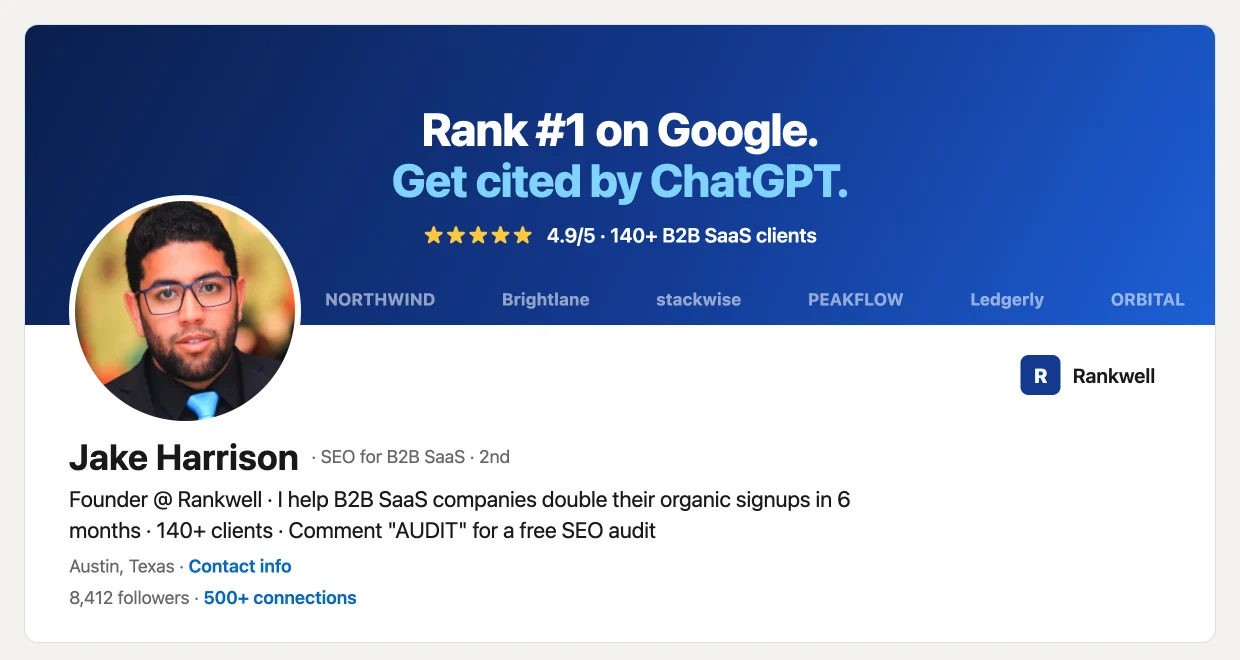
- The banner shows the promise in large type ("Rank #1 on Google. Get cited by ChatGPT."), the client names and a rating: "4.9/5 · 140+ B2B SaaS clients".
- The headline gives the offer ("I help B2B SaaS companies double their organic signups in 6 months"), the proof ("140+ clients") and a call to action ("Comment 'AUDIT' for a free SEO audit").
- The photo shows a sharp face, looking at the camera, in business clothes.
This profile is a made-up example, built to show the method.
The checklist before your first campaign
- My photo shows my face, sharp and recent.
- My banner says what I do for whom, with proof.
- My headline gives my offer and proof, not just my job title.
- My About section reads in 15 seconds and ends with a way to reach me.
- I have posted or commented on my topic in the last two weeks.
How do you define your ideal customer?
Your ideal customer is already in your customer base: find your best customers, understand why they signed, then describe them precisely enough to say yes or no to a LinkedIn profile in 10 seconds. A great message sent to the wrong people gets no replies.
The method in 4 steps
- List your 5 to 10 best customers: the ones with the best LTV (what they bring you over the whole relationship), the ones who got the best results with you, the ones who signed fastest.
- Understand why they signed: what problem, what trigger, why at that moment. The easiest way is to call three of them and ask.
- Write down their context when they signed, with the grid below.
- Write it in one sentence, then list who to exclude.
| Level |
Criterion |
Example |
| Company |
Industry |
B2B marketing agencies |
| Company |
Headcount |
5 to 30 |
| Company |
Revenue |
$500K to $3M |
| Company |
Location |
United States and Canada |
| Person |
Job title |
Founder, CEO, managing partner |
| Person |
Role in the purchase |
Decides alone |
| Context |
Trigger |
Hiring their first salesperson |
| Context |
Timing |
Right after a funding round, early in the year |
| Context |
Signal visible just before |
A "Business Development Rep" job post |
The result fits in one sentence:
"Founders of B2B marketing agencies with 5 to 30 people in the US, hiring their first salesperson."
Write down job titles in every form people really use on LinkedIn: "CFO", "VP Finance", "Head of Finance", "Chief Financial Officer".
Who to exclude
Write the list before you launch anything: your competitors, your current customers, people already talking to your team, students and interns, freelancers if you sell to companies, and companies too small to pay for your offer.
Split it into segments
An ideal customer usually gives 2 to 4 segments: by job title, by industry or by buying signal. One segment, one campaign, one message. Aim for a few hundred to a few thousand reachable people per segment: below that, the campaign runs dry in a week; above it, the message stops speaking to everyone.
No customers yet? Start from a hypothesis (who has the problem most, who has the budget, who decides alone) and treat it as a test: your first campaigns will tell you whether it holds.
Start from buying signals: your reply rate can literally double. A signal is something the prospect or their company did recently that gives you a concrete reason to write, at the right time. In Belkins' study of 14,077 contacts prospected in 2025, 18.7% of invitations were accepted. When we invited people who had just done something on LinkedIn that gave us a reason to write, 92 out of 156 accepted: 59%.
The LinkedIn signals to watch
| Signal |
Why it works |
| Viewed your profile |
They already know you |
| Liked or commented on your posts |
They care about your topic |
| Follows your company page or your newsletter |
They already follow you |
| Voted in your poll |
Their answer tells you their need |
| Engages with an influencer's or a competitor's posts |
The problem matters to them |
| Posts or comments about your keywords |
They are talking about it right now |
| Registered for a LinkedIn event |
A shared context, ready-made |
| Started a new role |
Budget and appetite for change |
| Their company is hiring for a role tied to your offer |
A visible need, budget ready |
| Posted or commented this month |
They will read your message |
| 1st-degree connection, "People you may know" |
No invitation to get accepted |
Write while the signal is fresh, in the days that follow (90 days for a new role). After that, it is just a fact: open on the prospect's situation instead, not on something they did two months ago.
Advanced signals, specific to your market
The most powerful signals are the ones your competitors don't track. Ask yourself what happens at a customer's company just before they need you, then where it shows.
| What happens |
Who it's a signal for |
Where to spot it |
| A trucking company grows its fleet |
Insurance, financing, telematics, recruiting |
Driver job posts, announcements |
| A bad review of a competitor |
Any competitor of that tool or provider |
G2, Trustpilot, Google reviews |
| A new building, a construction permit |
Construction, fit-out, security, energy |
Public permit data, local press |
| A funding round |
Recruiting, software, growth services |
Business press, founders' LinkedIn posts |
| A new office, a move |
Fit-out, IT, business services |
LinkedIn posts, local press |
| A new regulation |
Consulting, compliance, vertical software |
Official websites, trade press |
Which signal should you start with?
| You sell |
The first signal to test |
| B2B software |
People who engage with your competitors' posts |
| An agency or consulting |
Companies hiring for the role you replace or support |
| An offer for a specific job |
People who comment on your industry keywords |
| A transformation offer |
People who just started a leadership role, in their first 90 days |
| You already post on LinkedIn |
Your profile viewers and the people who like your posts |
| Tool |
What it does |
| Sendable |
Watches the LinkedIn signals above every day, keeps the profiles that match your ideal customer and sends them into a campaign |
| Pharow |
A database of companies and decision-makers, to build lists by criteria |
| Instant Data Scraper |
A free Chrome extension that pulls any list from a website: directories, reviews, trade show exhibitors |
| LinkedIn Comment Extractor |
Free tool: the people who commented on or liked a post, as a CSV |
| LinkedIn Job Scraper |
Free tool: the companies hiring for a role, as a CSV |
Clean the list before you launch
Remove duplicates, your customers and competitors, people contacted in the last three months, profiles with no photo or inactive for months, and job titles that don't match your ideal customer. A list of 300 good profiles pays more than a list of 3,000 rough ones, and it protects your account.
How should you approach prospects?
Automate the outreach (invitation, message, follow-ups) in small, tightly targeted campaigns: one per segment or per buying signal. A message written for 200 people who share the same reason to be contacted always beats a message written for 5,000. Automation sends; you answer every conversation.
Invitation with or without a note?
By default, send the invitation without a note and start the conversation in the first message, once the person has connected. Across 11.5 million invitations sent in 2025, Belkins found that invitations with a personalized note are accepted slightly less often (25.3% against 27.6%) but get more replies (8.2% against 5.3%). A note that sells is a reason to decline; a note that gives a real, specific reason can be worth it.
Two LinkedIn limits to know (LinkedIn Help): a note is 200 characters at most, and a free account can add one to only 3 invitations a month.
How many invitations a day?
20 invitations a day per account is a good default pace, around 30 with Premium or Sales Navigator. Ramp up slowly on a new account. Withdraw invitations pending for more than 3 weeks: they won't be accepted anymore, and a big pile of ignored invitations tells LinkedIn the account is a nuisance. Never raise the volume to make up for a low acceptance rate: fix the targeting and the profile first.
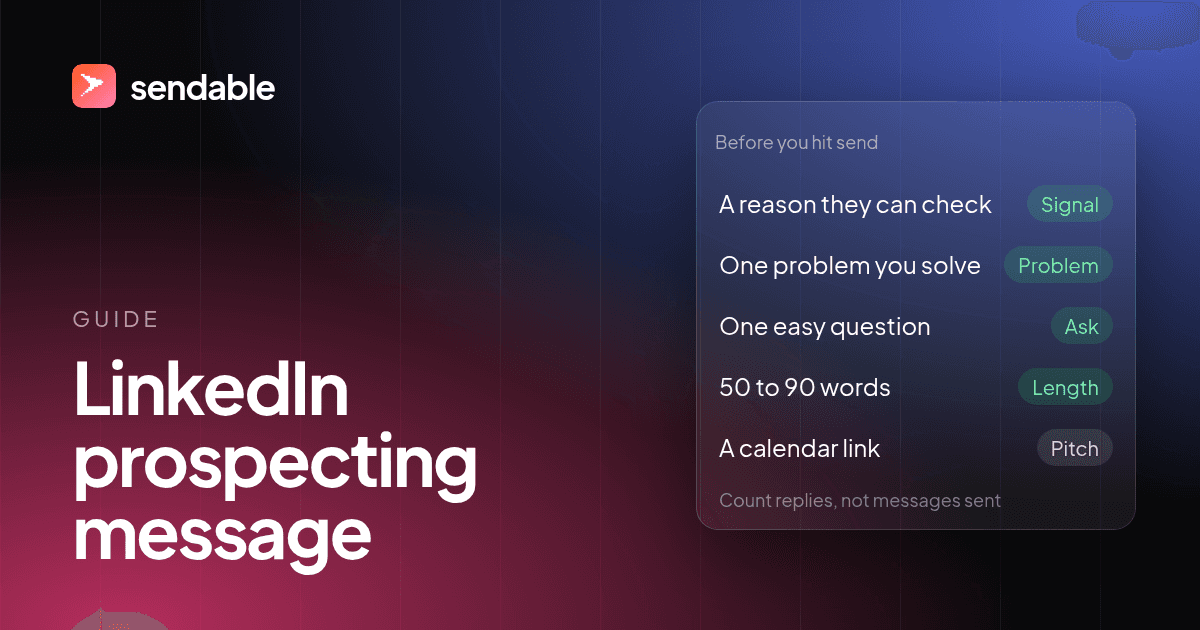
The structure of a first message
- The icebreaker: one sentence that proves the message was written for this person, taken from where the lead came from.
- The problem: the one people like them face, in one sentence.
- What you do, as a result, not as features. Optional in the first message.
- One easy question, answered in a few words.
Hi Sarah, I saw your comment on Mike's post about follow-ups. We had the exact same problem last year. Are you still handling it by hand today?
Hi Emily, I saw Nova is hiring two SDRs. How are you planning to feed them leads?
Writing rules
| Rule |
How to apply it |
| Short |
3 or 4 sentences, under 80 words, readable without scrolling |
| Talk about them, not you |
No "I'm X from Y" as an opener |
| An icebreaker tied to the source |
"I saw your comment on X's post", "Congrats on the new role!" |
| One easy question |
"How do you handle that today?" rather than "Do you have 30 minutes on Tuesday?" |
| No calendar link at first |
You open a conversation, you don't ask for a meeting |
| Few variables |
A badly formatted "ACME INC." gives the automation away and risks a typo. The first name is often enough |
| A spoken tone, without being sloppy |
The prospect should believe you are typing on your phone between two meetings |
| Spontaneous and creative |
A voice note as a follow-up, a Loom video, a GIF or an annotated screenshot: anything that stands out |
The first line, by signal
The rule: a public action, name it; a quiet action, name the topic. A post, a comment, a new role or a job post were made public: you can mention them. A like, a follow or a profile view are quiet: mentioning them feels like surveillance.
| Signal |
A first line that works |
| Their own post |
"Your post on onboarding churn: the part about week two really hit home." |
| A comment |
"Saw your comment under Mike's post: spreadsheets break at 50 people." |
| A like on a post |
"A lot of CFOs are rethinking their payroll process this quarter."
(the topic, not the like) |
| A new role |
"Congrats on the new role!!" |
| A job opening |
"Saw Acme is hiring two SDRs." |
| An event |
"You're going to SaaStr Annual too: which talk are you going for?" |
| A view of your profile |
Don't mention it: open on the topic of your latest post or on their job |
| A vote in your poll |
"You voted 'still by hand' in my poll about prospect lists." |
| No signal |
Their situation: "Running a 20-person agency usually means prospecting yourself." |
Never write: "I came across your profile", "Hope this finds you well", "I was impressed by your background", or a compliment on a post you didn't read.
Our 28 best LinkedIn approaches
We gathered the 28 approaches that signed us the most customers in a free Notion template (in French), each explained in a few lines.
| Family |
Approaches |
| Connection and context |
Industry jargon, 1st-degree network, bounce off their content, their news, a shared event |
| Positioning |
Expert question, value first, calculated vulnerability, contrarian, intro request, before/after |
| Format |
Voice note, Loom video, personalized GIF, carousel in a DM, selfie video on your phone, Loom at scale |
| Data and proof |
Micro case study, striking number, industry benchmark, free mini-audit, screenshot of a result |
| Weak signal |
Seasonality, new role, open position, detected growth, industry news |
| Social interaction |
LinkedIn poll, then a message to the voters |
How many follow-ups should you send?
2 to 3 short-term follow-ups at most, then a check-in every 60 to 90 days. A good share of replies comes after a follow-up, but pushing too hard puts the prospect off. Everything stops at the first reply, positive or negative.
The schedule of a sequence
| When |
Step |
What it brings |
| The day before (optional) |
Profile visit |
Your name becomes familiar |
| Day 0 |
Invitation, no note |
|
| 1 day after acceptance |
Message 1 |
The icebreaker and a question |
| 3 to 5 days later |
Follow-up 1 |
A voice note or a new angle |
| 7 to 10 days later |
Follow-up 2 |
A useful resource or a micro case study |
| 14 days later (optional) |
Follow-up 3 |
Close politely, door left open |
| Every 60 to 90 days |
Check-in |
Only with a new reason: a new role, a new post |
What a follow-up can bring
A follow-up works when it gives a new reason to reply. Pick one:
- A short example: what a similar company changed, with a real number. "One example: a 60-person team went from 14 corrections a quarter to 2."
- Another angle: another problem you solve, for the same person.
- Something useful, with no ask: a template, a benchmark, a resource.
- An easier question: a yes or no, a choice between two options. "Is prospecting on you, or on a salesperson?"
- A 20 to 30 second voice note: warmer, and it stands out in an inbox full of text.
The last follow-up closes the loop without pressure:
Happy to help if needed. Have a great day. Antoine.
And 60 to 90 days later, a check-in that starts from what you know:
Hi Sarah, we talked back in March about your follow-ups. Did you find a solution, or is it still done by hand?
Follow-ups to avoid
"Just bumping this", "Did you see my message?", "You must be very busy", a follow-up that rewords the first message, a fourth or fifth follow-up, and any follow-up after a no.
Which numbers should you track every week?
Two rates to aim for: 30% acceptance and 20% replies. These are the benchmarks we see after 3 years of prospecting, for an invitation without a note followed by short messages. Read them every week, campaign by campaign: each one points to a different problem.
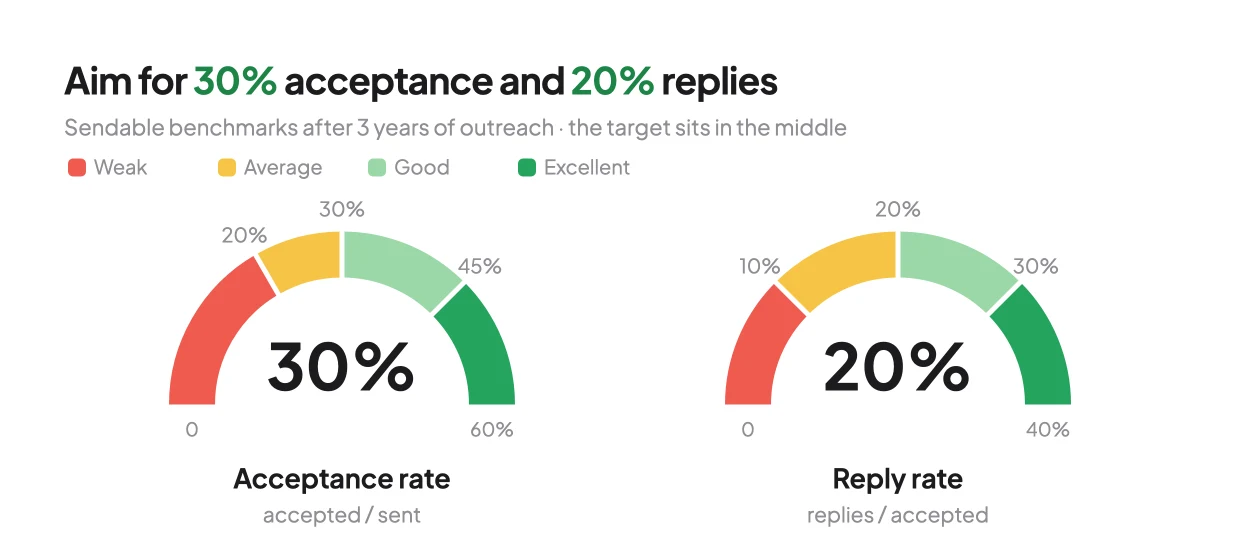
| Rate |
Formula |
Weak |
Average |
Good |
Excellent |
| Acceptance |
Accepted / sent |
<20% |
20‑30% |
30‑45% |
>45% |
| Reply |
Replies / accepted |
<10% |
10‑20% |
20‑30% |
>30% |
These are orders of magnitude, which move with the market, the seniority of your targets, your profile and the quality of the signal. Your best benchmark is still your own past campaigns on the same segment.
The share of interested replies and the meeting rate depend on too many factors (your offer, its price, your market, account size) for a general range to make sense. Track them on your own campaigns and compare them week over week.
Read your numbers the right way
- Wait for enough volume: at least 100 invitations to judge an acceptance rate, 50 connections for a reply rate. Below that, it's too early to tell.
- Count invitations sent more than two weeks ago: the most recent ones are still pending.
- Compare by segment and by signal, never across the whole account: a signal that does no better than a cold list isn't worth its cost.
- For an A/B test of the first message, keep both versions running until 50 connections each and a gap of at least 5 points.
- Start with the first step that gets stuck: improving meetings is pointless if too few people accept.
What your numbers tell you
| Symptom |
Likely causes |
What to do |
| Low acceptance |
A weak profile, a target that isn't on LinkedIn much, or that sees no reason to accept |
Rework your profile, target one level lower or smaller companies, test another signal |
| Low replies |
The message: a generic opener, too long, pitching too early, no easy question |
Rewrite the first line, shorten, test another approach from the template |
| Few positive replies |
Wrong segment, unclear offer, a signal that attracts the curious rather than buyers |
Tighten the ideal customer, change the signal |
| Few meetings |
You sell your service instead of selling the call, or you answer too late |
Give them a reason to come (free audit, a strategy shown live, a gift card) and answer the same day |
How to book the meeting
Ask for it when the prospect has confirmed a problem you solve, asked how it works or how much it costs, or said "interesting" twice. Otherwise, ask one more question about their situation.
- Sell the call, not your service: "to see if it fits your process", "to show you on one of your own cases".
- Give the length: 15 or 20 minutes.
- The sweet spot: 2 precise slots and your calendar link. The prospect picks in one click or suggests something else.
The easiest would be to show you on a real case, 20 minutes. Tuesday 10am or Thursday 2pm? Otherwise here's my calendar: [link]
Once accepted, confirm in one line (date, time, length, video link) and ask for their email for the invite. If the prospect doesn't show up, write 10 to 15 minutes after the start, with no blame: "No worries, shall we find another slot?". Two or three days later with no answer, one last message with two new slots, then stop.
The weekly routine
| When |
Action |
| Every day |
Answer every reply the same day, accept or reject the new leads |
| Monday |
Feed the campaigns with the week's leads, withdraw invitations older than 3 weeks |
| Tuesday, Wednesday |
Post or comment on your topic: your profile works for your invitations |
| Thursday |
Read the four rates per campaign and per signal |
| Friday |
Cut what doesn't work, double down on what does, change one thing at a time |
Give it at least 12 weeks before you decide prospecting doesn't work for you. The first weeks are for finding the right segment, the right signal and the right message; results follow once all three are dialed in.
FAQ
How many LinkedIn invitations should you send per day?
20 invitations a day per account is a good default pace, around 30 with Premium or Sales Navigator. Ramp up slowly on a new account and withdraw invitations pending for more than 3 weeks.
Should you add a note to a LinkedIn invitation?
By default, no: invitations without a note are accepted slightly more often (27.6% against 25.3% in the Belkins study) and a free account only gets 3 notes a month. Add a note of 200 characters at most when you have a specific reason to give.
How many follow-ups should you send on LinkedIn?
2 to 3 short-term follow-ups, a few days apart, each with something new. Then a check-in every 60 to 90 days, only with a new reason. Stop at the first reply.
What is a good LinkedIn acceptance rate?
Aim for 30% for invitations without a note. Below 20% across all your segments, the problem usually comes from the profile; on a single segment, from the target. With leads from buying signals, you can go well beyond that.
Can you prospect with a free LinkedIn account?
Yes. A free account sends invitations and messages to its connections. It is limited on invitation notes (3 a month) and on searches; Premium or Sales Navigator allow a bit more volume and finer filters.
How long before you see results?
The first replies come in the first week, but count 4 to 6 weeks to find the right segment and the right message, and at least 12 weeks before you judge LinkedIn prospecting on your results.
Sources
- Belkins, LinkedIn outreach study, updated June 29, 2026: acceptance and reply rates in 2025, invitations with and without a note.
- LinkedIn Help, Personalize an invitation: 200 characters per note, 3 notes a month on a free account.
- Sendable: 92 invitations accepted out of 156 sent to people spotted through a signal, and the rate benchmarks from our campaigns.